Running an AI newsletter site with Grok Bot and Cursor
The author diagrams a workflow where Grok Bot gathers X news into Notion, he approves drafts, and a Cursor Cloud Agent writes and previews articles.

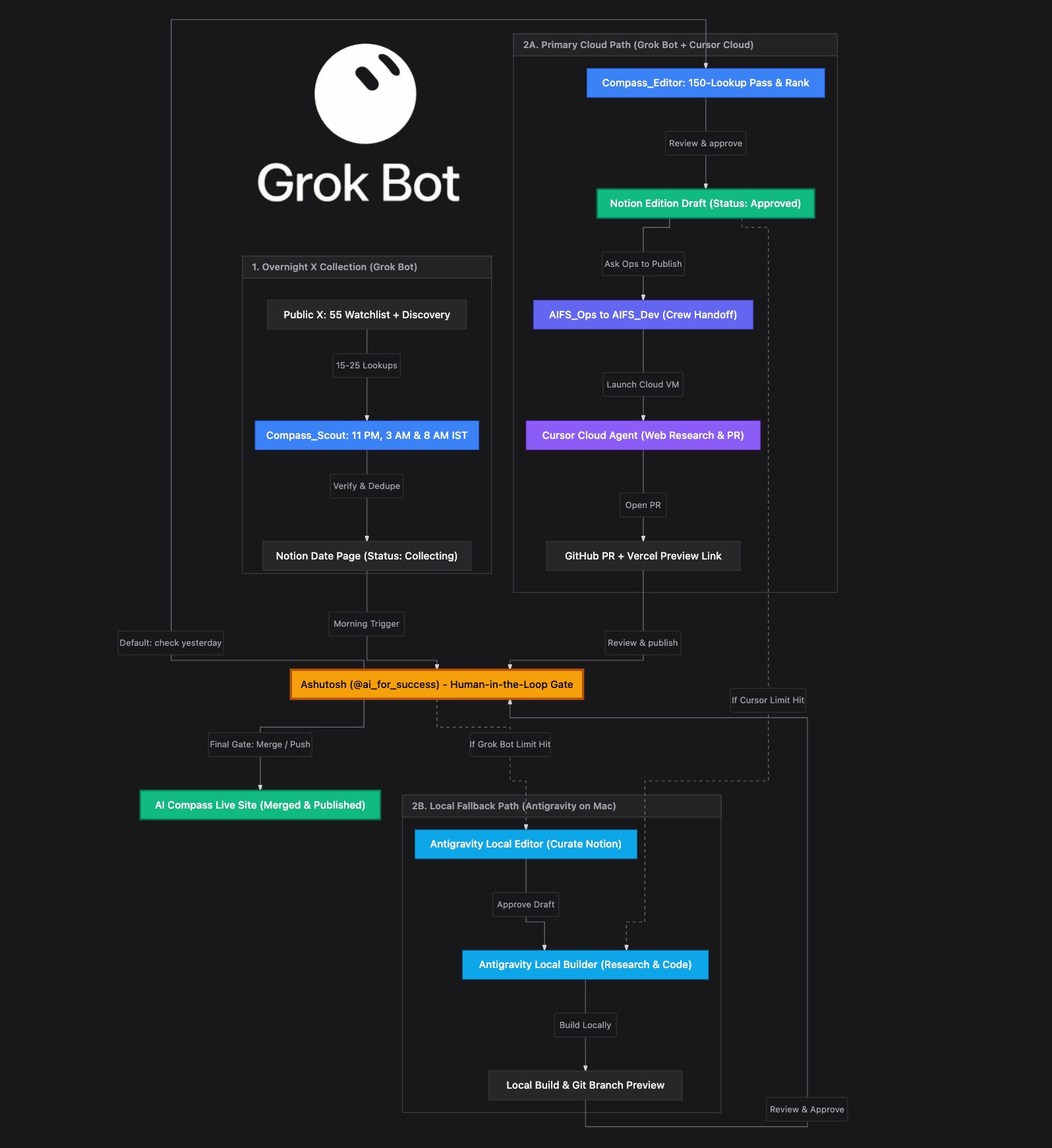
How I Use Grok Bot to run my new AI Compass newsletter website. I love Grok Bot it is extremely powerful and with X integration it can pull news and details directly. This is one of my use cases for Grok Bot. The diagram shows the complete flow, so here is a quick breakdown of how each part works and where I stay involved. 1. Compass_Scout Always On X News Gathering to Notion - News gathering from X always happens through Grok Bot. Even if I hit my Grok bot weekly plan limit, I increase on demand spending so Compass_Scout never stops. - It runs at 11 PM, 3 AM and 8 AM IST, monitoring 55 watchlist accounts through 10 grouped queries alongside X discovery searches. - It verifies primary sources, separates confirmed news from trending but unverified stories, removes duplicates and saves everything to the day's Notion Date Page. 2. Compass_Editor Morning Curation and Approval - In the morning, I auto triggers at 8:30 AM IST. - It runs a completeness check to catch anything missed overnight, ranks the top stories and creates an Edition Draft in Notion. - It then stops and waits for me. I review the stories, add my own takes and explicitly reply "approve". Nothing moves forward without my approval. 3. AIFS_Ops and AIFS_Dev with Cursor Cloud Agent - When I say "publish yesterday's edition", AIFS_Ops verifies that the Notion page is marked Approved and hands the brief to AIFS_Dev. - AIFS_Dev launches a Cursor Cloud Agent on my GitHub repository. - The agent researches official blogs, documentation and papers, retrieves official launch images, writes website articles, opens a GitHub PR and generates a Vercel preview. - I review the PR, preview and sources report. If changes are needed, I ask the same agent to make them. - Only when I explicitly say "publish" does the agent merge the PR and take the changes live. 4. Local Fallback with Google Antigravity on Mac - When I hit Cursor Cloud Agent limits, Compass_Scout continues gathering X news and saving it to Notion. - I stop the remaining cloud workflow at that point and switch to Google Antigravity running locally on my Mac. - Antigravity pulls the gathered news from Notion, handles the editor and developer workflow locally, and builds the website. - I review and approve the changes before pushing the code to publish the live site.