Claude Code's 118 commands, grouped by category
A breakdown of Claude Code's 118 commands by category, covering project management, model control, subagents, hooks, sandboxing, and cost tracking.

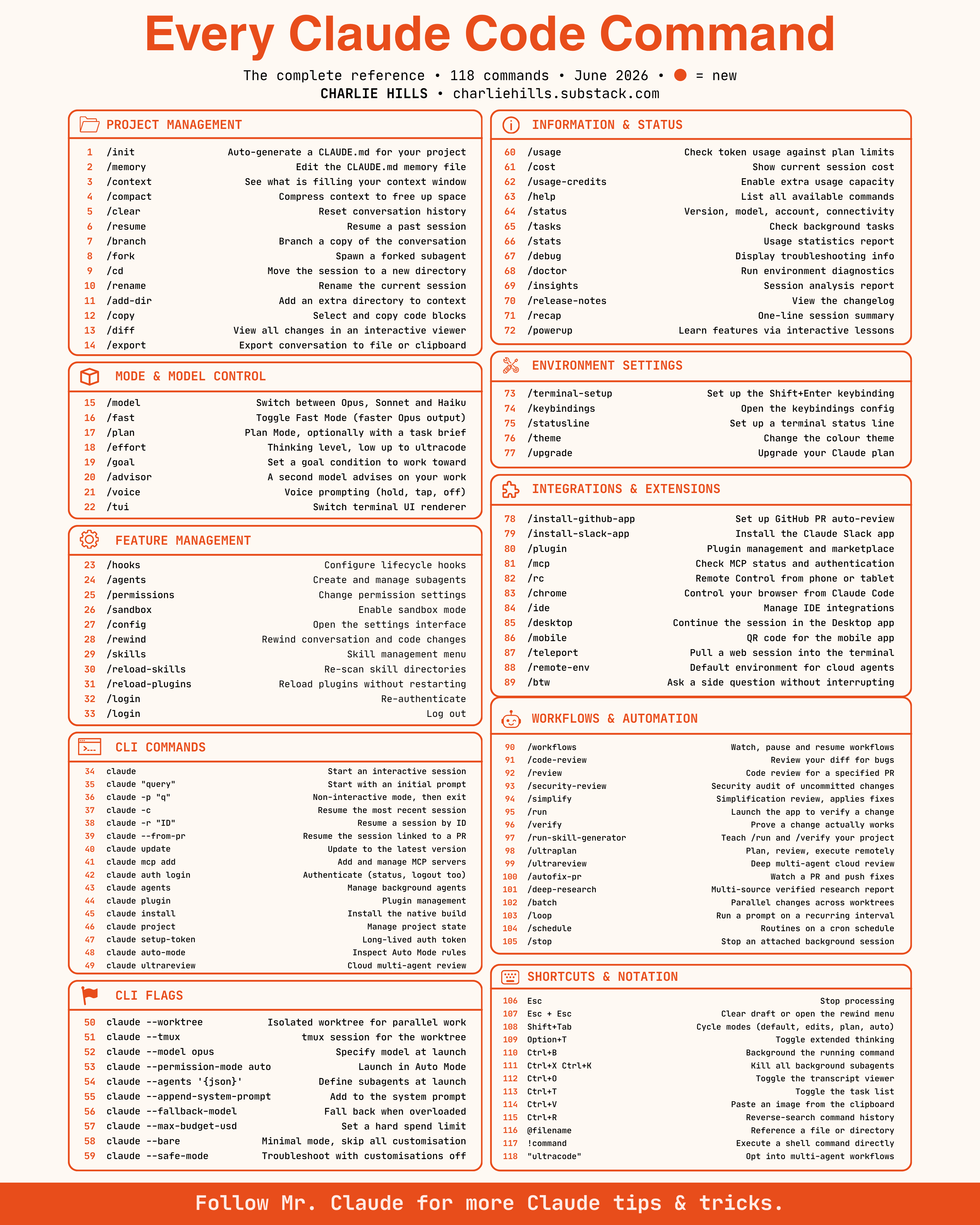
Claude Code has 118 commands now, and most people are still only using about ten of them. Project management covers the basics people already know, like /init and /clear, but also the ones that get skipped: /branch to fork a conversation, /rewind to undo code changes and not just chat, /diff to view every change in one interactive viewer instead of scrolling a terminal. Mode and model control decides how Claude actually works on a task, not just which model answers. /plan separates thinking from doing, /effort sets how hard it thinks, /goal sets a condition to work toward instead of a single instruction, and /advisor brings in a second model just to critique the first one's work. Feature management is where the infrastructure lives: /agents to create and manage subagents, /hooks to configure lifecycle behavior, /sandbox to isolate what Claude can touch, /skills to manage what it can reuse. CLI commands and flags are the version of all of this you script instead of type interactively: claude -p for non-interactive runs, claude --worktree for isolated parallel work, claude --max-budget-usd to cap spend, claude --agents to define subagents at launch instead of after. Information and status is how you stop guessing what Claude is doing: /usage and /cost track spend against your plan, /doctor runs environment diagnostics, /insights gives you a session analysis report instead of just a transcript. Integrations connect Claude to everything around it: /install-github-app for PR auto review, /chrome to control your browser from Claude Code, /teleport to pull a web session into the terminal, /mcp to check what is actually connected and authenticated. Workflows and automation is where Claude stops being a single session: /code-review and /security-review audit your diff automatically, /loop runs a prompt on a recurring interval, /schedule runs routines on a cron schedule, /ultrareview kicks off a deep multi-agent cloud review. Shortcuts round it out: Shift+Tab cycles modes, Ctrl+B backgrounds a running command, @filename references a file directly in the prompt, and ultracode opts into multi-agent workflows entirely. Credit to Charlie Hills for compiling the full reference. Bookmark this. You will not remember all 118, but you will remember this exists the next time you need one.