Jev works inside the IDE on real projects in four steps
Jev operates inside your IDE on the actual codebase, using project files, docs, terminal and Git, and works through understand, plan, act and deliver with verification.

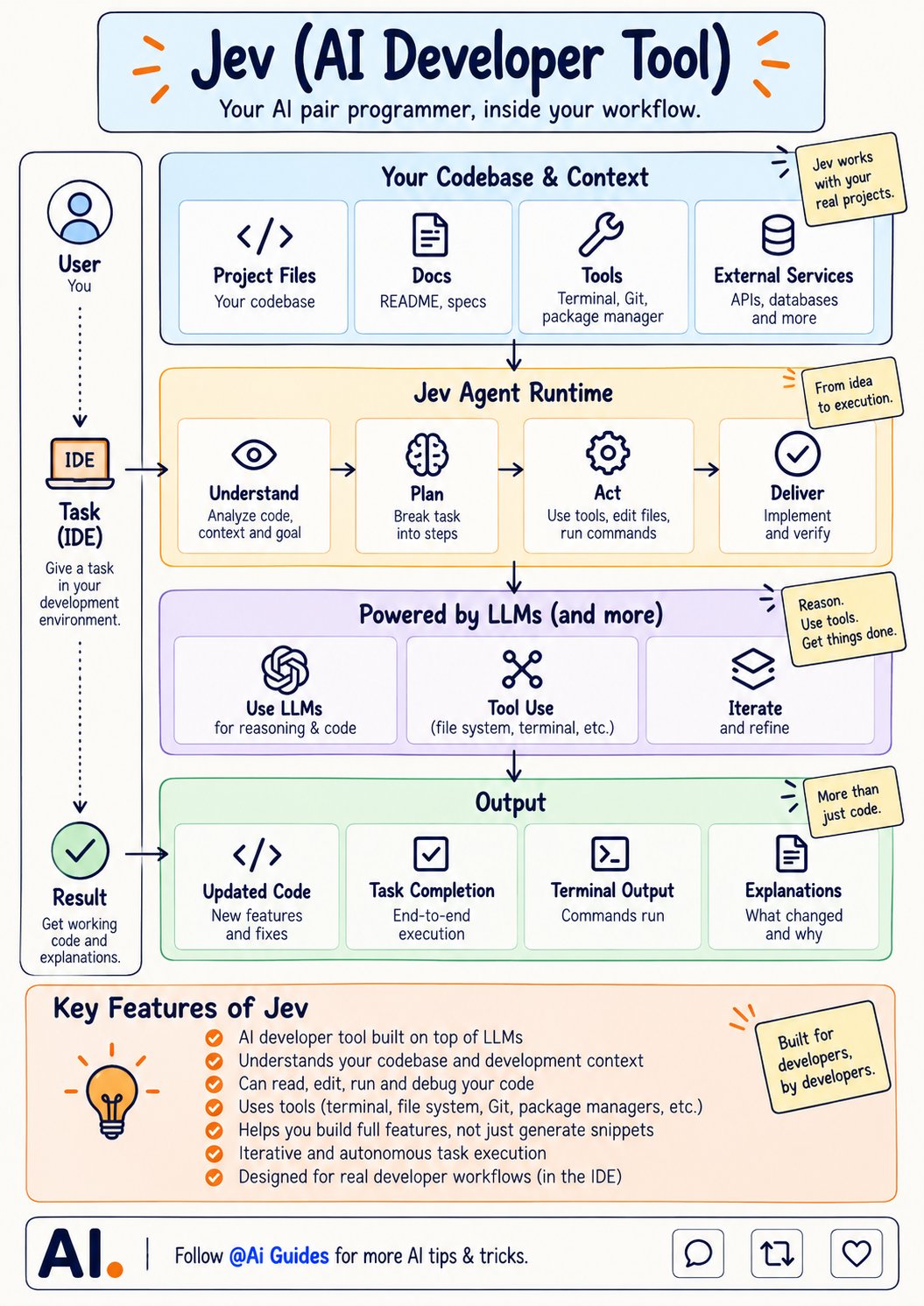
A snippet that compiles in a chat window still has to be pasted, wired in, and tested by you. Jev is built to skip that step by working inside your IDE on the real project. You give it a task in your development environment. Jev starts from your codebase and context, not a blank prompt: project files, docs like the README and specs, tools like the terminal, Git, and your package manager, and external services such as APIs and databases. From there it works in four steps. It understands by analyzing the code, the context, and the goal. It plans by breaking the task into steps. It acts by using tools, editing files, and running commands. Then it delivers by implementing the change and verifying it. Underneath, LLMs handle reasoning and code, tool use covers the file system and terminal, and iteration refines the result when the first attempt is not right. What you get back is more than code. You get updated code with new features and fixes, end to end task completion, the terminal output from commands it ran, and an explanation of what changed and why. It can read, edit, run, and debug your code, so you build full features instead of collecting snippets. Judge a tool like this on what it verified, not on what it wrote. Bookmark this before you pick an AI coding tool based on how good its snippets look.
This post quotes another post: x.com/1657385954594762758/status/211035952606285…