GPT Image 2.5 turns four philosophies into knowledge posters
A reusable long prompt lets GPT Image 2.5 pick topics and lay out four philosophies as a 2x2 editorial-style knowledge poster.

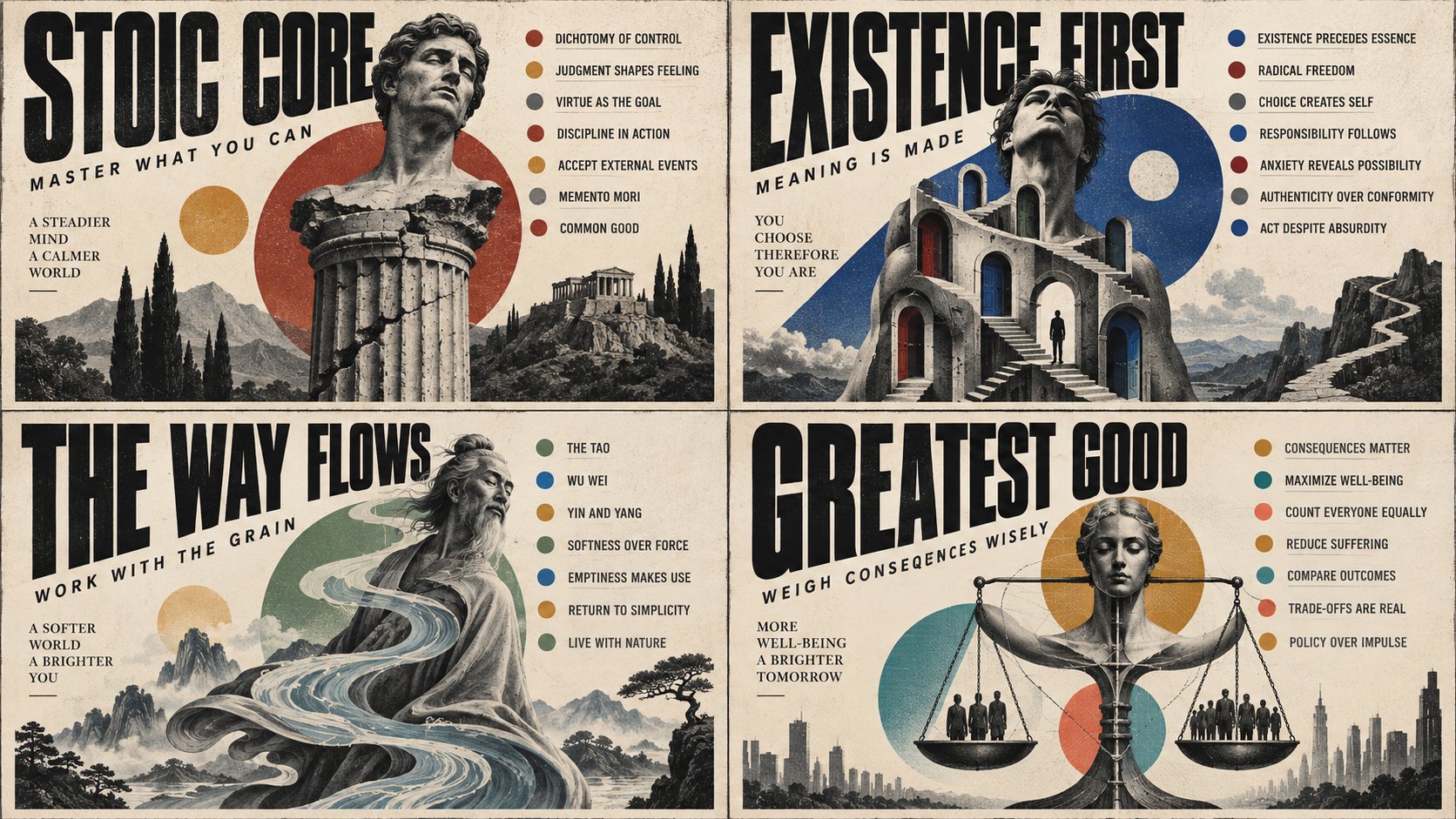
I asked GPT Image 2.5 to visualize 4 philosophies. Has potential :) 2x2 grid, 16:9, do this for 4 philosophies: AI picks topic: Create one finished editorial knowledge poster about the topic below. Make the art-direction decisions yourself, using the topic to determine the composition, hero, supporting elements, and colors. INPUTS TOPIC: [INSERT TOPIC] AUDIENCE: general curious adults ASPECT RATIO: 1:1 TITLE: AUTO HERO CHARACTER OR OBJECT: AUTO LAYOUT: AUTO ACCENT PALETTE: AUTO KEY POINTS AND COUNT: AUTO TAGLINE: AUTO REQUIRED COPY: none Only TOPIC is required. Use the defaults for omitted fields. Any supplied value overrides AUTO. Treat required copy as exact wording. MODULE 1 — CONSISTENT VISUAL STYLE Use oversized black condensed uppercase typography, warm ivory paper, one dominant monochrome illustrated hero, flat geometric color accents, and subtle analog print grain. Combine modernist editorial layout with surreal collage and vintage educational illustration. Use an extreme contrast between the main headline and compact supporting text. Make it feel like part of a thoughtfully designed collectible poster series. MODULE 2 — TOPIC AND COPY Develop a concise, specific 2–5-word title and a memorable 3–8-word tagline suited to the audience. Select a coherent set of approximately 6–12 short, accurate labels about the topic; use fewer if necessary for clarity or accuracy. Choose the appropriate relationship: principles, stages, types, components, or examples. If displaying a count, match it exactly to the visible items. Avoid invented facts, statistics, quotations, and filler. Preserve supplied copy exactly. MODULE 3 — INVENT A TOPIC-SPECIFIC CHARACTER The hero must be an original surreal character with a distinctive physical transformation that expresses the topic. This transformation is a required part of the design. Infer the mechanism: Identify a central action, relationship, or tension in the topic. Think in verbs such as filtering, attracting, exchanging, accumulating, branching, coordinating, or transforming. Use that idea to drive the character design. Choose the base form: Select a human, animal, imagined organism, or characterful object that suits this mechanism. A human face is only one option. Give the hero a unified body and a recognizable silhouette. Invent the transformation: Translate the mechanism into one bold alteration of anatomy, proportion, material, or physical behavior. Make the defining feature structurally part of the character. An ordinary subject with themed accessories or surrounding objects does not fulfill this requirement. Use one dominant transformation and, if useful, one supporting detail. Keep enough of the base form coherent that the unusual feature feels deliberate. Give it personality: Choose an expressive pose, attitude, and subtle asymmetry appropriate to the topic. Aim for an intriguing, slightly uncanny editorial presence and physically convincing texture. Let the character feel like a particular individual. Do not automatically make it cute, frightening, or heroic. Choose a concept before arranging the poster: Consider three substantially different character concepts and select the one with the strongest combination of topic relevance, distinctive silhouette, and unexpected but coherent design. Render only the selected concept. Check the concept: Its logic should fit the sentence “This character’s [physical transformation] embodies [a central mechanism of the topic].” The unusual feature must remain apparent at thumbnail size and the character must remain memorable without the headline. If the same character could be used unchanged for many unrelated topics, revise it. Do not repeat the oversized eye unless perception is relevant. Render the invented character in grayscale with sculptural shading, fine stippling or halftone, and tactile print texture. Treat its anatomy as a deliberate visual metaphor; keep the informational copy accurate. Let its pose and transformed structure guide the layout and supporting geometry. MODULE 4 — ADAPTIVE LAYOUT Choose the arrangement around the title length, hero silhouette, and information structure. Freely position the hero and title; place supporting labels in a sidebar, footer, split panel, orbit, or another coherent arrangement. Establish a clear reading order: title, hero, supporting information. Use intentional asymmetry, close alignments, deliberate cropping, and controlled overlap. Protect key facial features, essential object details, and every line of supporting copy. Fit the typography to the format rather than forcing a fixed template. MODULE 5 — GEOMETRY AND PALETTE Choose one primary family of geometric elements that expresses the topic: rays, arcs, ribbons, layers, paths, grids, wedges, or another purposeful form. Use it to connect the hero to the information and guide the eye. Select 2–6 coherent accent colors appropriate to the topic and mood, supported by ivory, black, and grayscale. Keep colors flat, matte, and slightly weathered. Use a rainbow only when conceptually justified. MODULE 6 — FINISH AND QUALITY Make the title dominant and supporting text genuinely readable. Keep paper texture subtle enough to preserve letter clarity. Balance dense focal areas with breathing room. Integrate the text, illustration, and geometric elements into one composition. Avoid generic icon collections, irrelevant decoration, glossy rendering, misspellings, duplicated labels, and accidental text overlaps. Use unique typography, print texture, tonal contrast, and collage language based on topic. Let the new topic determine its own layout, character, palette, and motif. Assume it is not attached though Resolve all AUTO choices before rendering. Output one complete poster containing only the intended poster copy. Do not print the input fields, module names, placeholders, or design instructions.