用 Obsidian、Claude Code 和 Jev 搭 AI 第二大脑的工作流
教程思路:笔记分 raw/wiki/output 三层,检索后再用 Jev 做结构化判断,避免每次把整个笔记库丢给贵模型。

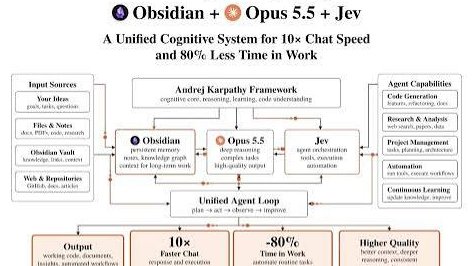
You can turn Obsidian into an AI second brain that remembers your research, connects related ideas, tracks decisions, and prepares useful summaries while you're away. The interesting part isn't giving Claude access to thousands of notes. It's building a system that knows which information matters, retrieves it when needed, and keeps your knowledge organized without constantly starting from scratch. Here's how I'd build it using Obsidian, Claude Code, Opus 5.5, and Jev. And there's one technical improvement I'd make immediately. Don't send your entire Obsidian vault to an expensive language model every time you ask a question. Use retrieval and structured decision-making to reduce unnecessary processing. Let's build the actual workflow. CREATE YOUR KNOWLEDGE BASE IN OBSIDIAN Start by installing Obsidian. It's a local-first note-taking application that stores your information in ordinary Markdown files. That matters because your notes remain accessible without depending on a proprietary AI database. Create a vault for your work. I'd organize it around three main areas: raw/ — Original articles, meeting transcripts, documents, research notes, and other source material. wiki/ — Organized knowledge, connected ideas, projects, decisions, and summaries. output/ — Reports, briefings, and other generated deliverables. Keep the original source material separate from AI-generated interpretations. If an AI summary turns out to be wrong, you should always be able to return to the original evidence. CONNECT CLAUDE CODE TO YOUR SECOND BRAIN You don't have to build the entire knowledge-management system yourself. There's an open-source implementation of the LLM Wiki approach that works with Claude Code and other AI coding agents. GitHub: http://github.com/NicholasSpisak/second-brain Install its Agent Skills using: npx skills add NicholasSpisak/second-brain Then launch Claude Code and run: /second-brain The setup wizard helps configure your vault and its knowledge-management workflow. Once configured, you can use: /second-brain-ingest To process new source material into structured knowledge. And: /second-brain-query To ask questions against the information already stored in your vault. There's also: /second-brain-lint To check the knowledge base for problems such as broken links and index inconsistencies. At this point, you already have the foundation of an AI-powered personal knowledge management system. MAKE YOUR NOTES CONNECT TO EACH OTHER Here's where the Zettelkasten approach becomes useful. Instead of storing every piece of information as one enormous document, organize important concepts into smaller, reusable notes. For example, imagine you're researching AI agents. You might have separate notes covering: Agent Memory Context Engineering Retrieval-Augmented Generation MCP Tool Integration Agent Evaluation Human Approval Workflows Now connect related notes using Obsidian's internal links. For example: [[Agent Memory]] [[Context Engineering]] [[Retrieval-Augmented Generation]] As your knowledge base develops, these links create a navigable knowledge graph. But I wouldn't automatically connect every note to every other note. A useful relationship should have a meaningful reason to exist. Otherwise, your second brain becomes a collection of links rather than a system that helps you understand information. ADD A SEARCH LAYER BEFORE CLAUDE This is one of the most important technical improvements. Imagine your vault contains 5,000 notes. You ask: "What were the main limitations we identified when evaluating multi-agent systems?" Claude doesn't need all 5,000 notes to answer that question. It needs the relevant notes about agent orchestration, evaluation, previous experiments, and documented failures. For larger vaults, you can use qmd, a local search tool that supports hybrid retrieval across Markdown documents. Install it with: npm i -g @tobilu/qmd You can then configure your second-brain workflow to search the vault and retrieve relevant material before passing it to Claude. This is much more efficient than repeatedly loading entire folders into the model's context window. It also makes the system easier to scale as your collection grows. USE JEV AS A DECISION LAYER Now let's introduce Jev. Jev is TypeSafe AI's structured decision model. Unlike Claude, it isn't designed to generate long explanations or write reports. It works with defined questions and returns structured decisions. Its main primitives include: Choice — Select from predefined options. Score — Evaluate something against an ordered scale. Noul — Estimate whether a specified condition is true. This makes Jev useful for certain routing and classification tasks. For example, suppose your second brain receives a new note. You could ask Jev to classify it as: Research Project Decision Meeting Reference Your application can then decide which workflow should process that note. Another use case is deciding whether a retrieved document is likely relevant enough to send to Claude. But here's an important distinction. Jev doesn't automatically scan your Obsidian vault, understand every document, or replace a search engine. You need a small integration that supplies it with the relevant text and interprets its structured response. To get started with the official JavaScript SDK: npm install @typesafe-ai/sdk Configure your TypeSafe API key, then use the SDK to send a state and typed questions to Jev. For a basic system, I'd use Jev only where structured decisions actually improve routing or reduce unnecessary expensive model calls. If ordinary keyword rules or local search already work well, you may not need Jev at all. That's an important cost-saving consideration. LET OPUS 5.5 HANDLE THE DEEP THINKING Once the system has identified the relevant notes, send that smaller collection to Claude Opus 5.5. This is where the actual synthesis happens. For example, ask: "Review our previous research on multi-agent systems. Identify the main technical limitations, explain which problems remain unresolved, and connect those findings to our current AI agent development project. Use only the retrieved evidence for factual claims. Reference the original notes and distinguish confirmed findings from assumptions." Now Claude can do more than summarize a document. It can compare information collected at different times. Identify contradictions. Connect previously separate ideas. Recognize unresolved questions. And suggest what deserves further investigation. But the source references matter. Without them, a convincing AI-generated synthesis can still contain unsupported claims. MAKE THE KNOWLEDGE BASE IMPROVE OVER TIME This is the part I find particularly valuable. Don't let every AI conversation disappear when it ends. Create a workflow that identifies useful information worth preserving. For example, after a research session, the system could extract: New findings. Important decisions. Unresolved questions. Changes to existing assumptions. Potential connections with earlier work. Instead of blindly adding everything as new notes, it should first check whether related information already exists. If a relevant page exists, propose an update. If the idea is genuinely new, create a separate note. Maintain links to the original sources and record when the information was updated. I'd also require review before overwriting important conclusions or resolving contradictory evidence. An AI model shouldn't silently turn two conflicting claims into one supposedly established fact. That's how an AI second brain avoids becoming an increasingly sophisticated collection of misinformation. ADD AUTOMATED MAINTENANCE Now comes the part that makes the system feel genuinely useful. You can schedule maintenance tasks to run at defined intervals. For example, every evening: Scan newly added source material. Identify notes that haven't been processed. Update the relevant index. Check for broken links. Find duplicate or contradictory information. Prepare a short summary of important changes. Suggest connections worth reviewing. Every week, the system could produce a research briefing covering what you've learned, which ideas have developed, and which open questions deserve attention. Claude Code supports scheduled automation, but there's a practical distinction to understand. A local Obsidian vault requires an automation environment that can actually access those files. Cloud-based scheduled agents won't automatically have access to a folder sitting on your laptop. For local vault maintenance, use a local scheduler or a supported desktop automation setup. For cloud execution, you'd need to make the necessary data available through an appropriately secured repository or connector. And I'd start with read-only summaries and proposed edits before allowing unattended changes. VERIFY WHETHER THE SECOND BRAIN IS ACTUALLY USEFUL Don't judge the system by how many notes it creates. Test whether it retrieves the right information. Prepare 20 questions based on things you already know are in the vault. Then evaluate: Does it find the correct notes? Does it cite the right evidence? Does it recognize outdated information? Can it identify conflicting conclusions? Does it avoid inventing facts that aren't in the vault? How much time does it save compared with searching manually? You can also track retrieval quality using metrics such as Recall@K and Mean Reciprocal Rank. If important notes aren't being retrieved, fix the search system before trying to improve Claude's prompting. A more powerful model can't reliably reason over evidence it never receives. THE COMPLETE ARCHITECTURE Here's the workflow I'd actually use: New information enters Obsidian. Original sources are preserved. The system extracts concepts and creates structured notes. Related knowledge is connected through meaningful links. A local search layer retrieves relevant information when needed. Jev optionally handles classification or routing decisions. Claude Opus 5.5 performs deeper analysis and synthesis. The results are checked against their sources. Approved updates become part of the knowledge base. Scheduled maintenance keeps the system organized. That's the entire idea. And there's one claim I'd be careful about. An AI second brain doesn't automatically reduce your workload by 80%, and keeping an agent running doesn't mean it's continuously learning. Those results depend on how well the workflow is designed and whether its outputs are genuinely useful. The stronger opportunity is something more practical. You stop repeatedly explaining the same projects, decisions, and research context to your AI assistant. Your previous work becomes reusable information. New research builds on earlier findings. Important decisions retain their original reasoning. And your knowledge base becomes easier to search, maintain, and develop over time. The real value isn't having an AI that reads everything you've ever written. It's having a system that can find the right information, understand how it connects to your current work, and help you make better use of what you already know. That's what a useful AI second brain should actually do.