用 DaVinci MCP 加 GPT-6 Astra 自动剪片流程
作者分享七步自动剪辑法:本地 Whisper 转写后把文字稿交给 Astra 决定保留哪些时间码,再让 MCP 批量剪。

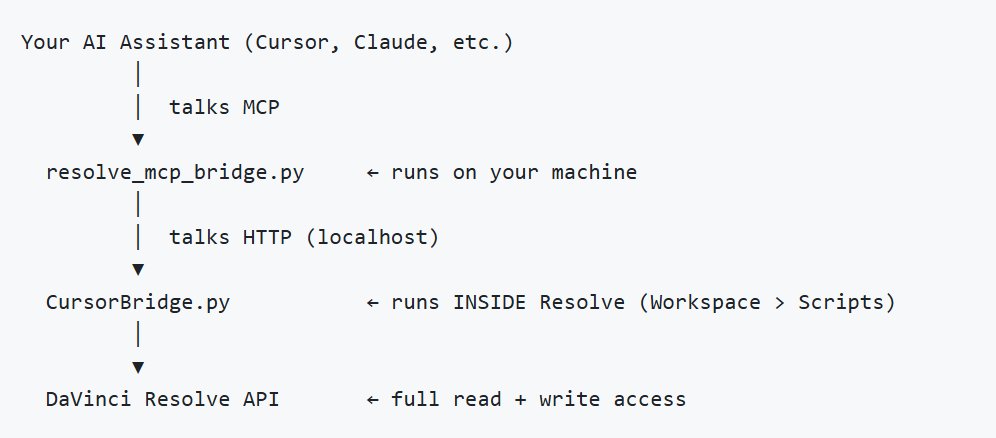
here's how i auto-edit video with the DaVinci MCP and GPT-6 Astra: the trick is that the model never watches the footage 1. import the raw files into the media pool one call, the MCP handles the pool and the folders 2. transcribe locally with whisper this is the whole thing, you now have every spoken word with a timecode attached 3. hand Astra the transcript, not the video it returns which timecodes to keep and which to kill, because models are hopeless at watching footage and very good at reading a transcript 4. ripple delete everything else the MCP applies the cut list to the timeline, dead air and blown takes gone in one pass 5. drop markers with notes on every keeper so when you open the timeline you can see why each cut survived instead of trusting it blindly 6. pull Text+ captions from the same transcript no second transcription, one source of truth 7. render queue, quick export and the part nobody mentions: 155 of the 162 tools run on the FREE version of Resolve local whisper replaces Studio auto-subtitles, demucs handles voice isolation, rembg does background removal only Smart Reframe and stabilization still need the paid license http://github.com/hiteshK03/davinci-resolve-mcp i want to be honest, five days ago i've been an absolute zero at video editing and even i can edit the videos now at mid-level...
这条是引用着另一条写的:x.com/deronin_/status/2098347425828073546