把 Codex 的 computer use 当 MCP 接给 Claude Code
作者发现 Codex 的电脑操作其实是 ChatGPT Mac 应用里的本地 MCP 服务器,附一段提示词让 Claude Code 注册并调用它做浏览器测试。

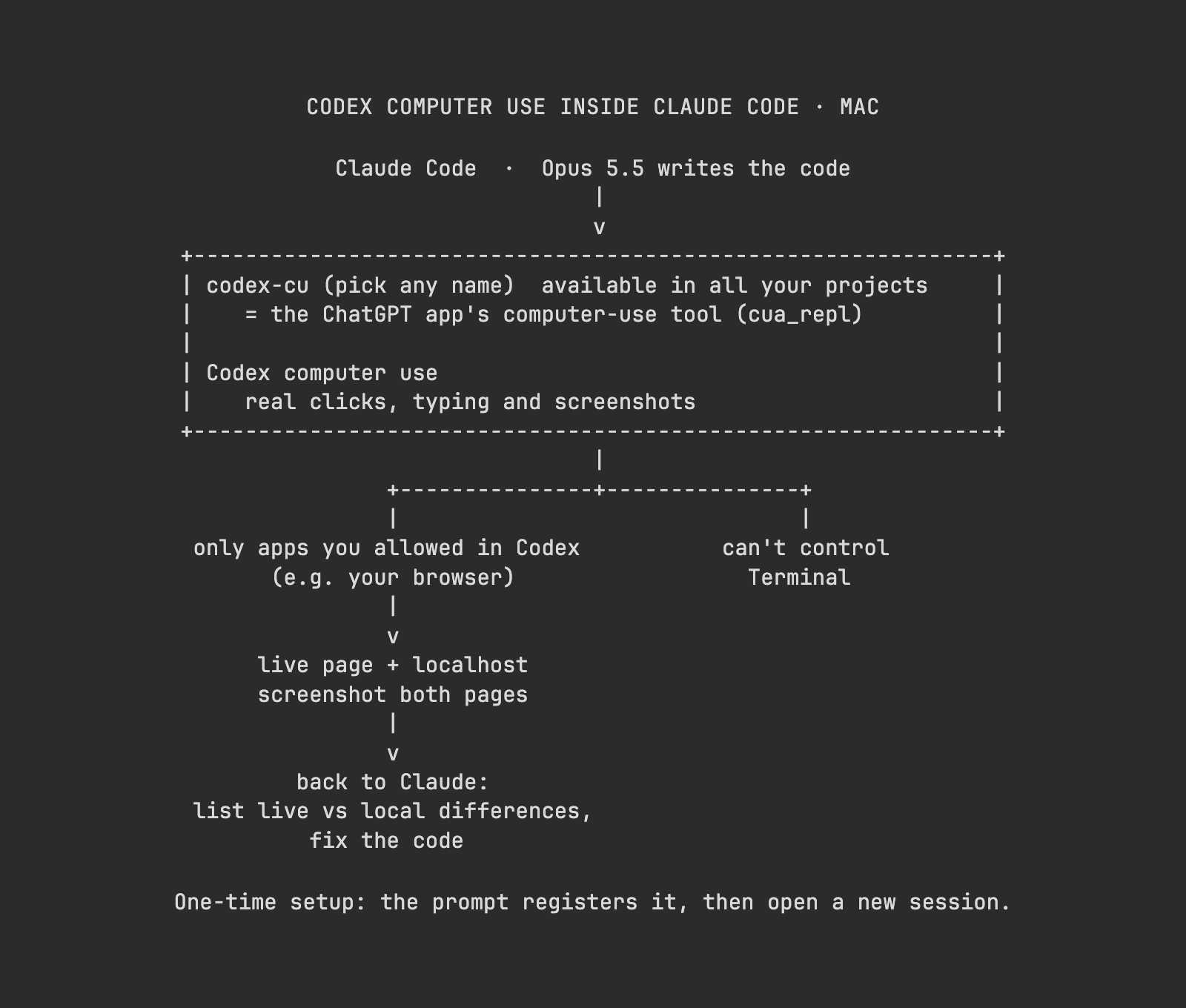
Hot take: 𝘁𝗵𝗲 𝗯𝗲𝘀𝘁 𝗯𝗿𝗼𝘄𝘀𝗲𝗿 𝗳𝗼𝗿 𝗢𝗽𝘂𝘀 𝟱.𝟱 𝗶𝘀 𝗖𝗼𝗱𝗲𝘅'𝘀 𝗰𝗼𝗺𝗽𝘂𝘁𝗲𝗿 𝘂𝘀𝗲. I always thought it only worked inside Codex. Turns out it's just 𝗮 𝗹𝗼𝗰𝗮𝗹 𝗠𝗖𝗣 𝘀𝗲𝗿𝘃𝗲𝗿 𝗶𝗻 𝘁𝗵𝗲 𝗖𝗵𝗮𝘁𝗚𝗣𝗧 𝗠𝗮𝗰 𝗮𝗽𝗽, and Claude Code can connect to it: Opus 5.5 writes the code and uses it to click through pages and take screenshots. Codex's computer use is one of the things I use most right now, and it's really fast. I use it all the time for browser testing: open the live site and the local version, compare what's different, then have it fix things. Claude's built-in browser has never worked well for me, and now I can use this from Claude Code too. It can only control apps you've approved in Codex, and Terminal is blocked outright. It's unofficial, so a ChatGPT update could break it any time, but right now it's ridiculously good. Send this to Claude Code 👇 "Set up Codex's computer use as an MCP server for you on my Mac: 1. If there's already an MCP server called codex-cu and it works, skip to step 3. 2. Otherwise, open the .mcp.json in the newest version folder under ~/.codex/plugins/cache/openai-bundled/unified-computer-use/ (if it's not there, search ~/.codex for a .mcp.json that contains cua_repl). Copy cua_repl's command, args and env exactly, and register it as codex-cu with claude mcp add-json --scope user. Then stop and tell me to start a new session, and I'll send this again. 3. It can only control apps I've approved in Codex. If you hit "not approved", tell me which app to approve in Codex, and don't switch to another app to get around it. Don't use browser backends like chrome or the in-app browser. Control the browser as a normal app. 4. Test: in a browser I've approved, open a new tab and load [live URL] and then [local URL, e.g. http://localhost:3000]. Take a screenshot of each and list what's different. If a URL is missing or the local server isn't running, ask me first. Don't type passwords or tokens, don't click submit, pay or send buttons, don't touch tabs I already have open, and close the tab you opened when you're done. 5. Once I confirm the differences, fix the local code and compare screenshots again."