claudeIMAGE
Claude Desktop 2.0: Code tab gets a graphical interface
Claude Desktop 2.0 turns the Code tab into a GUI for Claude Code, adding file editing and comments, version diffs and branch picking, a built-in browser for self-testing, prototype drawing and split-view sessions.

Paweł Huryn
@PawelHurynArchived 6 days agoOriginally posted 2026.10.22
Paweł Huryn @PawelHurynOriginally posted 2026.10.22
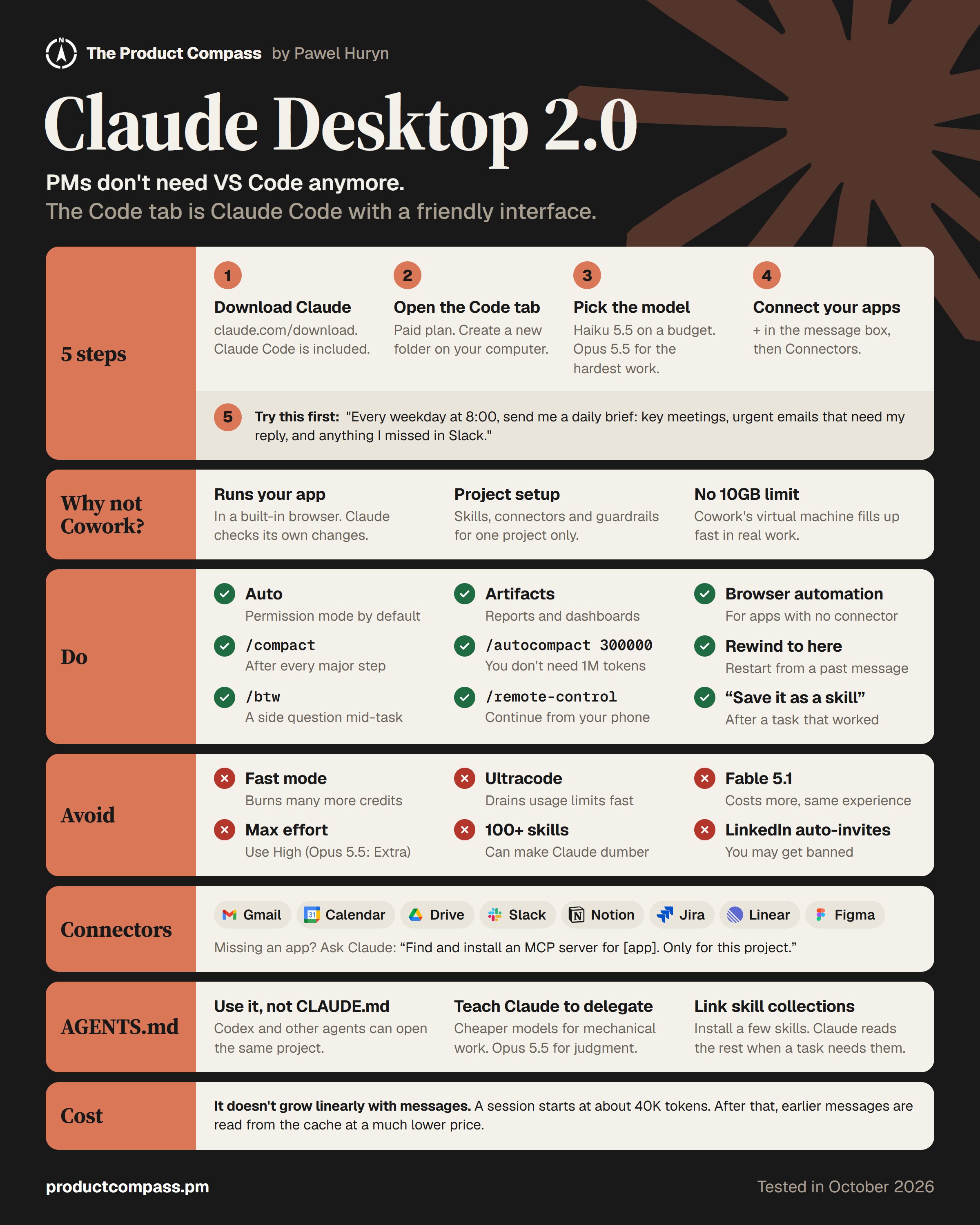
Non-engineers don't need VS Code anymore. I'm blown away by Claude Desktop 2.0. The Code tab is now Claude Code with a friendly interface. What's new: → Files: open, edit, or leave Claude a comment. → Versioning: see what Claude changed, or pick a Git branch. → Built-in browser: Claude runs your app and checks its own changes. → Visual feedback: draw on your prototype. → Split view: two or more sessions side by side. 5 steps to start 🧵
x.com/pawelhuryn/status/2113239296056365194Archived 2026.10.23 10:26