A workflow for animated marketing videos with Opus 5.5 and GPT-6
The author breaks down how Opus 5.5 handles storyboarding, screen recording, animation and editing, calls Codex for image assets, and shares practical steps like brand references and storyboards.

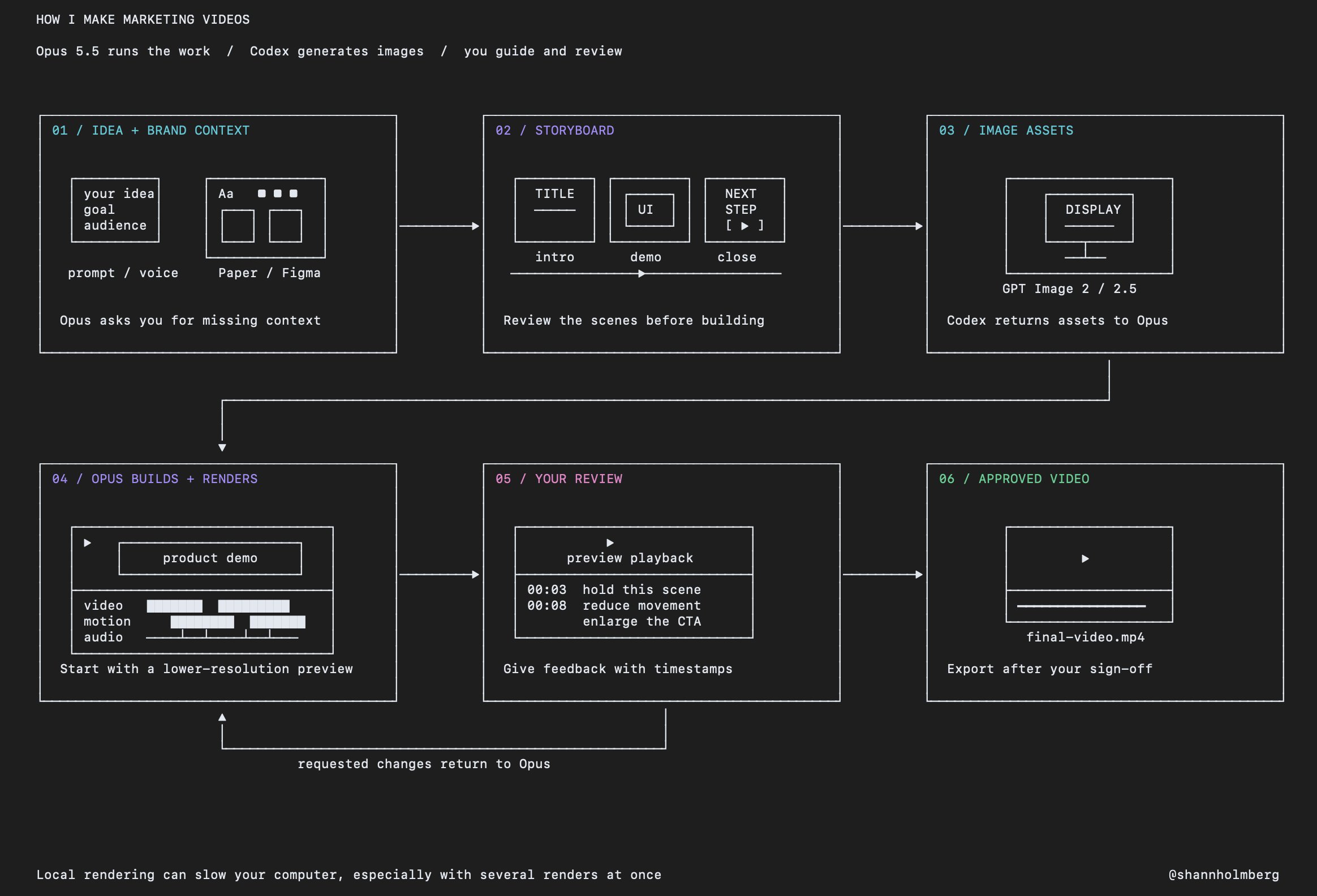
how to use Opus 5.5 + GPT 6 to make animated marketing videos Opus 5.5 handles the main work, from planning the scenes to screen recording, animation and editing when I need an image, it can call Codex to generate the asset and use it in the video for the video below, I asked Opus to use Codex to generate the display here’s how to set this up: 1. start with your idea and let Opus ask questions write out what you want or transcribe a voice note, then ask Opus to question you before it starts give it the campaign goal, the audience and what you want someone to do after watching include where you’ll publish it, the video length and the format you need you don’t need every detail ready, but you need to make the decisions together 2. give it your brand context and references share videos you like and explain what you like about them that could be the camera movement, the animation, the pacing or how they introduce the product add the assets you already have, including logos, fonts, screenshots and previous work if your brand book is in Paper or Figma, connect the tool and give Opus access to the relevant files it can inspect your designs and use the existing assets without you collecting everything into another folder your taste and feedback give it a direction to follow 3. ask for a storyboard before it builds the storyboard should show what happens in each scene and how the scenes connect ask it to include: > what the viewer sees in each scene > the text that appears on screen > which parts need a screen recording or a generated image > how the elements move and how long each scene lasts > whether the video needs music, sound effects or a voiceover review this together before it starts building the video if the opening takes too long or the product demonstration is unclear, change it here 4. generate the missing assets in my setup, Opus can call GPT-6 through Codex to request images from the image-generation tool you can also generate the assets separately with GPT Image 2 or 2.5, then give the files to Opus describe how the asset will appear in the scene, including its angle, background and available space for text Opus can then use the image in the animation and video edit for the display in this video, I gave Opus the instruction and it handled the request through Codex 5. build the video and review a first render ask Opus to build from the approved storyboard and render a preview rendering creates the video file, and it can take time depending on the animation, resolution and length local rendering can also use a lot of your computer’s resources, so several renders can slow down your other work review a lower-resolution preview before requesting the final export 6. give specific feedback and revise use timestamps so Opus knows exactly what to change > at 00:03, hold the product screen longer so the text is readable > at 00:08, reduce the movement around the display > make the final call to action larger on mobile be specific about audio too, including whether you want music at all if you want generated music, give it a suitable audio tool and references for the direction keep the storyboard, assets and feedback in the project so each revision uses the same context
This post quotes another post: “Making an AI marketing video in one pass with Opus 5.5”