《999 个小技巧》001:有点击手感的拟物按钮 Prompt
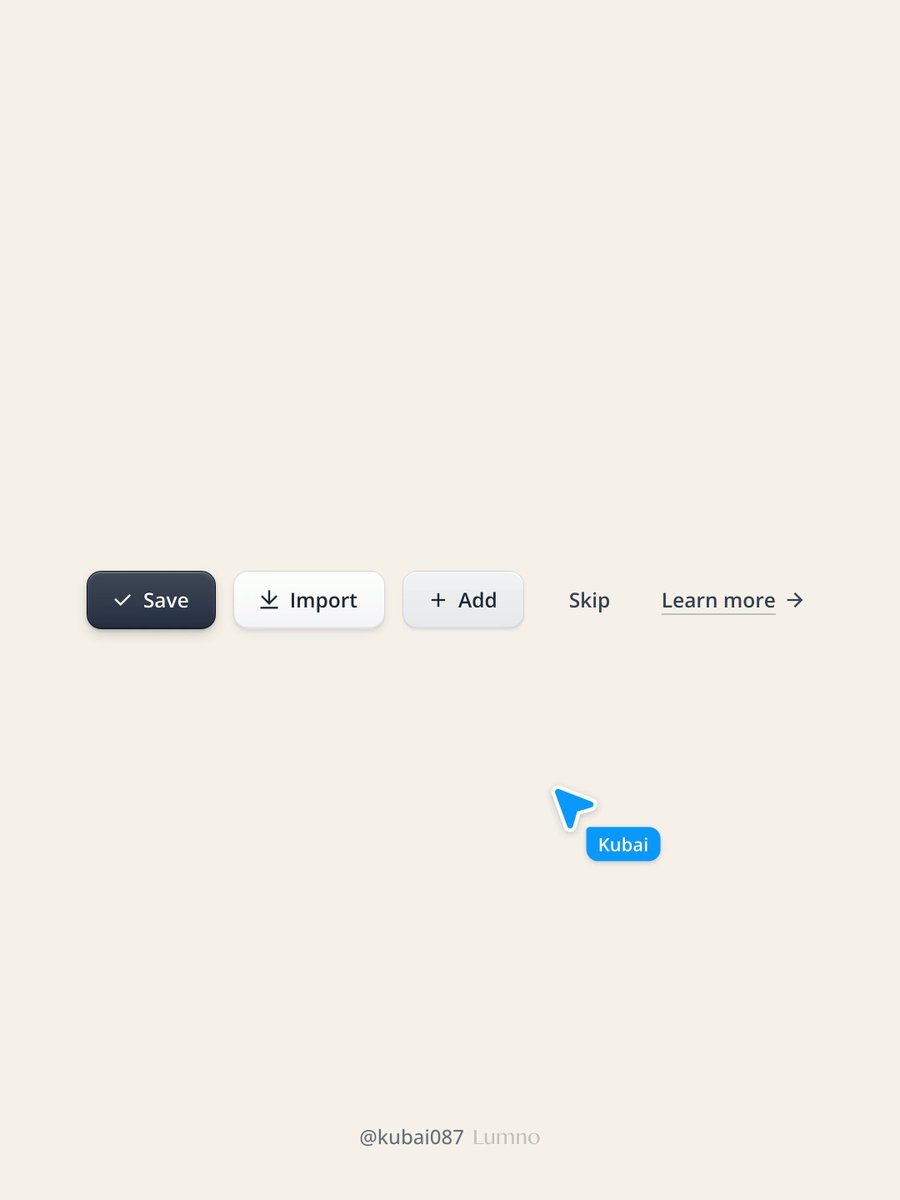
Define a tactile, skeuomorphic Button component with five variants, from strongest to weakest: primary, secondary, tertiary, ghost, text. If the project already has a component library or design system, do not add a new component: restyle its existing Button through its own variant and token system, and keep its API, props and accessibility as they are. Otherwise create one reusable Button with `variant` and `size` props. Style: calm and precise, like the Lumno browser extension and the Cloudflare dashboard. Neutral grays only, no brand hues. Lit from straight above. No glossy Web 2.0 shine, no glow, no large blur. Variants: 1. primary - near-black slate face (#404859 -> #273042), white label 2. secondary - raised white key (#FFFFFF -> #F4F5F7), dark gray label 3. tertiary - soft gray key (#F3F4F6 -> #E7E9EC), dark gray label 4. ghost - no face at rest; faint gray fill on hover; a recessed well when pressed 5. text - gray label with a thin underline and an arrow that nudges right on hover Every filled variant is the same five material layers; only the values change, so define them once as tokens and let each variant set its own: 1. Face: 180deg linear gradient, top 6-8% lighter than bottom. 2. Edge: 1px solid border one step darker than the bottom of the face (primary #12161F, secondary rgba(15,23,42,.14), tertiary rgba(15,23,42,.1)). 3. Top highlight: inset 0 1px 0 white (18% on slate, 85-100% on light faces). Put every inset layer in the button's own box-shadow, before the drop layers, never on a pseudo-element overlay: inset shadows on the element follow the inner radius (outer radius minus border), so the corners line up in every state. 4. Bottom shade: inset 0 -1px 0 black (22% on slate, 6% on light faces). 5. Drop shadow in two layers: a tight contact shadow 0 1px 2px plus a soft lift 0 4px 10px -3px (18% and 28% on slate, about a third of that on light faces). States (hover, pressed/active, focus-visible, disabled): - Hover: face one step lighter; the lift grows to 0 8px 16px -5px. - Pressed: translateY(1px); flip the gradient (darker on top); the outer shadow collapses to 0 1px 1px; the top highlight becomes an inner shadow, inset 0 1px 2px black (40% on slate, 12-16% on light faces). Light faces keep a 1px white line below, 0 1px 0 rgba(255,255,255,.9), like a key pressed into paper. - Give rest and pressed the same number of inset layers (pad with inset 0 0 0 transparent) so the shadow animates instead of jumping. - Focus-visible and disabled follow the library's existing conventions. - Timing: 120ms for transform, 140ms for shadows, 160ms for colors. Sizes: all values above are for the 14px label size: height 40px, padding 0 18px, radius 10px, label weight 600, optional 16px leading icon. On the slate face add a label text-shadow 0 -1px 0 rgba(0,0,0,.28). Scale the material with the type, never keep it at fixed pixels: express every length (height, padding, radius, border, icon, the 1px press offset, and every shadow offset, blur and spread) as a multiple of a size unit u = label size / 14. Provide two sizes: md (14px label, u = 1px) and lg (16px label, u = 16/14 px, so height 45.7px, radius 11.4px, lift shadow 0 4.6px 11.4px -3.4px).