ChatGPT apps and MCP servers worth trying, by use case
Start with ChatGPT directory plugins that do one clear job: Canva for design, Runway or Pika for video, MotherDuck or Upstash for developer data, Omnisend for store marketing and Metro MCP for transit, then add custom MCP servers such as TradingView's (paid plan, beta) or the open-source RemCTL for Apple Reminders. Every pick's listing or official page was checked on October 18, 2026 but not tested by us, and read against 391 hand-checked posts from the chatgpt-mcp-apps collection (September 3 to October 17, 2026) plus OpenAI's help and developer pages.
The short answer is to begin in ChatGPT's own plugin directory, where tools install in a few clicks on every plan, and to add a custom MCP server only when a tool isn't listed, such as TradingView's official server (Essential plan or higher, public beta, delayed data).
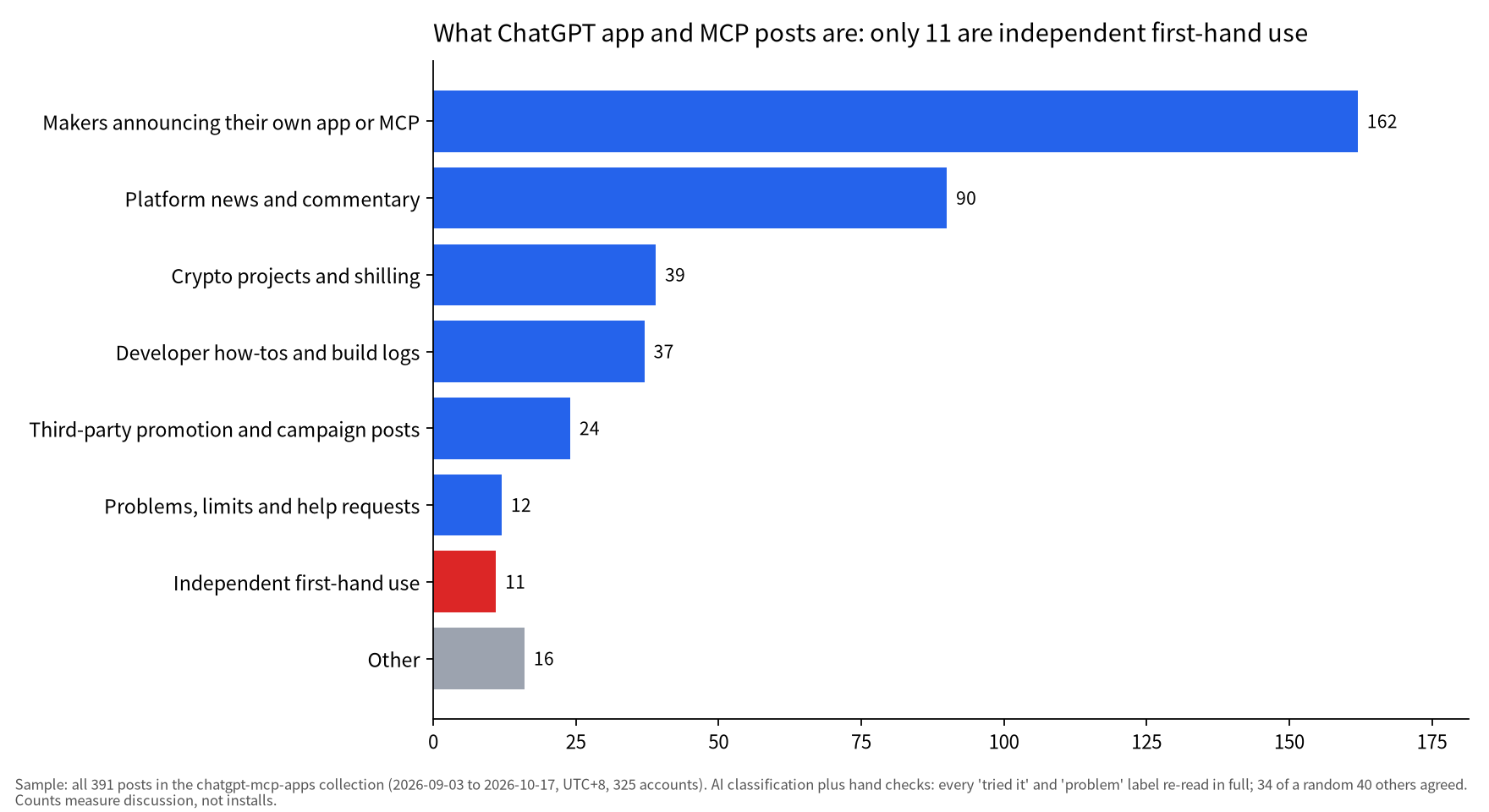
Treat the buzz with care. Of 391 posts in the collection, 162 are makers promoting their own releases and only 11 are independent first-hand use, so this guide shows what exists and how to add it, not which tool is best. We did not install or test any of them; "verified" means the public listing or project page existed and matched its description on October 18, 2026.
Your plan matters too. OpenAI's help page says custom MCP servers work on the web only, with full MCP support on Business, Enterprise and Edu and read/fetch only on Pro, while directory plugins also run on desktop and mobile.
For new plugins as they appear, browse the ChatGPT MCP and Apps collection. Other assistants are adding connectors too: Grok Bot vs Meta Muse compares the two; for the model behind Sites and dots, see the GPT-6 Astra review.
How this list was picked
We picked by whether a tool can be added today and by what independent users reported, not by launch hype. The collection holds 391 posts from 325 accounts between September 3 and October 17, 2026, peaking at 53 posts on October 1, after OpenAI DevDay on September 29 and the next day's announcement that ChatGPT Sites can host MCP servers.
Sample/method: Sample: all 391 posts in the chatgpt-mcp-apps collection (2026-09-03 to 2026-10-17, UTC+8, 325 accounts). AI classification plus hand checks: every 'tried it' and 'problem' label re-read in full; 34 of a random 40 others agreed. Counts measure discussion, not installs.
Of the 34 posts that looked like "I tried it", only 11 held up on reading; the rest were makers testing their own app, campaign posts or how-tos.
We also removed 63 promotional posts, including 10 hyping an Internet Computer plugin on October 15 and 16, 7 near-identical posts for a crypto market-data MCP, 4 for a prompt library and 4 Pika campaign posts with bonus-credit offers or per-creator links.
Launch posts lean heavily toward developer tools; consumer categories are thinner.
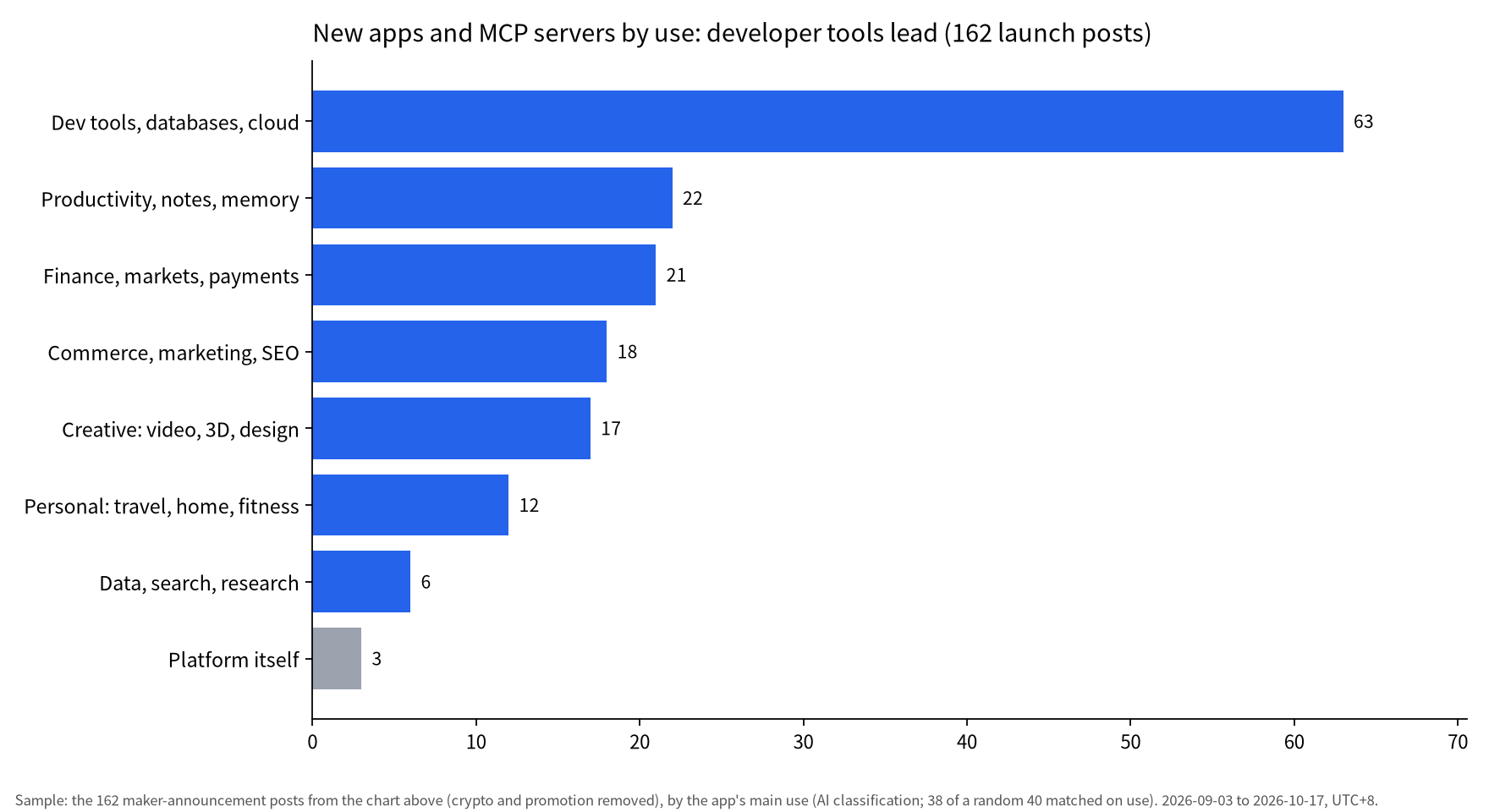
Sample/method: Sample: the 162 maker-announcement posts from the chart above (crypto and promotion removed), by the app's main use (AI classification; 38 of a random 40 matched on use). 2026-09-03 to 2026-10-17, UTC+8.
The shortlist by use case
Nine of the 13 picks are in ChatGPT's plugin directory; the other four need a custom MCP URL or a local setup.
Table: ChatGPT apps and MCP servers by use (pages checked 2026-10-18, not tested)
| Use | Name | What it does | How to add | Requirements | Evidence in the collection |
|---|---|---|---|---|---|
| Design | Canva | Decks, posters, social posts, previewed in the sidebar | Plugin directory | Canva account; generation uses Canva AI credits | 1 user made a deck from the Codex sidebar |
| Video | Runway | Images, video, music | Plugin directory | Uses Runway credits | Vendor and reposts only |
| Video | Pika | Product ads, headshots, short films, edits | Plugin directory | Pika account | Mostly campaign posts |
| Video | HeyGen | Avatar video, voices, translation | Plugin directory | HeyGen account | Vendor and reposts only |
| Creative | Melius | Creative canvas, many image models | Custom MCP (desktop) | Melius account | 1 hands-on review with pros and cons |
| 3D | blend-studio | View and point at Blender/GLB/VRM models in chat | Open source, runs locally | Free | Maker's demo |
| Dev | Upstash Redis | Manage Redis, QStash, vector indexes | Plugin directory | Upstash account | Maker launch |
| Data | MotherDuck | Query your data warehouse in plain language | Plugin directory | Free sign-up | Maker launch |
| Markets | TradingView MCP | Quotes, screener, filings, watchlists, alerts | Custom MCP URL | Essential plan or higher; beta; delayed data | 2 user install guides |
| Marketing | Omnisend | Campaign and automation performance | Plugin directory | Omnisend account | 1 store owner's report |
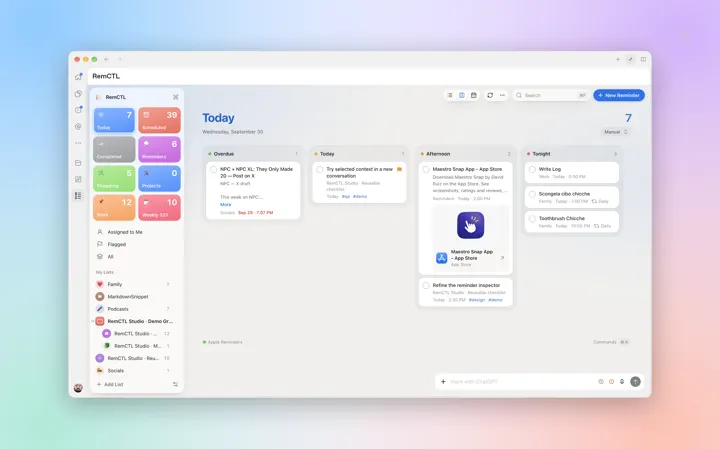
| Productivity | RemCTL | Power UI for Apple Reminders | Open source, Mac | Free | Maker's own project; 2 user reports |
| Productivity | Notion | Docs, tasks, databases | Plugin directory | Notion account | 1 user found some actions missing |
| Transit | Metro MCP | Live DC and NYC transit | Plugin directory | Free, no login | Maker's usage figures |
Sample/method: Every row's directory listing or official project page was opened on 2026-10-18 (UTC+8) to confirm it exists and matches the description; the editor did not install or test any of them. The evidence column comes from the hand-checked 391 posts in the chatgpt-mcp-apps collection.
In the editor's reading, only Melius, Canva, Omnisend and RemCTL have a first-hand report from someone other than the maker.
Three ways to add an app, and plan limits
Directory plugins provide a straightforward path across user tiers, whereas custom MCP servers no longer need developer mode but work on the web only, with full support tied to business plans.
Table: Three ways to add an app: who can use them and where
| Route | Who can use it | Where | Watch out for |
|---|---|---|---|
| Plugins from the directory | All plans | Web, desktop and mobile (except Desktop-only plugins) | Sign in to the service on first use |
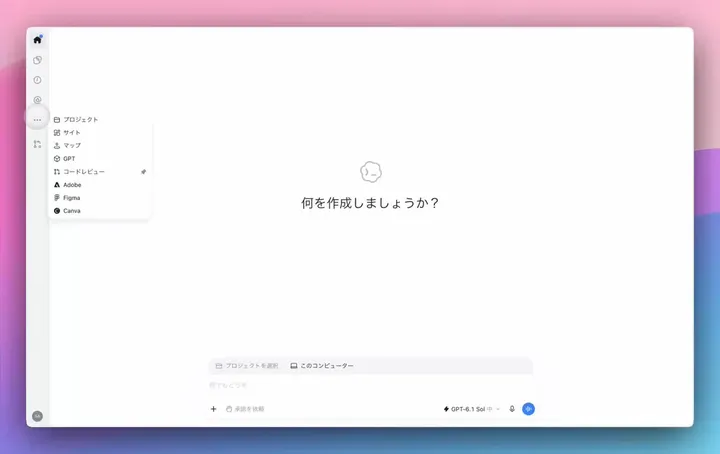
| Plugin extensions (sidebar, panels, file viewers) | All plans; web for Free and Go "coming soon" | Desktop is most complete; composer @-mentions are desktop only | Support differs by surface |
| Custom MCP server (paste a URL) | Help page: full MCP on Business, Enterprise and Edu; Pro is read/fetch only; Plus and Free not mentioned | Web only, not mobile | No developer mode needed; local servers need Secure MCP Tunnel |
| MCP Events (event-triggered automations) | All plans | Work chats (web, or desktop with Cloud) and dots | Server must support MCP 2.0 |
| Host your own MCP on Sites | Sites is for Plus, Pro and supported business workspaces | Publishing the Site creates the plugin | Pro and personal accounts can't share these plugins yet |
Sample/method: Sources: OpenAI's DevDay 2026 recap; Help Center pages on connecting custom MCP servers, hosting a plugin with Sites and creating Sites; the ChatGPT Learn plugins page; developer docs for Plugin Extensions and MCP Events. All opened on 2026-10-18 (UTC+8).
Directory install: open Plugins, open the plugin's details, select the plus button, connect the service when asked, then start a new chat or type @ to pick it.
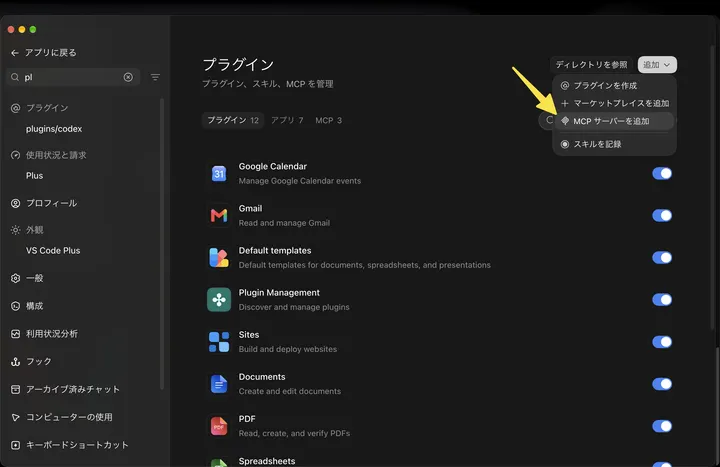
Custom MCP: Plugins, plus, Add custom MCP server, then a name and a public HTTPS endpoint or a Secure MCP Tunnel, authentication, the risk warning and Create as a plugin.
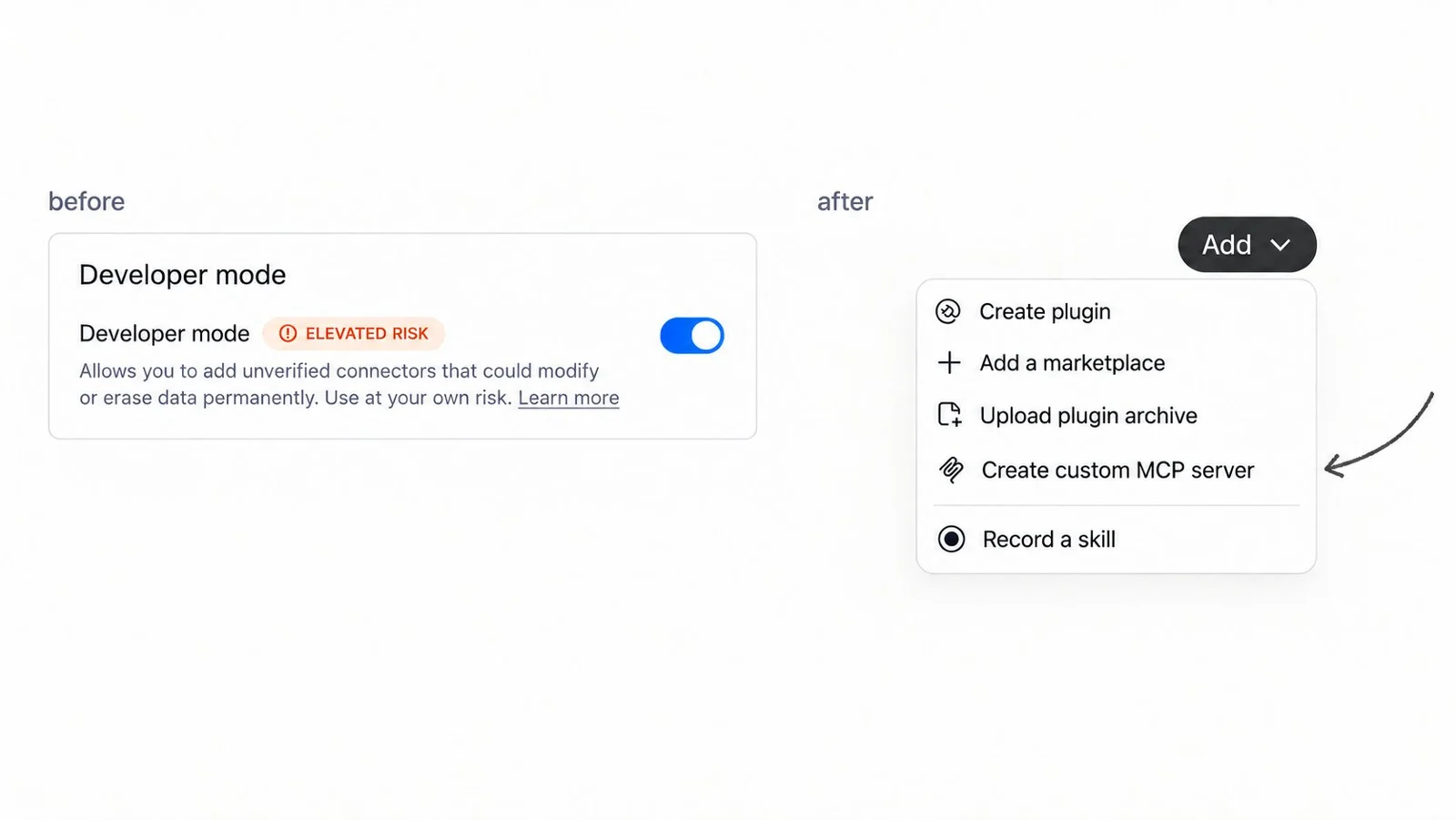
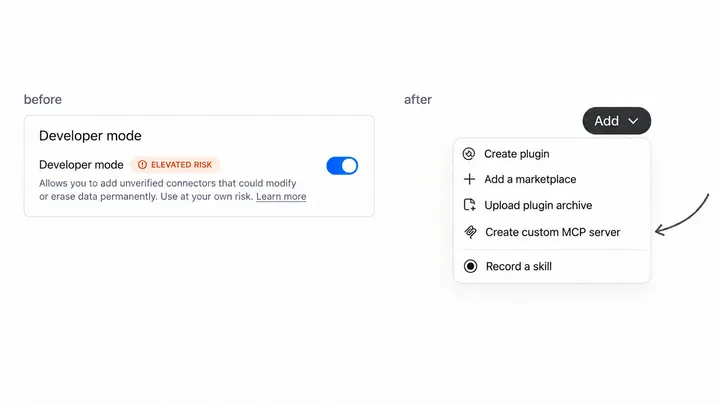
OpenAI staffer Max Stoiber (@mxstbr) posted this before-and-after on October 6, 2026: the developer mode toggle is gone and Create custom MCP server replaces it. It is a vendor statement, not a neutral test. (Item: ChatGPT drops the developer mode toggle for custom MCP servers)
Older guides still say to switch on developer mode: Motion's and Supermemory's setup docs did on October 18, and the Korean and Japanese TradingView guides from mid-September predate the change.
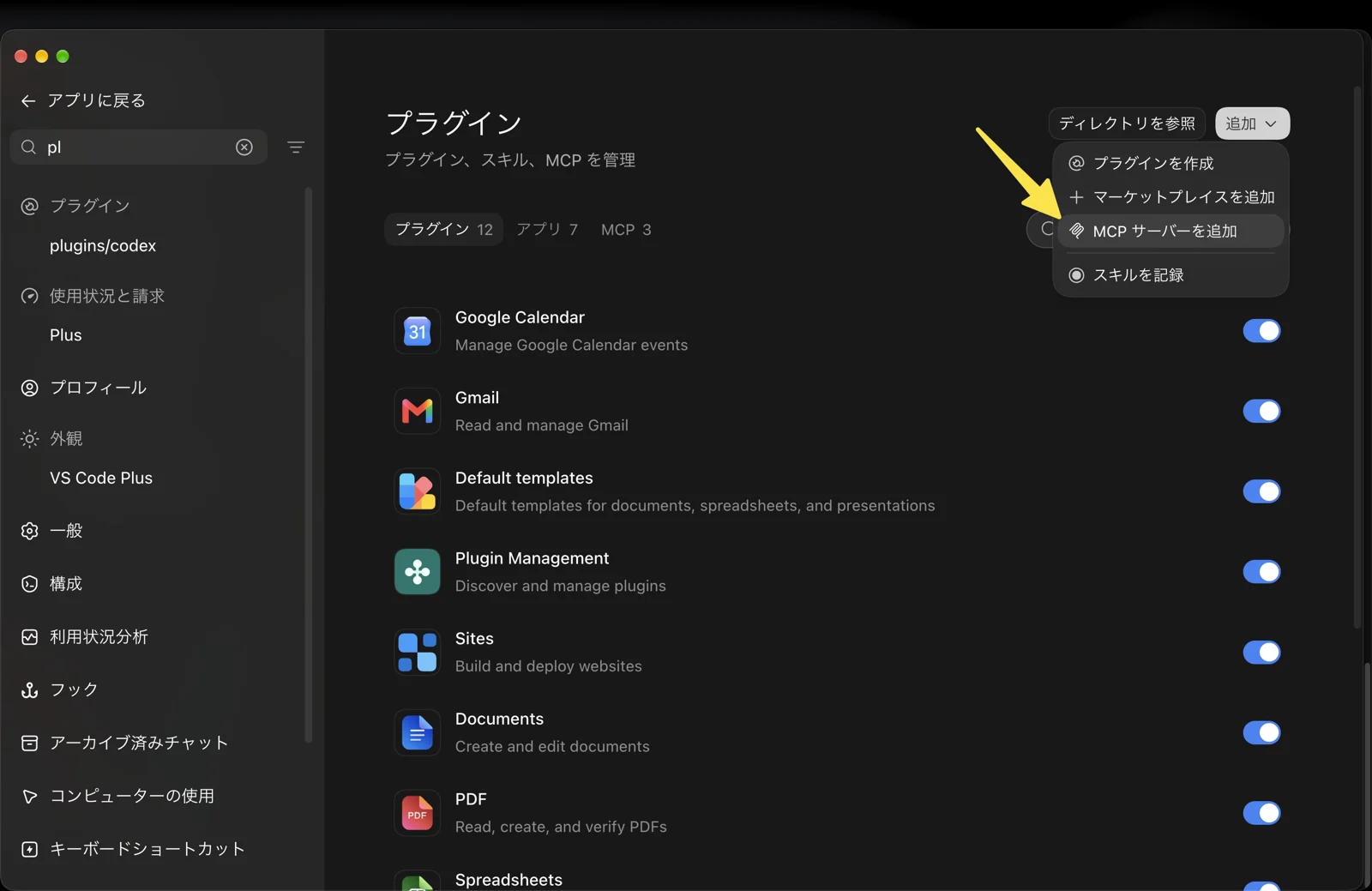
FX龍王【ドル円予想】 (@fxdragonking88) posted these TradingView setup screenshots on September 17, 2026. The post ends with a TradingView referral link, so read it as partly promotional; the screenshot shows the add-MCP menu on a Plus account. (Item: TradingView MCP setup guide for ChatGPT connectors)
One gap remains. The help page names Business, Enterprise and Edu (full) and Pro (read/fetch) and says nothing about Plus or Free, yet Max Stoiber wrote on October 6 that all users can now add custom servers, and one user's screenshot shows the menu on Plus. Treat Plus support as likely but unconfirmed.
Design, video and 3D
Creative plugins are the most polished, but the collection holds more ads than reviews for them.
Canva is OpenAI's own example of a sidebar extension. On October 4, 2026, 木内翔大 (@shota7180) built a slide deck from the Codex sidebar, fixing text and font size while watching the preview, then saved it.
Pika is a partner plugin, but posts by Meng To (@MengTo) and Oluwatimileyin (@Timmysofine) carry per-creator campaign links and others advertise 250 bonus credits, so most Pika chatter here is promotion.
Runway and HeyGen are listed in the directory and use your own account; Runway says its MCP spends Runway credits. Neither has an independent first-hand report in the collection.
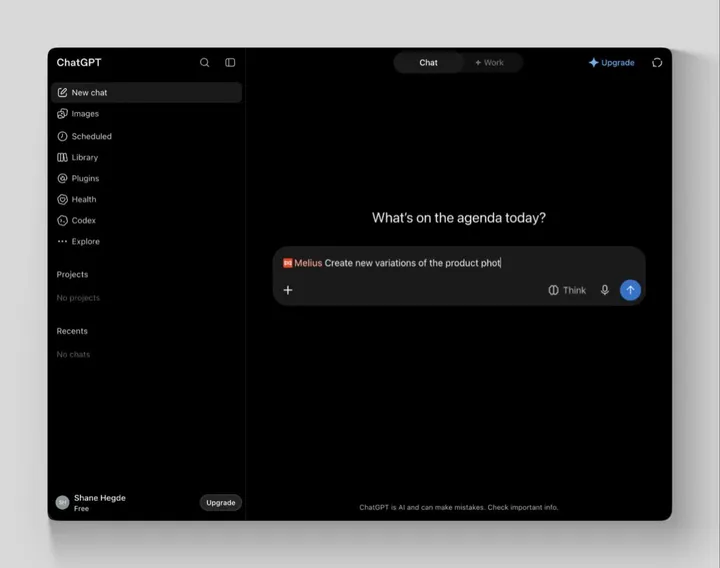
Melius connects as a custom MCP server. On October 16, 2026, Shane Hegde (@shanehegde) liked skipping the node canvas and getting four kitchen-scene ideas fast, but reference images still had to be uploaded on the canvas, a 4:5 crop took several rounds and brand assets such as a logo kept drifting.
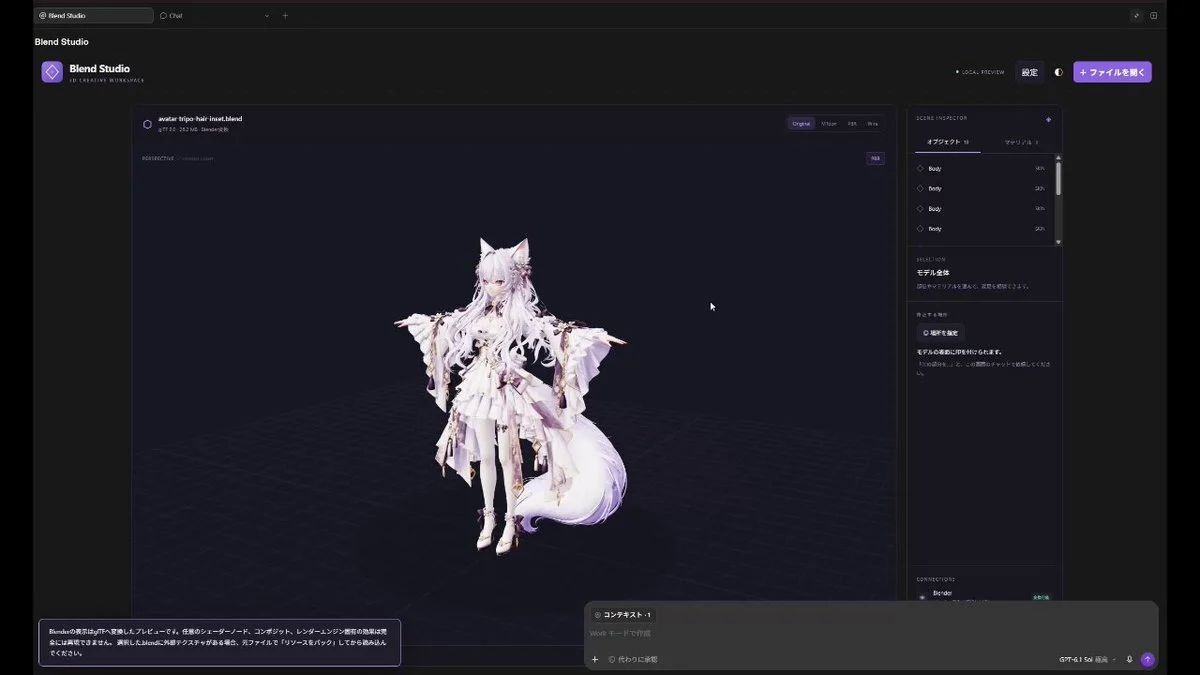
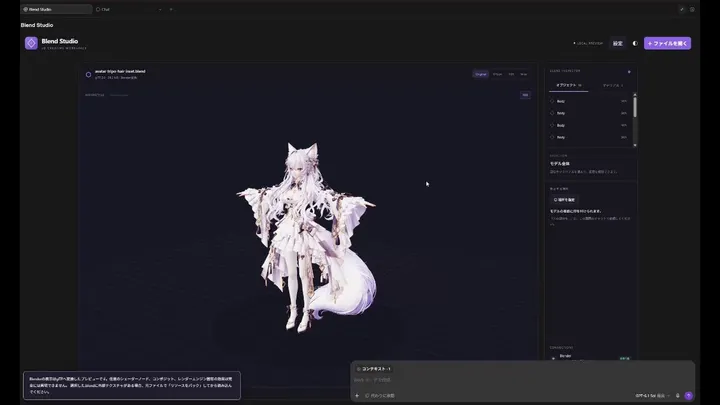
シーチ金太郎(トロ) (@moekadaisuki) shared this open-source blend-studio demo on October 12, 2026: you point at a spot on the model and instruct ChatGPT there. The clip is cut to one minute; the real run took 10 minutes. (Item: blend-studio MCP extension edits Blender 3D models inside ChatGPT)
VFX DESK, citing CG Channel, reports that Cinema 4D 2026.4 ships an official local MCP server for Claude Desktop and ChatGPT Desktop, off by default and only in the full version; we did not check Maxon's page. Ninja Dynamics (@ninjadynamics) reported on October 12 learning Blender in a week with ChatGPT voice mode on a phone connected to Blender through an MCP server, doing the modeling by hand and asking how-to questions.
Developer data, markets and store marketing
For work data, official vendor plugins are the safest picks. TradingView's official server is the most-saved custom MCP here, with its two ChatGPT install guides drawing 319 and 203 bookmarks, but it is paid and in beta.
Upstash Redis (v1.2.1) and MotherDuck (v5.0.0) are both in the directory. Upstash signs in with OAuth on first use; MotherDuck has a read-only query tool and a separate read-write one, so writes can be kept apart.
TradingView opened its MCP public beta on September 16, 2026 at mcp.tradingview.com/mcp. Its own walkthrough uses Claude; user guides show the ChatGPT steps and note that free and trial plans can't connect, data is delayed and it can't draw on charts.
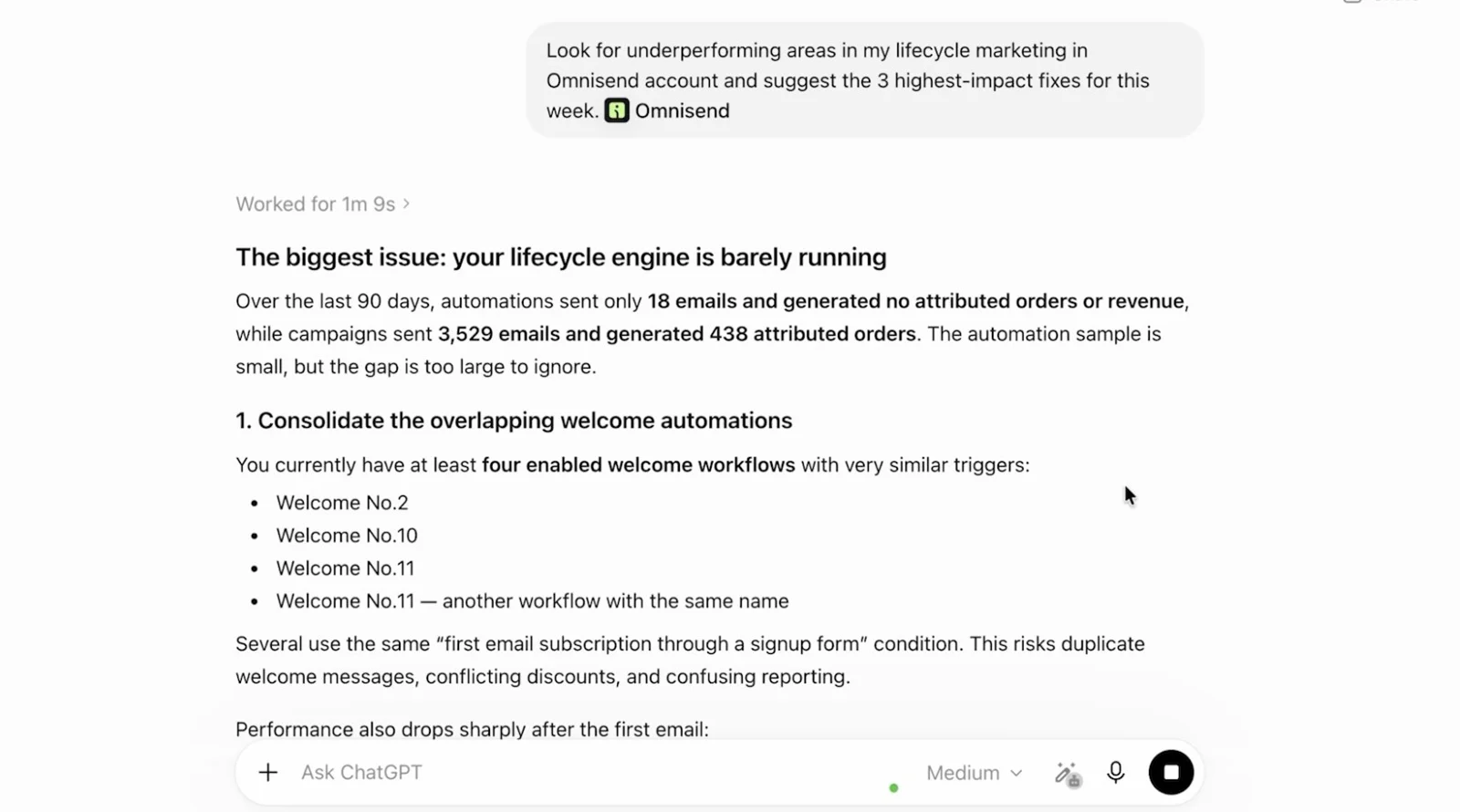
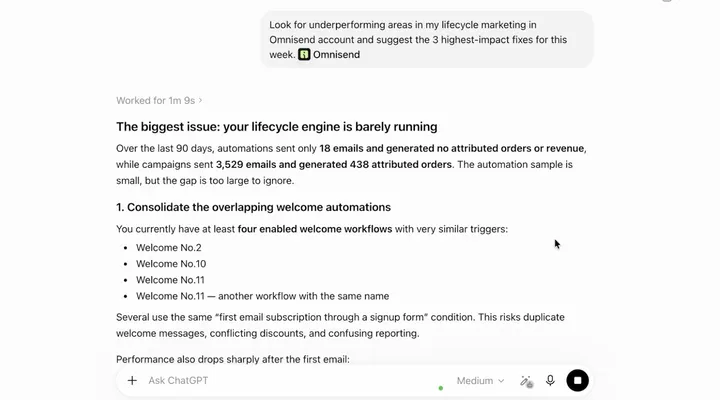
Tru Earth co-founder Ryan McKenzie (@RyeMcKenzie) shared this screenshot of Omnisend in the ChatGPT composer on October 1, 2026. The post says it first showed which segment went cold, then built a BFCM automation from one sentence as an editable draft ("It builds a draft, not a send"); that is a self-report, not our test. (Item: Omnisend MCP builds email and SMS automations inside ChatGPT)
On October 15, 2026, Ilias Ism (@illyism) asked ChatGPT to schedule 10 tweets; it checked its own plugin store and recommended what the founder called a competitor, a sign the directory is where ChatGPT itself looks.
Everyday productivity and life
The everyday picks are small, often free tools, and the best-known one, RemCTL, is its maker's own open-source project.
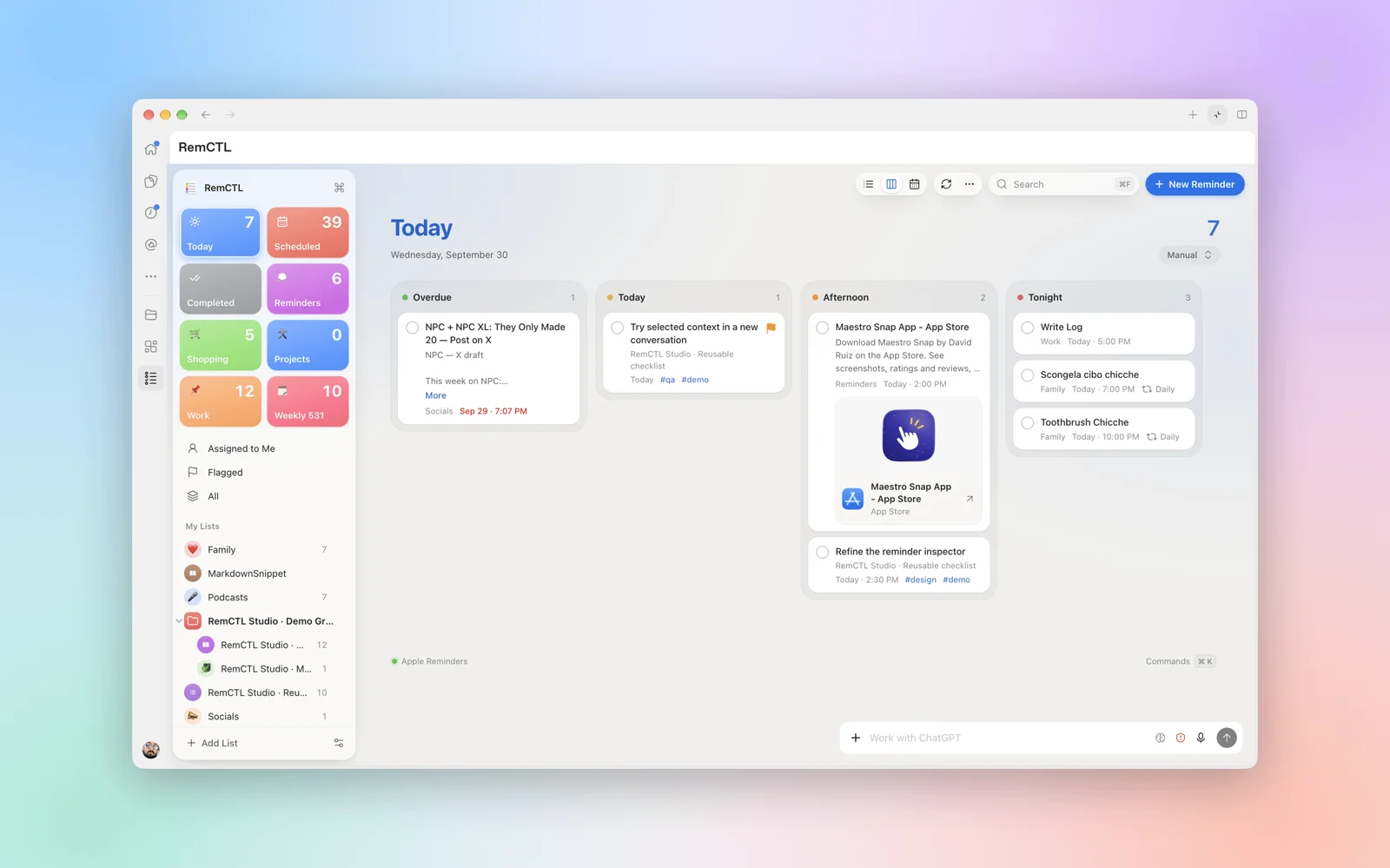
Federico Viticci (@viticci) announced RemCTL 2.0 on September 30, 2026: the free, open-source Apple Reminders CLI now runs inside ChatGPT for Mac with shortcuts, a Cmd-K palette and list, Kanban and calendar views. With 1,010 bookmarks it was the most-saved launch in the collection, but it is a maker's showcase. (Item: RemCTL 2.0 runs Apple Reminders as a ChatGPT extension)
Two independent users report using it: on October 1, Yassine (@y_ssinebenh) tunneled the RemCTL MCP to a VPS to reach Reminders from ChatGPT cloud tasks, and on October 15 Şerafettin Sarışen (@ssarisen) used it from the terminal.
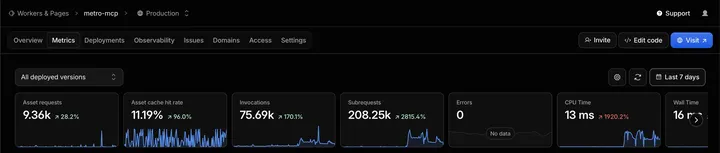
Metro MCP gives free, login-free live transit for Washington, D.C. and New York City. Its maker Anurag (@aarekaz) reported 22k requests in a single day and 75k for the week after it entered the directory; the renamed Transit MCP site shows about 77K a week.
Notion is listed for docs, tasks and databases. Rowan Strang (@RowanStrang) started using Notion because of the plugin, but reported on October 8 that it can't create or edit buttons.
Tinkerers can self-host: Kaido (@odiak_) built a HEY email server on Cloudflare Workers, and Sivori (@sivori) a Calibre ebook library connector that runs locally, so in the editor's reading it needs a Secure MCP Tunnel.
Problems to know before you install
The 12 problem posts cluster around review rules, stale tools, uneven support across apps and unexplained safety blocks.
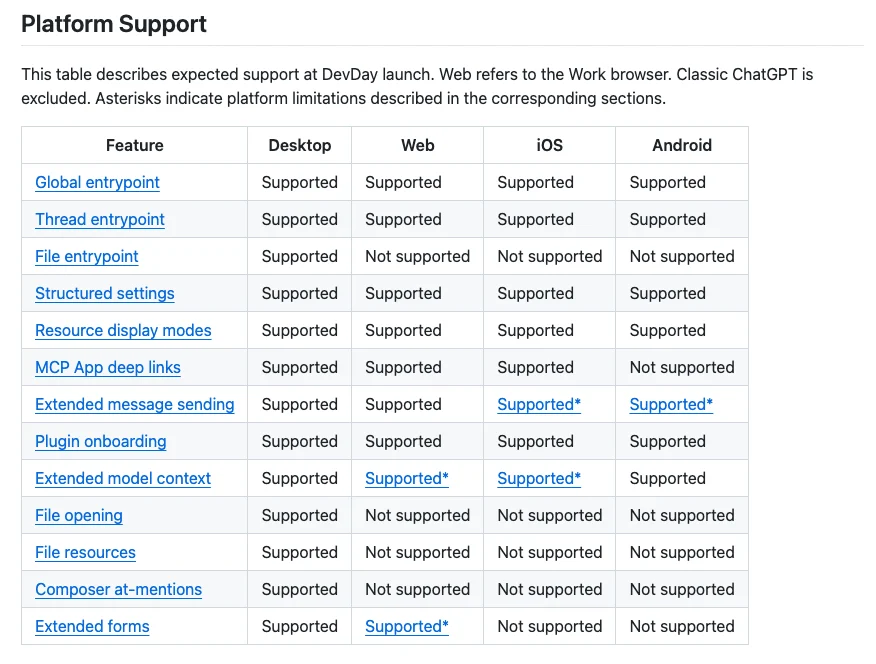
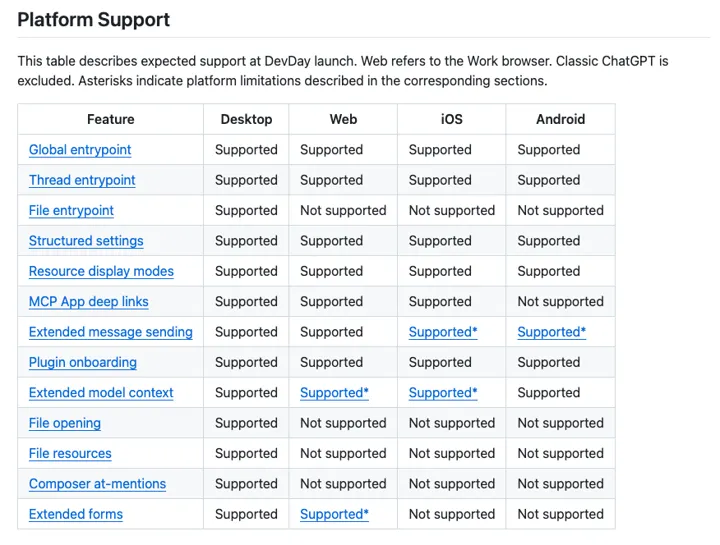
Gota (@gota_bara) posted this support table on October 16, 2026: the desktop app supports every listed extension feature (as expected at DevDay launch), while web, iOS and Android each miss some, such as file entrypoints and composer mentions. (Item: OpenAI MCP Extensions support varies widely across clients)
Review rules: on October 1, 0xDesigner (@0xDesigner) said ChatGPT doesn't allow plugins that sell digital services or credits, and on October 7 Pengwu (@afkpengu) found that a server that is "just a URL" still needs a ZIP submission and OpenAI review.
Stale tools: on October 7, Lars Jansen (@oldstackjournal) saw ChatGPT use an old tool definition after a server update. OpenAI's docs say to select Refresh on the connection in Plugins, then start a new conversation.
Unexplained blocks: on October 16, Tony Ennis (@tonyennis) showed identical calls "blocked by OpenAI's safety checks" that then succeeded on a retest, and IzumiSy™ (@sy_izumi) pointed to issue #36 in openai/mcp-extensions, saying app-provided tools may be buggy in ChatGPT Desktop.
Events: on October 5, Jonas Templestein (@jonas) couldn't get any cloud-hosted ChatGPT session to subscribe to events from an unpublished plugin's MCP server. The docs limit MCP Events to Work chats and dots and require MCP 2.0; whether that explains the failure is unconfirmed.
OpenAI also warns that untrusted MCP servers raise prompt-injection risk, so connect only servers you trust.
Building your own: Sites hosting and plugin extensions
If nothing fits, ChatGPT can now host a small MCP server for you on a Site, though sharing it is limited on personal plans.
Ask ChatGPT or Codex to add an MCP server to a Site, then publish the Site to create the plugin. OpenAI says Pro and personal accounts can't currently share Site-hosted plugins by invitation or link; Business and Enterprise users can share with coworkers. Max Stoiber demoed the prompt "@sites create a todo list that I can use in ChatGPT" on October 1, 2026.
For a server on your own machine, OpenAI's open-source tunnel-client connects it to ChatGPT without exposing it to the public internet.
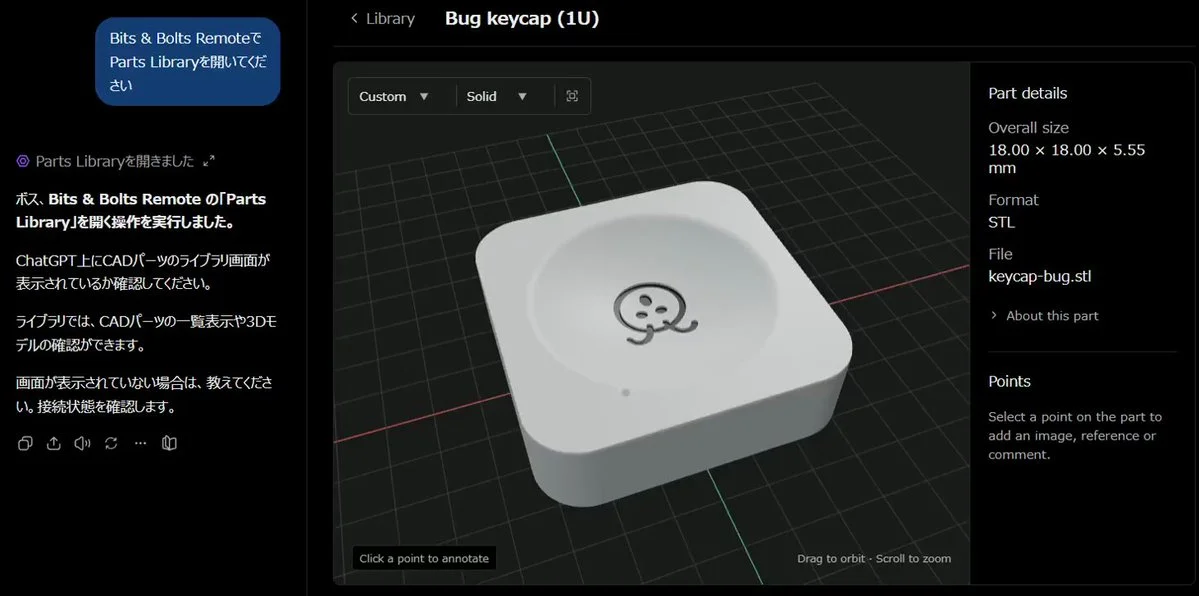
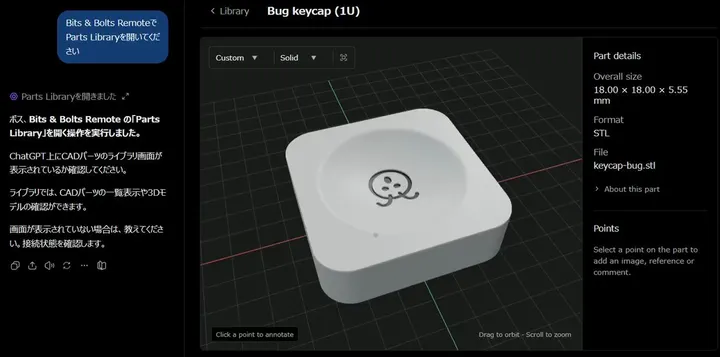
On October 11, 2026, インベスターS (@shinano_suzuki) opened OpenAI's Bits & Bolts Remote demo in a regular ChatGPT Plus web chat and got a library of 36 parts with search, part cards and import buttons. It shows extensions open on Plus web, at least for OpenAI's own demo. (Item: OpenAI's Bits & Bolts Remote MCP demo runs in ChatGPT Plus web chat, user finds)
Extensions are built with the openai/mcp-extensions SDKs for TypeScript and Python; OpenAI's docs call the feature Plugin Extensions.
Questions and answers
Where did developer mode go, and how do I add a custom MCP server now?
It was removed. Open Plugins, select the plus button, choose Add custom MCP server, enter the HTTPS URL or a Secure MCP Tunnel, set authentication, accept the risk warning and select Create as a plugin. This works on the web only.
Is it called MCP Extensions or Plugin Extensions?
They are the same thing: OpenAI's docs say Plugin Extensions, while the GitHub repository and SDKs are named openai/mcp-extensions.
Can I share a Sites-built plugin with another personal ChatGPT account?
Not currently. OpenAI says Pro and personal-account users can't share a Site-hosted plugin through invitations or a share link; Business and Enterprise workspaces can share with coworkers.
I updated my MCP server but ChatGPT still uses the old tools. What do I do?
Open the connection at chatgpt.com/plugins, select Refresh, check that the metadata changed and start a new conversation. Published plugins update through OpenAI's continuous review instead.
Sources
Selected examples
“I tested what happens when you ask ChatGPT and Grok to schedule…”
“I can’t believe how easy is to learn Blender and how much progre…”