VIDEO
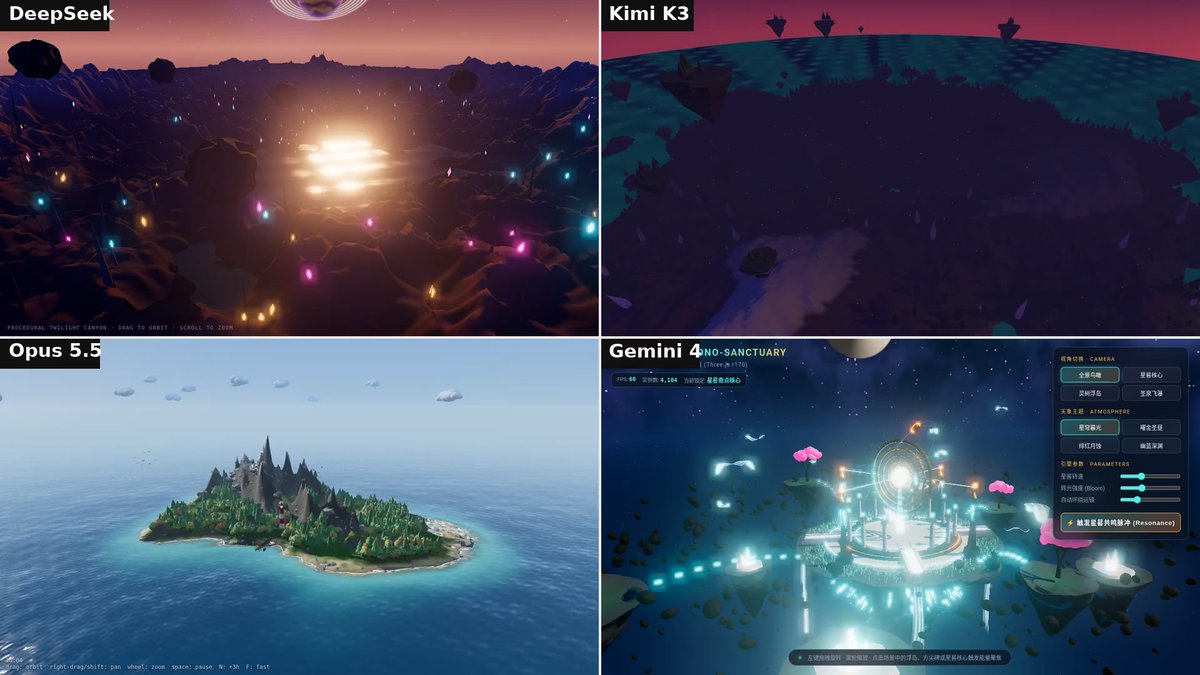
Four models, one line: a complex procedural 3D scene in Three.js
Build a complex procedural 3D scene in Three.js.
AI collections from X · 22 collections · 58,924 posts
3D scenes, Three.js, WebGL and WebGPU pages and 3D games built by AI models, only with the original prompt published. Starting with Claude Opus 5.5; Kimi K3.1 and other models follow, so the same prompt can be compared across models.
Build a complex procedural 3D scene in Three.js.
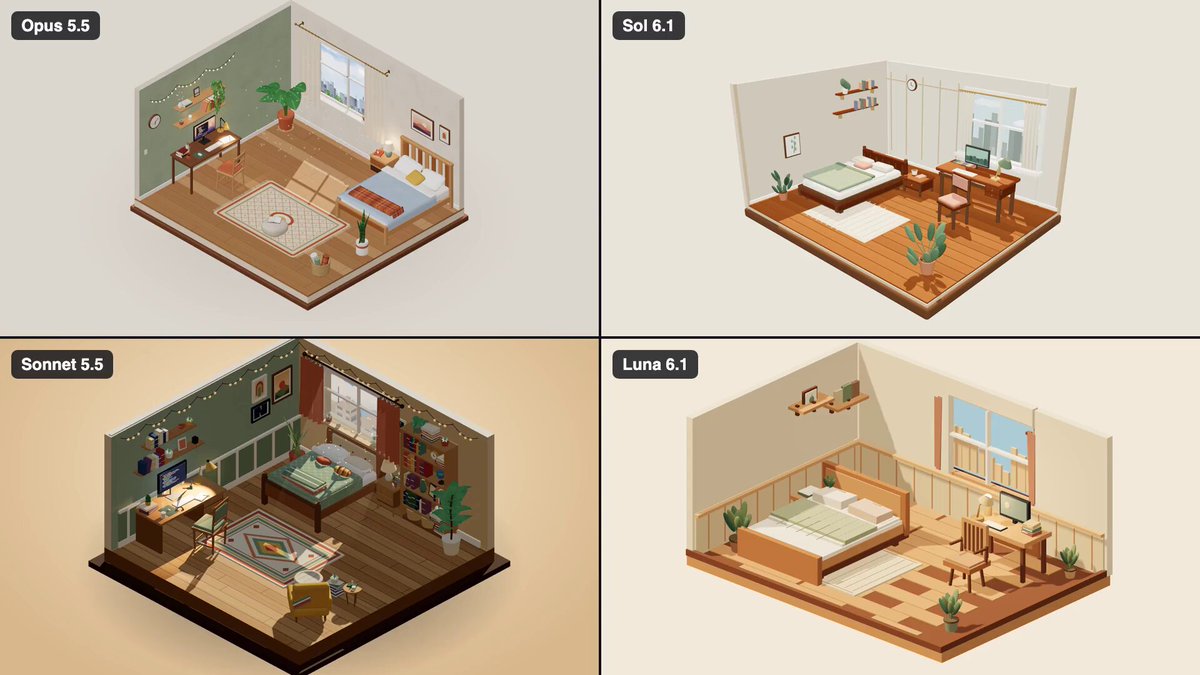
Build a cozy, detailed 3D bedroom diorama using Vite, Three.js, and plain JavaScript. Create a miniature cutaway bedroom with a wooden bed, pillows, a folded blanket, a bedside table, a desk with a monitor and books, a chair, indoor plants, shelves, and a large window overlooking a small city. Use an isometric perspective to showcase the entire room, with warm wooden furniture, soft fabrics, detailed materials, and cozy lighting. Animations and interactions: A desk lamp switches on and off. Curtains sway gently near the window. Outside the window, clouds drift by and city lights glow at night. Animate a smooth transition between day and night. Allow users to rotate and zoom the camera. Clicking the bed or desk triggers a subtle visual reaction. Use procedural geometry and materials only, without external models or image assets. Keep the scene responsive, lightweight, visually cohesive, and smoothly animated. Focus on small details, realistic proportions, attractive lighting, and a polished miniature-diorama aesthetic.
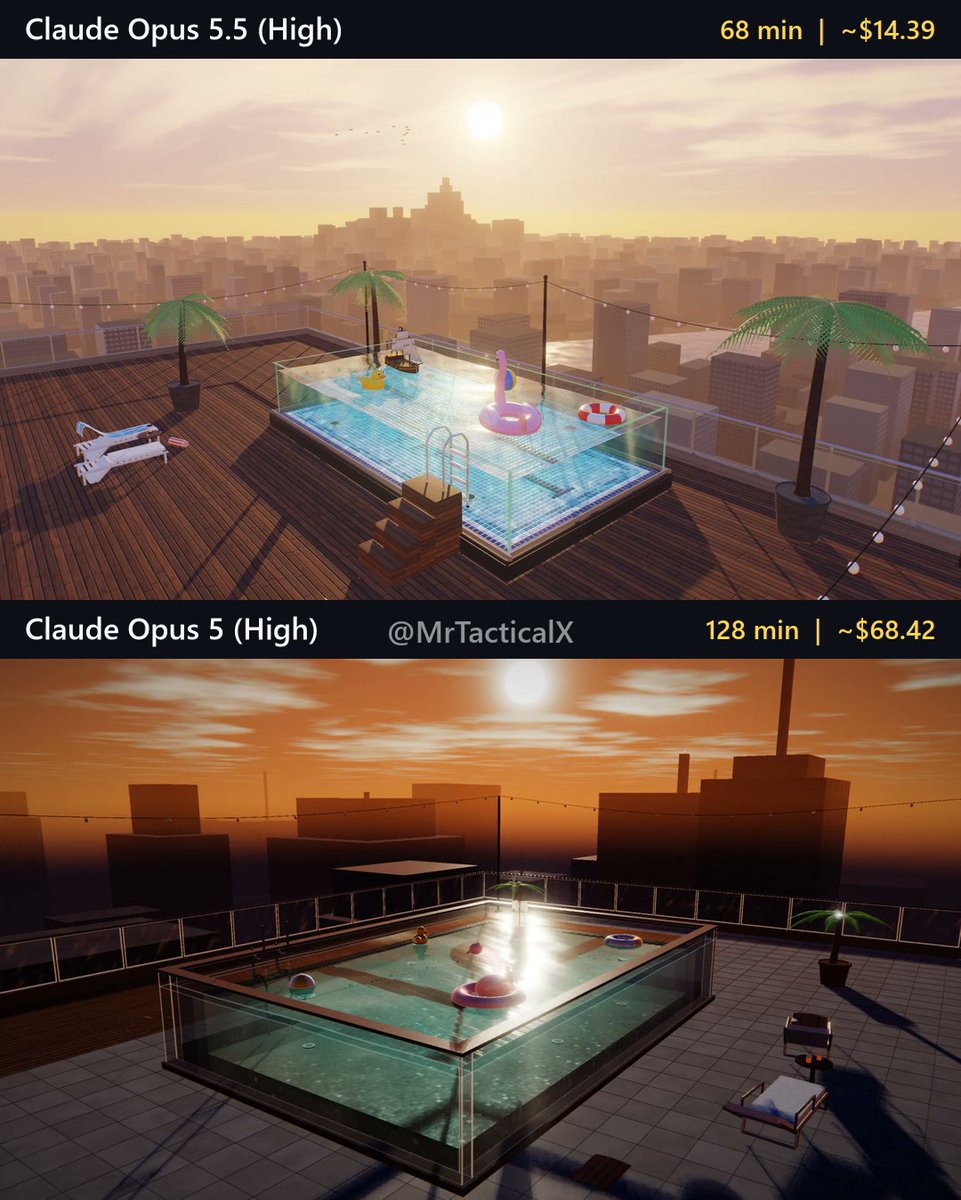
Make a stunning, highly detailed interactive 3D web scene, entirely from scratch in code: a rooftop glass swimming pool at sunset. A swimming pool with thick clear glass walls sits on the roof of a skyscraper, high above a city skyline. Floating in the pool are a detailed toy pirate ship, an inflatable pink flamingo, a glossy rubber duck, a beach ball and a swim ring. Over 30 seconds the sunset fades into a warm night.
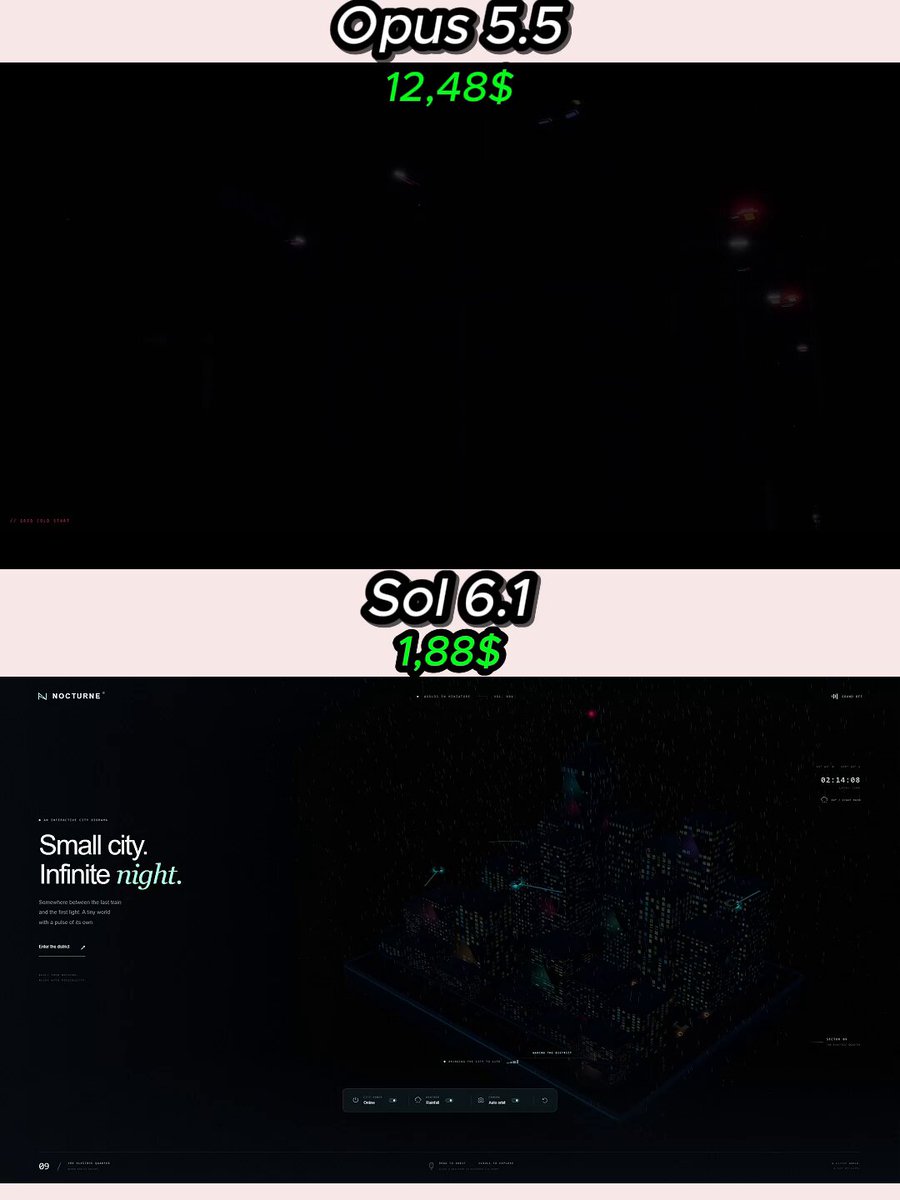
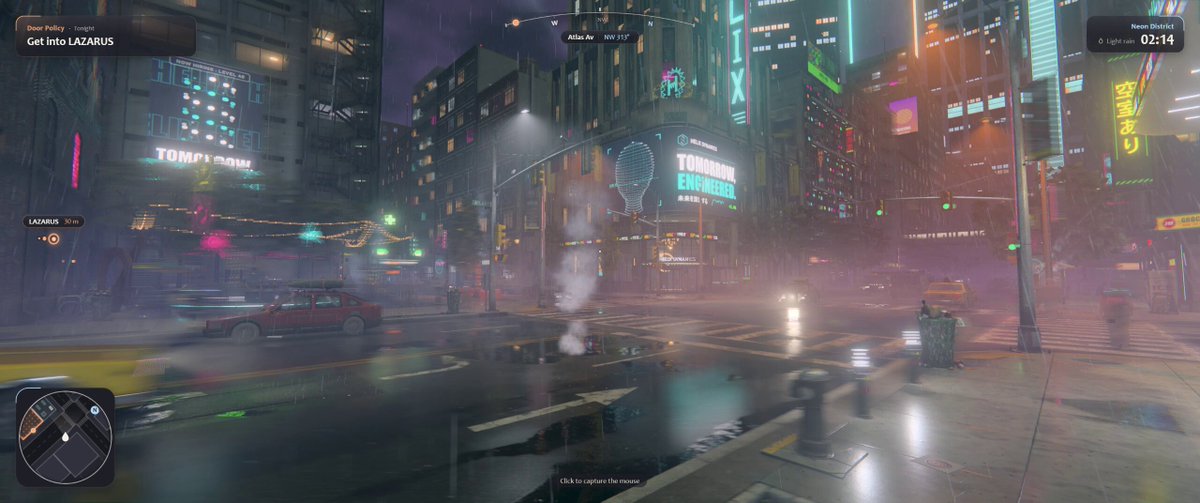
Create an interactive miniature cyberpunk city diorama in Three.js. The result should feel stylish, neon-lit, dense, alive, and premium. The first few seconds must have a strong wow effect and immediately hook the viewer. Core idea: Build a small cyberpunk city on a compact platform or floating base, packed with neon buildings, animated signs, traffic, lights, rain, and futuristic atmosphere. Main requirements: Build everything from scratch in code No pre-made 3D models Use Three.js Prefer a single HTML file unless a few small extra files are truly necessary The project must run locally in the browser The city should include: small but dense building cluster neon signage animated windows glowing streets moving vehicles or floating traffic rain or atmospheric particles reflections if possible hologram-style elements if they fit well Interaction ideas: orbit camera day/night is optional, but night is preferred power on / power off mode rain on / off auto camera tour zoom in to explore details Important visual moment: The start should feel very strong. For example, begin in darkness, then power surges through the city and neon signs flicker on one by one, making the whole miniature city come alive. Make the city feel alive and cinematic, with lots of tiny details for the viewer to discover. Optional polish: tiny rooftop details animated billboards subtle fog moving trains, drones, or hovercars little ambient storytelling touches
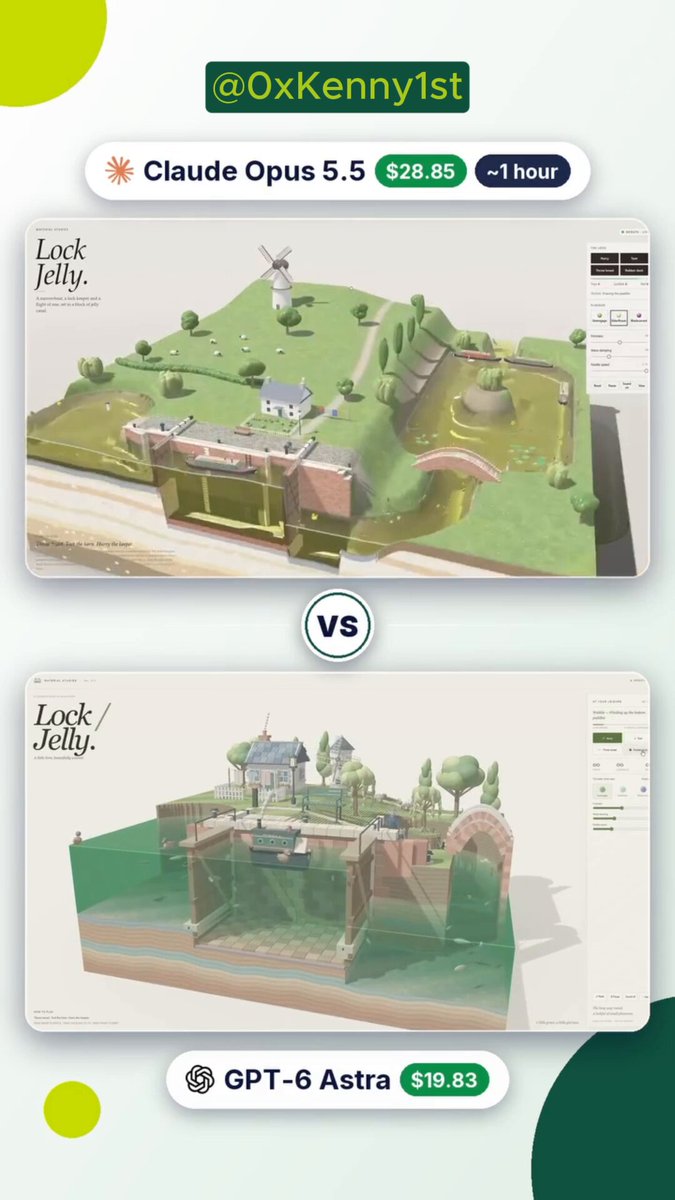
build a 3D jelly canal with a lock, a boat, and a windmill, right in the browser.
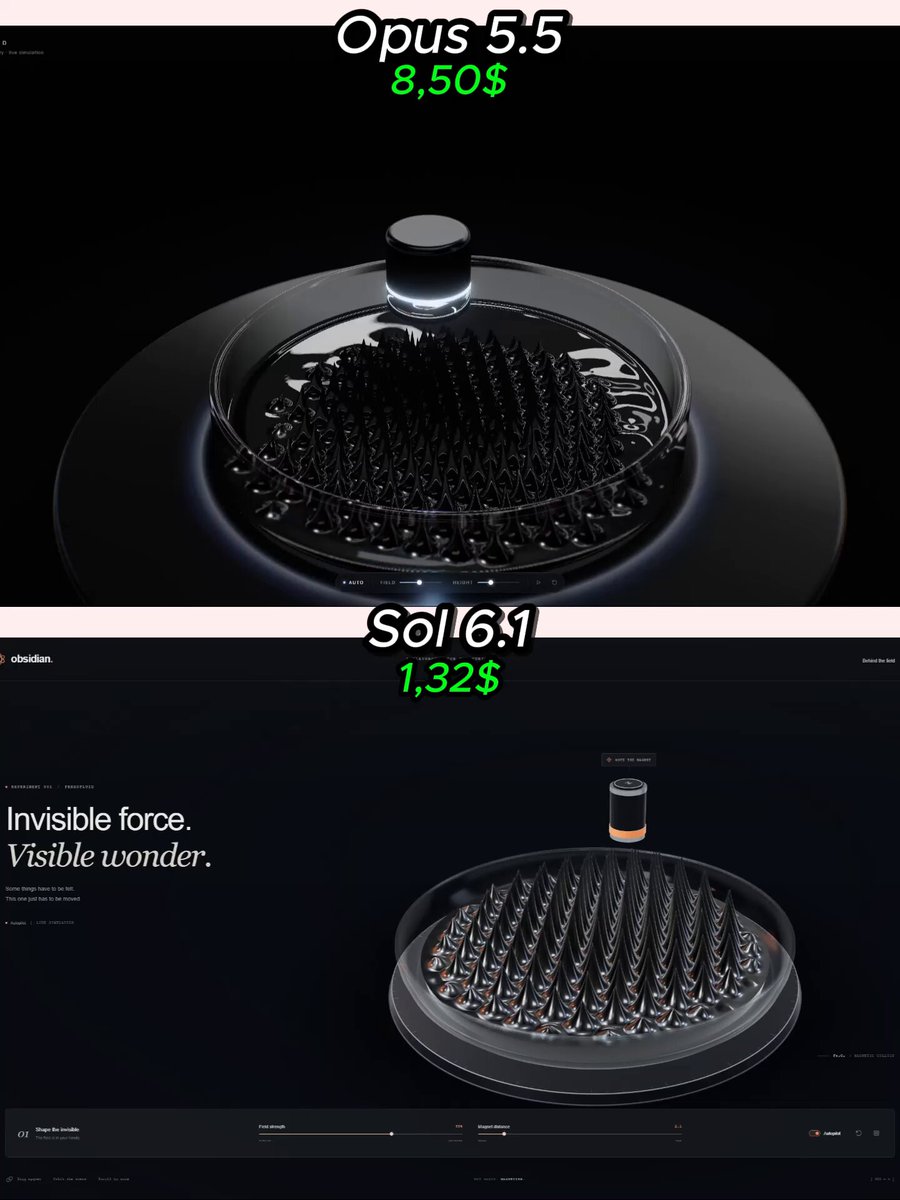
You are an expert creative developer, technical artist, and interactive simulation designer. Build a visually stunning interactive 3D ferrofluid simulation in the browser using HTML, CSS, JavaScript, and Three.js. The result should feel like a premium interactive science-art demo, not a rough prototype. MAIN IDEA Create a glossy black ferrofluid surface inside a clear glass bowl or shallow transparent container. A magnet moves near the fluid, and the ferrofluid reacts dramatically: sharp spikes rise up the surface stretches toward the magnet the spike pattern shifts dynamically as the magnet moves when the magnet moves away, the fluid smoothly relaxes back toward a calmer state The ferrofluid should look visually impressive, elegant, and satisfying to watch. FIRST SECONDS / HOOK The first 2–4 seconds are very important. The scene should already look beautiful on the first frame. A strong opening sequence should happen automatically: the viewer sees a glossy black liquid resting inside a transparent bowl a magnet approaches the fluid rapidly erupts into a field of metallic spikes the spikes stretch and reorganize in a dramatic but clean way The opening should immediately create a “wow” moment. Do not start with a blank screen, slow loading scene, or weak framing. VISUAL STYLE The ferrofluid should look: glossy dark metallic reflective smooth when calm sharply spiked when activated The bowl or container should look: transparent elegant realistic cleanly lit Use a dark premium studio environment with cinematic lighting. The contrast between the black ferrofluid and the highlights should be beautiful. The whole scene should feel like a luxury science exhibit or futuristic product demo. INTERACTION Make the scene interactive. Required: the user can move the magnet and see the ferrofluid react in real time the camera can orbit smoothly zoom works a reset control returns the scene to a clean resting state Optional but good: a slider for magnetic strength a toggle for automatic magnet motion a button to replay the opening animation SIMULATION GOAL The ferrofluid does not need to be scientifically perfect, but it must feel physically coherent and believable. The fluid should: clearly respond to the magnet position form spikes that follow the field have smooth transitions between calm and active states avoid looking random or fake Do not just place static decorative spikes on a mesh. The pattern should feel alive and reactive. PRESENTATION Use clean minimal UI. Do not clutter the screen. The main focus should be the fluid. The default camera angle must already look excellent for a social media preview. TECHNICAL REQUIREMENTS Use actual Three.js rendering Build a real interactive project No prerecorded fake animation No broken controls No console errors The experience should run smoothly in the browser You may use advanced shaders, procedural animation, GPU effects, post-processing, and any suitable open-source techniques that improve the result. Internet access for finding suitable open-source assets or references is allowed, but do not use paid external APIs or external AI generation services. FINAL PRIORITIES Priority order: strong first 2–4 seconds beautiful ferrofluid look convincing magnetic reaction premium lighting and materials smooth interactivity clean presentation Build the actual working project, not just a description. The final result should look impressive enough that people would stop scrolling to watch the spikes form.
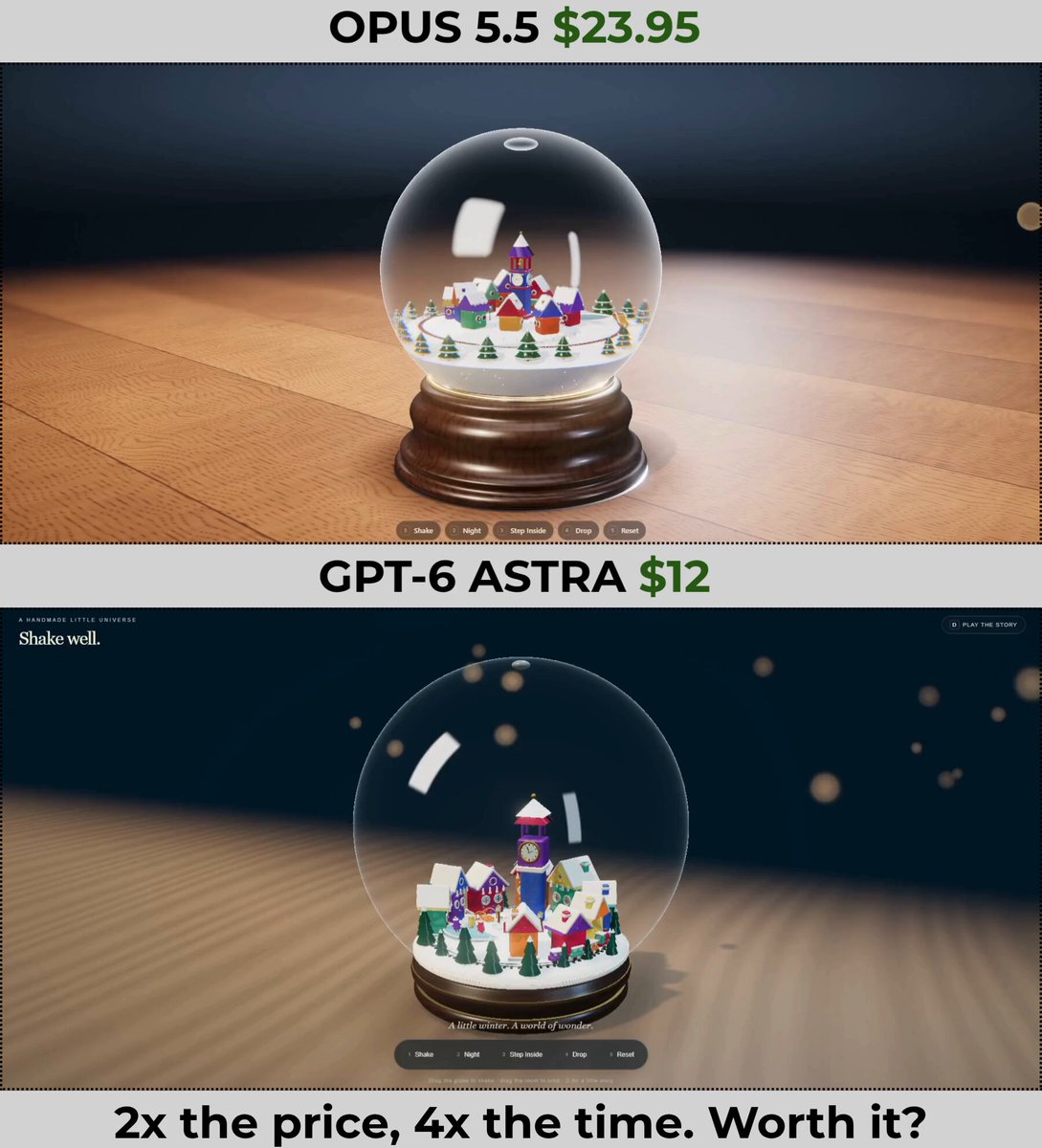
Build one self-contained HTML file, shake-well.html: a glass snow globe on a table with a tiny winter village inside, made of jelly. Original design only: no real brands, logos, characters or text from real products. Open it and check it runs before you finish. THREE.JS ONLY - All rendering goes through Three.js: import exactly three@0.180.0 from a CDN with an import map and use WebGLRenderer - Only Three.js and its official addons (three/addons: OrbitControls, EffectComposer, bloom, depth of field, RoomEnvironment and so on). No other libraries - No raw WebGL or WebGPU code: no getContext, no direct gl calls. Custom shaders only through Three.js materials (ShaderMaterial or onBeforeCompile) - All physics and motion are your own plain JavaScript. No physics libraries, no external models or textures, all geometry and materials procedural FIRST STEP, BEFORE ANYTHING ELSE Run a shell command that creates a unique run ID and the current time, and saves both to run-log.txt next to your HTML. Print the run ID once in your reply. You will need it at the end to find your own session log. After every major step (globe, village, room, each toy, demo), read your session log and append the running token totals and the current time to run-log.txt. If your context gets compacted, these checkpoints keep the earlier usage. The picture matters most. It should look like a high-end product shot of a handmade collectible. THE GLOBE - A large glass sphere on a turned dark-walnut base with a thin brushed-brass ring. The glass is perfectly clear and thick at the edges, with two soft rectangular studio highlights and a thin bright rim where it curves away - The globe is filled with clear liquid. The village looks slightly magnified through it, like a real lens, and bends at the edges - A small air bubble is trapped at the very top and always slides to the highest point when the globe tilts - About 6000 white flakes float inside, plus a few hundred tiny gold glitter specks that flash when they turn to the light THE VILLAGE (all jelly) - A small snowy hill fills the bottom of the globe. Every building, tree and figure is glossy translucent jelly, like gummy candy: raspberry, tangerine, lemon, mint, blueberry, grape. Light passes through and glows softly inside them, with sharp wet highlights and a few tiny frozen air bubbles in each piece - 8 to 10 small houses with steep roofs, round windows and chimneys around a little square. In the center: a clock tower with a bell and a round clock face - A frozen pond of pale blue jelly ice with three tiny skaters gliding in slow loops. A creek with an arched bridge. A snowman. A ring of dark-green jelly pines with white snow tips - A tiny jelly train (engine plus three cars, round headlight) runs on a loop track around the village, forever - Snow on roofs and ground is soft matte white, like powdered sugar, contrasting with the glossy jelly THE ROOM - Calm and clean, studio-like. A warm wooden tabletop, a soft contact shadow under the base, a dark dusty-blue backdrop with a few out-of-focus warm bokeh lights far behind - Warm key light from the upper left, cool fill from the right, a rim light that outlines the glass - The globe is centered and fills about 70% of the frame height. It must read well in a square crop and in a portrait 9:16 crop. The background stays soft so the globe pops TOYS (small pill buttons at the bottom, minimal UI, keys 1 to 5) 1. Shake. The globe jolts and tilts, the snow explodes into a swirling blizzard, the jelly houses wobble a beat late (tall ones more), then everything settles. You can also shake it by hand: drag on the globe, a harder drag gives a stronger shake. Drag elsewhere to orbit 2. Night. The room fades to deep blue. Windows, path lanterns, the clock face and the train headlight turn on and glow warm through the jelly. The globe becomes a lantern and throws a soft warm pool of light onto the table under it 3. Step Inside. The camera dives into the globe, passes through the glass with a short refraction ripple and lands in the village square at the height of a tiny villager. Snow falls around you, jelly houses tower overhead, the train rolls past. Look up: the curved glass dome and, beyond it, the giant warped room. Drag to look around, WASD to walk around the square. Pressing Shake from inside: a giant soft grey cat paw taps the glass from outside, blurry and enormous, and the whole world lurches. The button becomes Step Out 4. Drop (outside only). The globe lifts off its base a hand's height and falls onto the table. The glass shatters into curved shards, the liquid bursts out in a splash toward the camera, and a few drops land on the lens and slowly run down the screen. The jelly houses bounce out, wobble and stay intact. Snow spills across the table. The tiny train keeps chugging in circles on the table. The bell rings once 5. Reset PHYSICS (real but light) - Snow: each flake sinks at its own slow terminal speed and is carried by the liquid. The liquid lags behind the glass when the globe moves, so a shake creates a swirl that decays over time. Flakes that land rest on roofs and ground and get lifted again by the next shake. Full settle in about 15 to 20 seconds - Jelly: every object is a damped spring (lean plus squash and stretch) driven by the globe's acceleration. Taller and softer means bigger wobble. Settles in about 2 seconds - Drop: real gravity for the fall, simple rigid shards, liquid as particles, jelly squashes and bounces on impact - 60 fps on a normal laptop IDLE AND DEMO - On load: daytime, snow settled, a slow auto-orbit around the globe. This alone should work as a clean 20-second beauty shot - Press D for a fixed demo with a fixed random seed, so every run is identical. Buttons light up as they are pressed so the viewer sees what happens: 0s slow orbit 5s Shake 12s Night 18s Step Inside, look around the square, the train passes 26s look up at the dome and the giant room 29s the cat paw taps the glass 36s Step Out 40s Drop 44s to 52s slow push-in on the wreck, drops running down the lens LAST STEP: REAL TIME AND API COST Do this as the very last step, right before your final reply. Use real numbers from your own session log, do not estimate. 1. Find your session log on disk: the file that contains your run ID - Claude (Claude Code, Cowork): a .jsonl file under ~/.claude/projects/. Sub-agent logs, if any, may sit in a subfolder with the same name; include them - Codex: rollout .jsonl files under ~/.codex/sessions/ 2. Time: from the first to the last timestamp in the log. If the log has no timestamps, use run-log.txt start time to now 3. Tokens - Claude logs: every API response has message.usage with input_tokens, cache_creation_input_tokens (split into 5-minute and 1-hour in cache_creation when present), cache_read_input_tokens and output_tokens. The same response is repeated on several lines, one per content block, so count each message id only once - Codex logs: take the last cumulative token_count totals. Cached input is usually included inside input, and reasoning tokens are billed as output: do not count anything twice 4. Price every request with the table below. For a model not in the table, use your vendor's official pricing page and give the URL PRICES, USD per million tokens (Claude API, http://platform.claude.com/docs/en/about-claude/pricing, checked 12 Oct 2026) model | input | cache write 5m | cache write 1h | cache read | output Opus 5.5 | 4 | 5 | 8 | 0.20 | 20 Sonnet 5.5 | 2 | 2.50 | 4 | 0.10 | 10 Haiku 5.5, prompt up to 100k | 0.10 | 0.125 | 0.20 | 0.01 | 0.50 Haiku 5.5, prompt over 100k | 0.50 | 0.625 | 1 | 0.05 | 2.50 - Haiku's tier is decided per request: prompt size = input + cache write + cache read tokens of that request - If usage shows speed "fast" (Opus only): $8 input, $40 output. If inference_geo is "us": multiply everything by 1.1 5. If th [… truncated at the 8000-character field limit — full prompt in the source post]
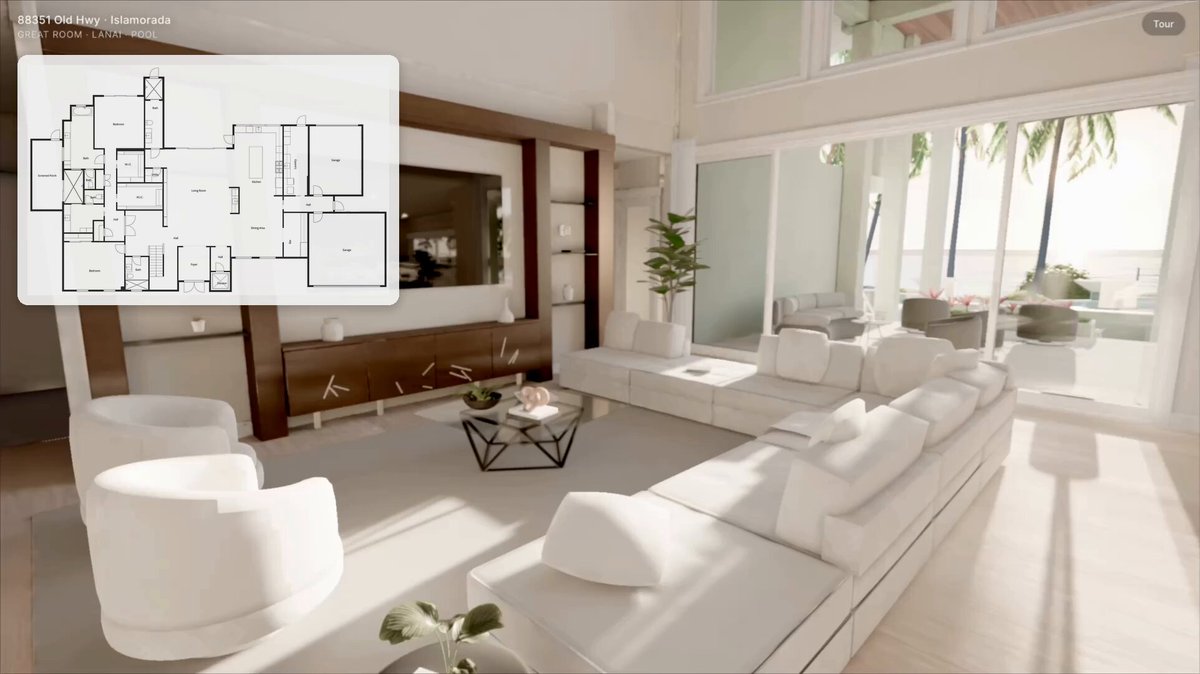
here's a floor plan and photos for one house. build it as a three.js site i can walk through in the browser, to scale from the plan, with every room, finish and piece of furniture matched to the photos. the bar is the photos themselves. split the house into pieces you can judge separately, and give each one a builder and a separate critic with fresh context. the critic compares a screenshot of our room with the matching photo, picks the better one, names the biggest gap, and sends it back. keep looping until ours wins or i stop you, and tell me anything you couldn't match.
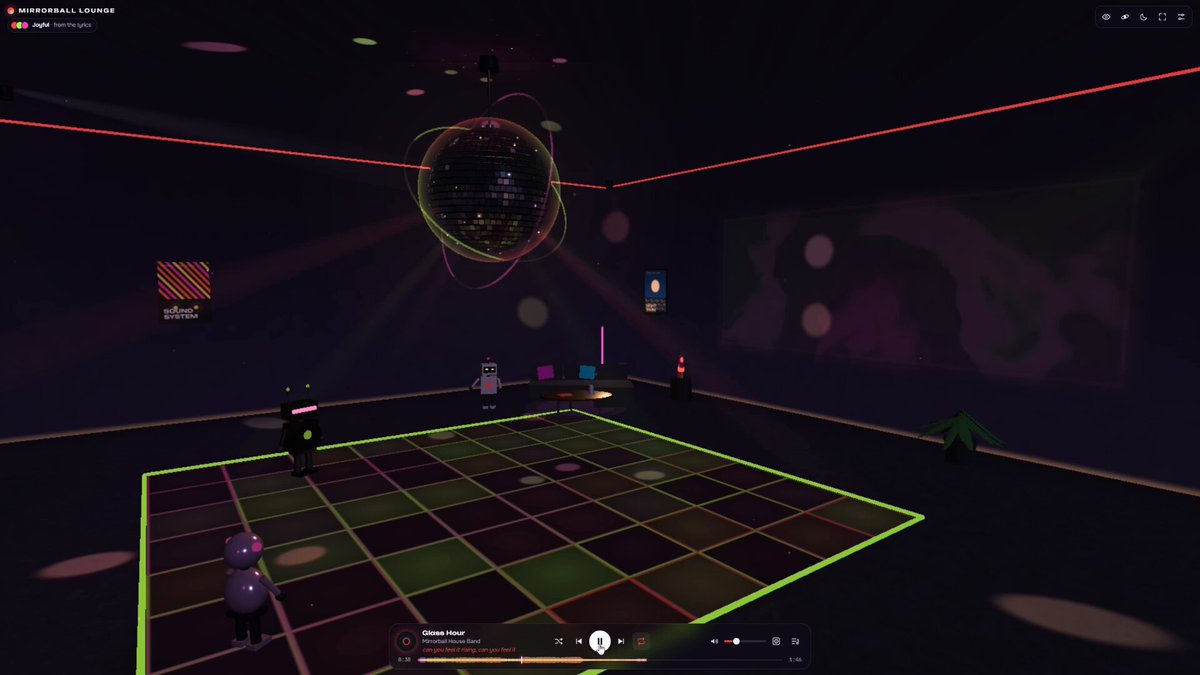
Create an immersive, interactive 3D music room in a single HTML file (three.js + Web Audio API) with a large mirrored disco ball as its centerpiece. Make it a personal space where people can listen to music, explore the room, customize it, and watch the whole environment respond to each song. VISUAL DIRECTION A nighttime neon atmosphere: volumetric lighting, soft haze, realistic reflections, floating particles and bloom. The disco ball is the main focal point. Balance energetic effects with quieter areas so the room never feels overwhelming. Neon in the room: tubes along the ceiling edges, around the dance floor and along the window frame, glowing seams between the floor tiles, and an "after hours" neon sign above the window. Use a saturated palette. DISCO BALL - The ball hangs from a rod and sways like a pendulum: strong bass hits push it. - Inertial spin: each beat gives it a push, then the speed eases back to normal. Add a slight precession wobble. - Real reflections of the room in the mirror tiles (cube camera). Only walls, floor and neon are reflected, to keep it fast. - Light spots from the ball travel across walls, floor and furniture and rotate with it. - On every beat a neon ring sweeps down across the tiles. During choruses, glowing spiral stripes wind around the ball. High frequencies make individual tiles sparkle. - A neon halo around the ball and two thin orbiting rings with running light segments. - Bass makes the ball pulse and sends light waves across the room. - Rhythm and energy drive the rotation speed, beam movement and particle intensity. COLOR AND MOOD The mood of the lyrics sets the palette: - tenderness — pink and gold; - sadness — blue and purple; - joy — warm, vivid colors; - tension — red and cool white. Blend colors smoothly, never jumping on every beat. Lyrics come from MP3 tags (USLT), an .lrc file with the same name, or text pasted by the user; LRC timing enables synced effects. Without lyrics, read the mood from the sound (energy and spectral brightness). Only show synced lyric effects when timing data exists. Users can choose the automatic palette or set three colors of their own. AUDIO ANALYSIS - Drive reactions from real frequency analysis (AnalyserNode). - Give each band its own role: bass drives the floor, the ball and the speakers; mids shape the wall patterns and beams; highs add sparkles. - Precompute a loudness envelope for the whole track. Use it to find choruses (lighting opens up, projections spread across walls and ceiling), quiet passages (the atmosphere softens), and strong transitions. - Detect tempo with autocorrelation. PLAYBACK (important) Play all music through Web Audio: decode files into an AudioBuffer and play them with AudioBufferSourceNode. Do not use the <audio> element or blob URLs — sandboxes such as Claude artifacts block them. Build a small custom player with play, pause, seek, currentTime, duration and an ended event. Start audio only after a user action. DEMO TRACKS Three original tracks with original lyrics, synthesized in the browser sample by sample (in a Web Worker, with a main-thread fallback): - "Glass Hour" — 120 BPM, joy; - "Low Tide Letters" — 84 BPM, sadness; - "Static Bloom" — 128 BPM, tension. Each has a structure with intro, verse, build-up, chorus and break, and lyrics timed to the bars. INTERACTIVE FEATURES - Reactive light floor: tiles ripple outward on bass hits; clicking a tile sends an extra light wave. - Panoramic window showing a night city, deep space or an ocean. The view responds gently to the track: city lights brighten, stars drift faster, waves grow. - Projection walls with flowing abstract patterns and lyric fragments; at musical peaks the projections spread across the walls and ceiling. - DJ desk: clicking a record opens the playlist; labeled knobs adjust visual intensity, bass sensitivity and room lighting. The same controls exist in the compact interface. - Small details: speakers vibrate, a lava lamp flows with the music, VU meters on the desk. - Three dancing robots with distinct looks and places: Disco (white, by the sofa), Volt (black with a neon visor, on the dance floor), Bubble (pink and round, by the DJ desk). They dance on the beat; clicking one changes its style (Bounce, Wave, Spin, Robot, Disco point). Each robot's style can also be set in the settings. - Rare surprises at strong transitions: a star field on the ceiling, a glowing whale passing the window, an aurora. They can be turned off, and the settings include preview buttons. MUSIC AND PLAYLISTS - Upload several audio files at once, or drag files into the room. - Playlists: create, rename, delete; switch tracks, play/pause, seek, volume, shuffle, repeat. - Uploaded files are kept in IndexedDB. - No adding music by link and no YouTube. ROOM CUSTOMIZATION - A catalog of furniture, plants, posters, lamps and speakers; an arrange mode for dragging pieces across the floor, rotating them, changing their style, or removing them. - Save rooms and visual settings to localStorage, and link a room to a playlist. - Three coordinated presets: - Neon Club — saturated colors, moving beams, a glowing city skyline; - Cosmic Drift — floating particles, aurora, a view of space; - Retro Disco — warm light, vintage furniture, vinyl, a classic multicolor dance floor. CAMERA Viewpoints: overview, from the sofa, beside the DJ desk, beneath the ball, at the window. Optional smooth drift and a slow cinematic orbit. Default to a stable camera. Support mouse, touch and keyboard, and keep the camera inside the walls. SIGNATURE FEATURES - Musical Aura: each track grows its own mix of color, light and motion; when tracks change, the atmosphere dissolves smoothly into the next. Users can save an aura as a preset. - Song Light Trail: a thin colored line on the seek bar that draws the song's changing atmosphere. At the end it can be turned into an abstract cover image. - Ambient Mode: hides the interface and calms the motion. INTERFACE AND ACCESSIBILITY - A minimal translucent player at the bottom and a collapsible settings panel. In fullscreen, controls hide after inactivity. - Responsive on desktop and mobile. - Reduced-motion mode, no-flash mode, adjustable intensity, readable labels, full keyboard control. No strobing by default. - Playback errors are explained specifically and never stacked as duplicates. PERFORMANCE - High / Balanced / Simple quality tiers; weak devices start on Simple. - Dynamic resolution: lower it when FPS drops below 50 and raise it back smoothly. - Cap rendering at about 60 FPS on 120–144 Hz displays. - Precompile shaders while the welcome screen is showing. - Music must keep playing smoothly under any load. PRIORITY Build a polished, working core first: the reactive ball, light floor, window, music controls and robots. Add the remaining details without compromising responsiveness or visual coherence.
make a cool cyberpunk 2077 looking game. Do everything on your own only use blender. And you can use magnific for sound.
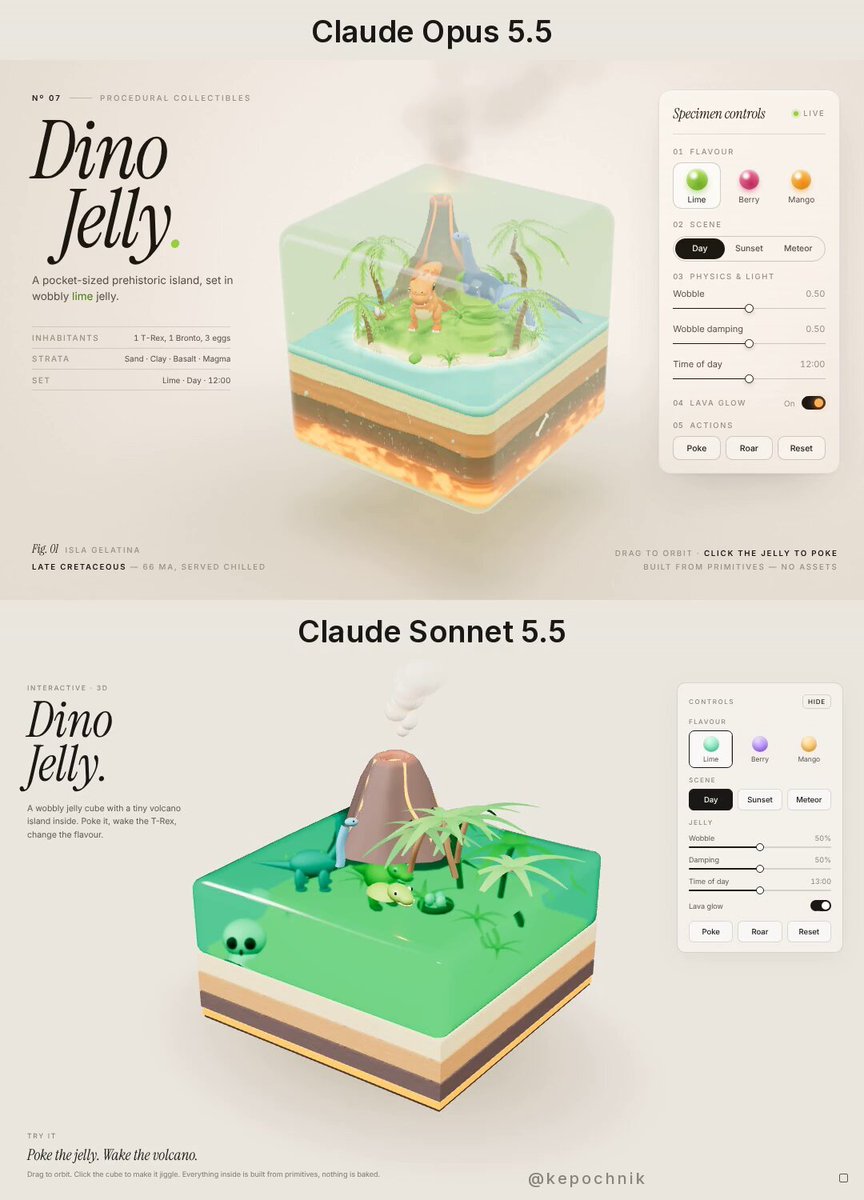
Build a single-file interactive 3D web page called "Dino Jelly" using Three.js (import from a CDN, no build step). CONCEPT A translucent, wobbly jelly cube floats in the middle of the page like a collectible diorama. Inside the top layer lives a tiny prehistoric island: a lush jungle of palms and giant ferns, a smoking volcano, a baby T-Rex, a long-neck brontosaurus, a few eggs in a nest and a fossil skull half buried in the sand. Below the island the cube shows cut-away soil layers (sand, clay, dark rock, glowing magma at the very bottom) like a cake slice. LOOK - Soft, warm off-white studio background, huge soft shadow under the cube, no harsh black. - The jelly must feel real: transmission/refraction, thickness, subtle caustics, slight inner glow, glossy rim highlight, gentle subsurface colour. - Editorial typography on the left: big italic serif title "Dino Jelly." with a one-line subtitle, small caps captions in the bottom corners. - A minimal frosted control panel on the right, tiny type, 1px borders, lots of air. MOTION - The cube idles with a slow float and a continuous jelly wobble (spring-damped vertex deformation). Clicking/dragging the cube pokes it and the whole thing jiggles, the island inside lags behind slightly. - Volcano emits smoke puffs and occasional lava bombs that splash into the jelly with ripples. - The T-Rex blinks and roars every few seconds (head tilt + jelly ripple); the brontosaurus slowly turns its neck; palms sway. - Camera: slow orbit, OrbitControls
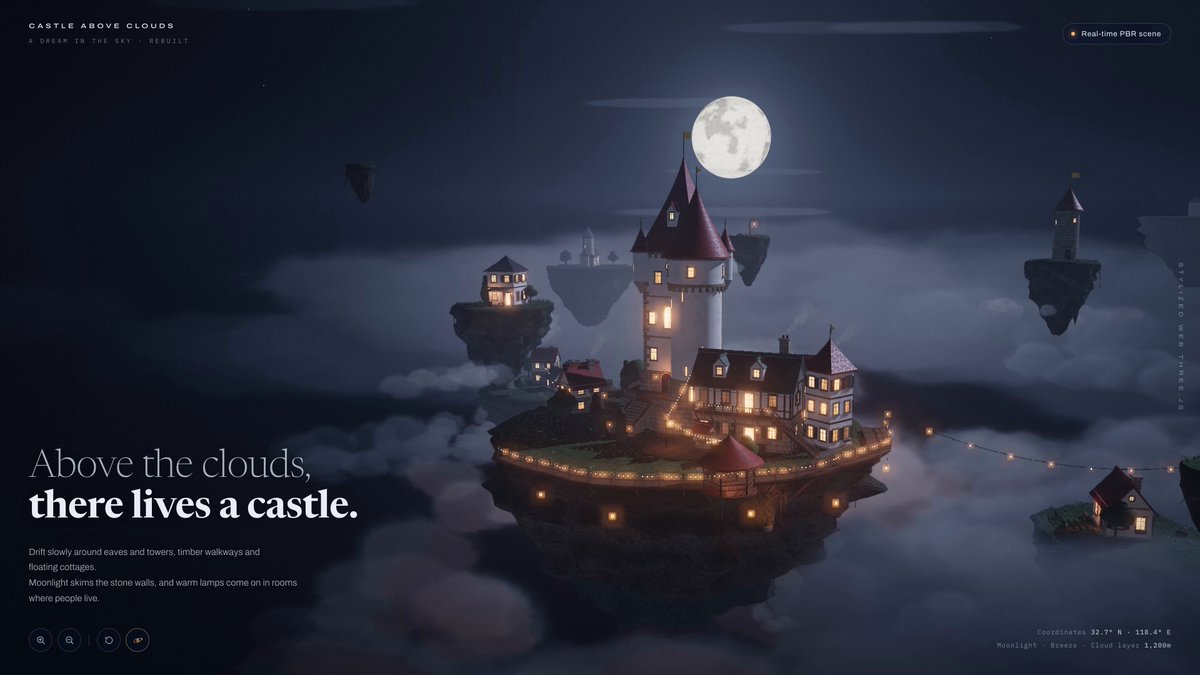
Build one self-contained, real-time Three.js PBR web experience titled: CASTLE ABOVE CLOUDS Subtitle lockup: A DREAM IN THE SKY · REBUILT Hero line, large, two weights: Above the clouds, / there lives a castle. Small supporting line under it: Drift slowly around eaves and towers, timber walkways and floating cottages. Moonlight skims the stone walls, and warm lamps come on in rooms where people live. Top-right badge: REAL-TIME PBR SCENE Bottom-right telemetry: Coordinates 32.7° N · 118.4° E / Moonlight · Breeze · Cloud layer 1,200 m Vertical side credit: STYLIZED WEB THREE.JS Bottom-left: zoom in / zoom out / reset / orbit icons. This is not a still. It is a screen-recordable product shot of a live scene. Mouse orbit, scroll zoom, slow auto-orbit when idle. Hold 60fps. Pixel ratio capped at 2. WORLD Night sky, deep blue-black, not pure black. Large pale moon, soft clouds at several depths, a few small stars. Cloud layer sits around the islands, not below the whole world. Faint breeze moves clouds and tiny pennants. A cluster of floating rock islands. Undersides are dark, chunky, slightly mossy rock with hanging roots and a few dangling lanterns. Tops are lived-on ground: grass patches, stone paths, wooden decks. HERO ISLAND One large central castle-town, white plaster walls, warm stone base, red conical tower roofs, small yellow flags on the peaks. Readable architecture, not a blob: - main keep with a tall red spire - attached round tower with slit windows - lower wing with a green roof and open balcony - wooden external stairs and a wraparound deck - string lights along railings - dozens of individual warm windows, some brighter, some dim, a few flickering - a small market stall / awning on the lower terrace - chimney, gutters, shutters, flower boxes if cheap Scale is toy-like but materials are serious. Close orbit must not fall apart. SATELLITE ISLANDS At least six smaller floating islets at different heights and distances: - one with a red-roof cottage and a chimney - one with a white house and a warm porch lamp - one almost empty rock with a single lantern - one with a tiny tower and a flag - two mid-size hamlets linked visually to the castle by implied paths, not a rigid grid Each has its own rock underside. They bob very slightly, out of phase. No identical clones. LIGHTING AND MATERIALS Real-time PBR, stylized, not Unreal photoreal and not flat toon. - Moon as key, cool, soft shadows - Window and lantern emissive as practicals, warm 2200–2700K, bloom only on lights - Stone slightly rough, plaster matte, roof tiles with a soft specular, wood with grain - Rock undersides darker and rougher than the town - A little atmospheric fog so far islands desaturate - No harsh studio three-point. The moon path and window glow are the picture. CAMERA Start three-quarter above the castle, moon behind the towers. Then a slow orbit: drop to deck level so string lights and windows read, slide past a satellite cottage, rise again to a high aerial of the whole cluster, return. User can interrupt with drag and scroll at any time. Ease, no jitter. UI Editorial, dark glass, low chrome. Do not cover the castle. Left copy stays readable over sky. Right telemetry stays small. Cursor is a normal pointer; hovering a building can brighten its windows a touch, nothing else. DO NOT - Make one island with a castle texture - Use a skybox city - Add characters, combat, inventory, or a loading fantasy novel - Go full Ghibli flat color or full photogrammetry - Fake the float with a static render Taste: a rebuilt dream you can orbit. Someone should be able to screen-record any second and it still looks like the product shot.
This collection holds 3D scenes made by AI models: Three.js / WebGL / WebGPU pages, explorable 3D worlds, mini-games and Blender models. Every entry carries the author's original prompt text, ready to copy and re-run on another model for comparison. It currently covers Claude Opus 5.5, including same-prompt posts that set Opus 5.5 against GPT-6, Gemini 4, DeepSeek and Kimi; Kimi K3.1 and other models will be added later and told apart by model tags. Results, run times and costs are the original authors' own reports; we have not reproduced them.
Open an entry and read the prompt in its prompt block, kept identical to the original post. For a fair model comparison, pick prompts that are self-contained, single-HTML-file and need no external assets, run each with the same settings, then compare against the author's video. If a very long prompt was cut off in the entry, the full text is in the source post.
Yes. Only prompts that the author published in the post, a reply thread, a screenshot or a linked file are included, unmodified. Reconstructed prompts or third-party rewrites are left out.
Yes. When Kimi K3.1 and other new models ship, they will go into this same collection under their model tags so the same prompt can be compared.
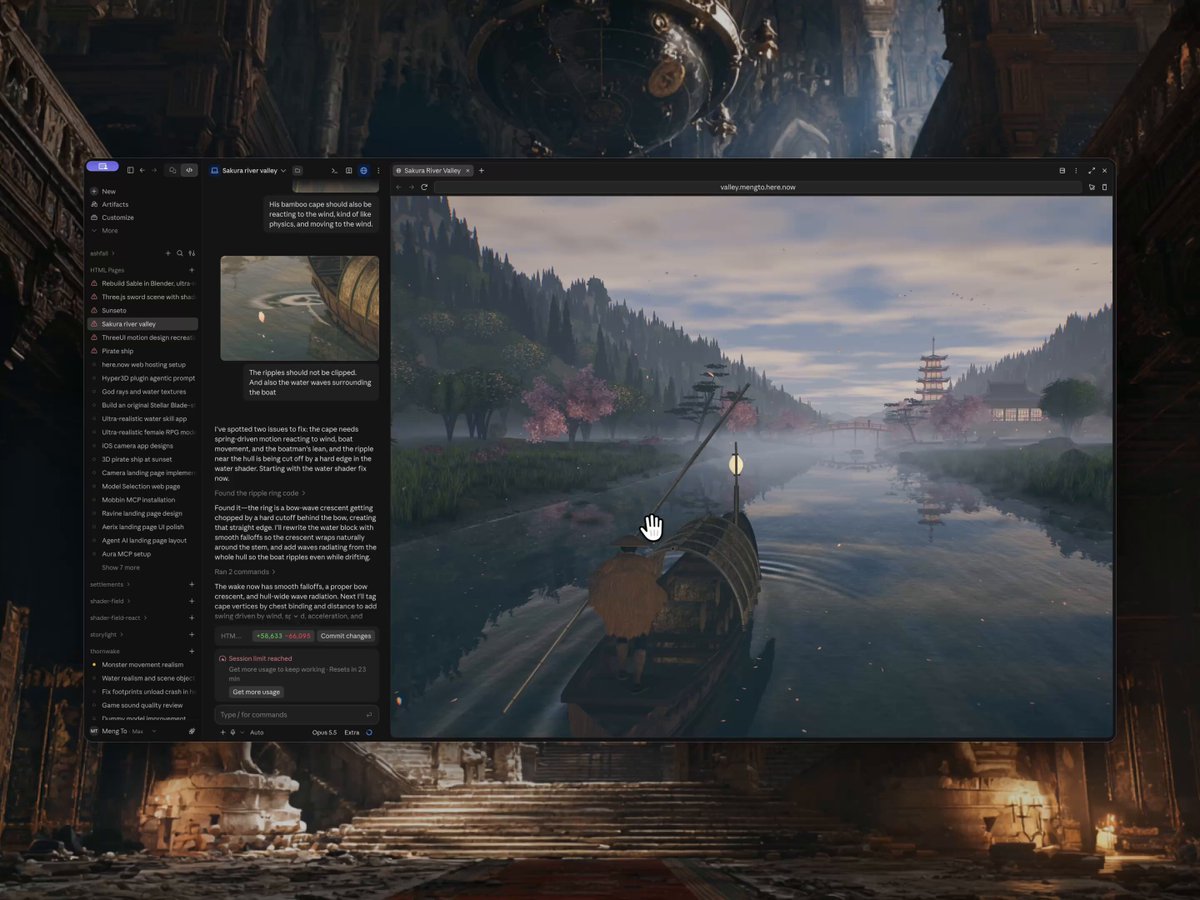
Create from scratch a fully interactive 3D scene of a traditional wooden riverboat being poled upstream through a mountain river valley in feudal Japan during cherry-blossom season. The visual style should be cinematic and painterly rather than photorealistic, while still being exceptionally rich, detailed, polished, and visually sophisticated. Build the valley terrain, river, riverbanks, rocks, cherry trees, maples, pines, forest, ground cover, temple architecture, boat, boatman, villagers, sky, clouds, distant mountains, lighting, materials, water, reflections, petals, mist, particles, wildlife, weather, a full day-and-night cycle, sound, animation, camera work, composition, atmospheric depth, and color grading. The final result should feel like a premium, high-production 3D artwork, not a prototype, technical demo, or low-quality scene. Start from a completely blank page. Do not reuse or depend on any previous project or scene. You may create the assets yourself or use reliable, trusted, open-source assets and libraries when necessary. Mandatory requirements: No text of any kind may appear anywhere inside the scene, including the loading screen. No titles, names, logos, descriptions, credits, labels, or control instructions in any language. Any loading indicator must be purely graphic. Deliver the entire project as one final standalone page file that can be opened directly in a web browser, with assets embedded inside it as much as reasonably possible and no runtime requests to external CDNs. The valley must feel like one continuous, believable place. A winding river flows down a long valley that narrows into a gorge upstream. It has a deep channel and shallow pebbled margins. Its banks vary between gravel bars and steeper earthen banks. Forested valley walls rise into rounded mountains, and far ranges fade layer by layer into haze. Build these landmarks along the river: - An arched vermilion wooden bridge on piers that stand in the water. - A torii gate at the bridge's end. - A path to stone steps and a temple terrace held up by dry-stone retaining walls. - A main hall with a curved tile hip-and-gable roof, upturned corners, bracket sets, a railed veranda, and lattice doors. - A five-storey pagoda with a ringed spire on a knoll. - Stone lanterns along the approach. - A small wayside shrine in a clearing on the far bank. - A tunnel of small vermilion torii climbing the bank upstream to a hillside shrine. - A rope fence with paper streamers. - Bells hanging from the roof corners that swing in the wind. For vegetation, place hero cherry trees by hand, including a weeping cherry. Give them gnarled, leaning trunks, let some overhang the water, and cover them in dense blossom. Add Japanese maples, cloud-pruned pines, and a dense mixed forest of cedars and broadleaf crowns on the slopes. Cover the ground with wind-blown grass, reeds, spring wildflowers, ferns, clipped azalea shrubs, mossy boulders, and exposed roots at the water's edge. All foliage must move in one shared, gusting wind, and the blossoms must glow when backlit. The hero boat is a takasebune-style river cargo boat. It needs a planked hull with real thickness, ribs, thwarts, floorboards, and iron clamps. Give it a reed-mat canopy on bamboo hoops, a cargo of rice bales, crates, and a glazed jar, plus coiled rope, a bow lantern on an arching bamboo pole, and a sculling oar stowed at the stern quarter. A boatman in a straw cape stands on a raised bow platform and poles the boat with a long bamboo pole, using his whole body: hips drop, the spine leans into the push, the feet stay planted, and both hands grip the pole firmly. The cape reacts to the wind and to each stroke. The pole must never pass through the hull, the hands, or anything else. Add two villagers. A woman under a red oiled-paper umbrella stands at the bridge rail watching the boats. An old monk sweeps petals off the temple approach. Both breathe and move subtly. The water must be the centrepiece. It needs: - Accurate reflections of everything above it. - Refraction and depth-based color absorption, with the pebbled riverbed visible in the shallows. - Ripples that follow the flow. - Faster water and white foam collars around boulders and bridge piers, with foam trailing downstream. - A convincing wake that follows the boat: a bow wave, V-shaped arms, and a disturbed band along the hull. - Rafts of petals drifting in the slack water along the banks. Fill the valley with life and particles: - Petals tumble from each cherry canopy and through the air. - Petals ride the current downstream and settle on the banks, the steps, and the bridge deck. - Dust motes glow only inside the sunbeams. - Banks of low river mist drift over the water. - Flocks of birds wheel over the valley, and a pair of herons sometimes crosses the river ahead of the boat. - Fireflies come out at dusk. Run a continuous day-and-night cycle of several minutes that loops: dawn, morning, afternoon, a thunderstorm, golden hour, sunset, blue hour, moonlit night, pre-dawn. The sun travels a real arc, the moon takes over as the key light at night, and shadows follow whichever one is lit. Sky color, clouds with silver-gold linings, fog, ambient light, exposure, and the color grade all change with the hour. At night, show stars, a faint Milky Way band, and a cratered moon. The afternoon storm thickens the clouds into a dark overcast. It brings rain streaks, splash crowns on the river, and branching lightning that lights the clouds and the whole valley. Surfaces turn wet and glossy, then dry slowly through sunset. After dusk: - The stone lanterns and the hall's doors glow. - Paper lanterns set adrift on the river (tōrō nagashi) flow past and part around the boat. - Pale spirit wisps with comet-like trails drift above the water. Each one lights the water, mist, and banks around it and appears in the reflections. Golden hour is the signature look: a low warm sun up the valley, long shadows, god rays through the trees and mist, backlit blossoms, and a warm haze. Add a quiet synthesized soundscape of flowing river, rain, and thunder that rolls in after each flash, with a keyboard toggle to mute it. The boat must travel upstream on its own. An autopilot threads it between rocks and bridge piers without ever touching them. The viewer can take over with WASD or the arrow keys. Steering needs momentum, turning inertia, water drag, and a heel into turns. Banks, rocks, and piers push the boat back physically. After a short idle period, the autopilot resumes. A third-person chase camera follows the boat with drag-to-orbit, scroll-to-zoom, and a slow cinematic drift. It must never dip below the banks or into tree canopies. Holding a key fast-forwards the time of day. When the boat reaches the head of the gorge, the scene fades into mist and restarts downstream, so the journey loops forever. The water, boat, boatman, foliage, petals, and camera must all be animated naturally and smoothly. Avoid artificial slow motion or sluggish movement. The boat should feel like it is genuinely being pushed upstream against the current. Do not rely on primitive geometric shapes as the finished result. The trees, architecture, boat, characters, and rocks need carefully shaped geometry and clearly visible small-scale details: bark, roof tiles, rafters, joinery, planking, rope lashings, and bamboo nodes. Use detailed, scanned, or high-quality textures for rock, bark, ground, stone walls, and wood. Everything must rest on the ground or the water. Nothing may float, and no objects may intersect. Lighting must reveal the geometry and materials clearly at every hour. Use soft shadows, ambient occlusion in crevices and at roots, light shafts, bloom, and a filmic grade. Shadow sides must stay readable, never crushed to black. Maintain a strong balance between visual quality and real-time performance, includ [… truncated at the 8000-character field limit — full prompt in the source post]
here's a floor plan and photos for one house. build it as a three.js site i can walk through in the browser, to scale from the plan, with every room, finish and piece of furniture matched to the photos. the bar is the photos themselves. split the house into pieces you can judge separately, and give each one a builder and a separate critic with fresh context. the critic compares a screenshot of our room with the matching photo, picks the better one, names the biggest gap, and sends it back. keep looping until ours wins or i stop you, and tell me anything you couldn't match.
make a cool cyberpunk 2077 looking game. Do everything on your own only use blender. And you can use magnific for sound.
Make a stunning, highly detailed interactive 3D web scene, entirely from scratch in code: a rooftop glass swimming pool at sunset. A swimming pool with thick clear glass walls sits on the roof of a skyscraper, high above a city skyline. Floating in the pool are a detailed toy pirate ship, an inflatable pink flamingo, a glossy rubber duck, a beach ball and a swim ring. Over 30 seconds the sunset fades into a warm night.
Build a single-file interactive 3D web page called "Dino Jelly" using Three.js (import from a CDN, no build step). CONCEPT A translucent, wobbly jelly cube floats in the middle of the page like a collectible diorama. Inside the top layer lives a tiny prehistoric island: a lush jungle of palms and giant ferns, a smoking volcano, a baby T-Rex, a long-neck brontosaurus, a few eggs in a nest and a fossil skull half buried in the sand. Below the island the cube shows cut-away soil layers (sand, clay, dark rock, glowing magma at the very bottom) like a cake slice. LOOK - Soft, warm off-white studio background, huge soft shadow under the cube, no harsh black. - The jelly must feel real: transmission/refraction, thickness, subtle caustics, slight inner glow, glossy rim highlight, gentle subsurface colour. - Editorial typography on the left: big italic serif title "Dino Jelly." with a one-line subtitle, small caps captions in the bottom corners. - A minimal frosted control panel on the right, tiny type, 1px borders, lots of air. MOTION - The cube idles with a slow float and a continuous jelly wobble (spring-damped vertex deformation). Clicking/dragging the cube pokes it and the whole thing jiggles, the island inside lags behind slightly. - Volcano emits smoke puffs and occasional lava bombs that splash into the jelly with ripples. - The T-Rex blinks and roars every few seconds (head tilt + jelly ripple); the brontosaurus slowly turns its neck; palms sway. - Camera: slow orbit, OrbitControls