Tips for editing videos with Claude Code and Opus 5.5
The author shares nine practical tips for editing video in Claude Code with Opus 5.5, including starting with a single prompt, using HyperFrames and motion graphics libraries, a timestamp-based review dashboard, and organizing B-roll.

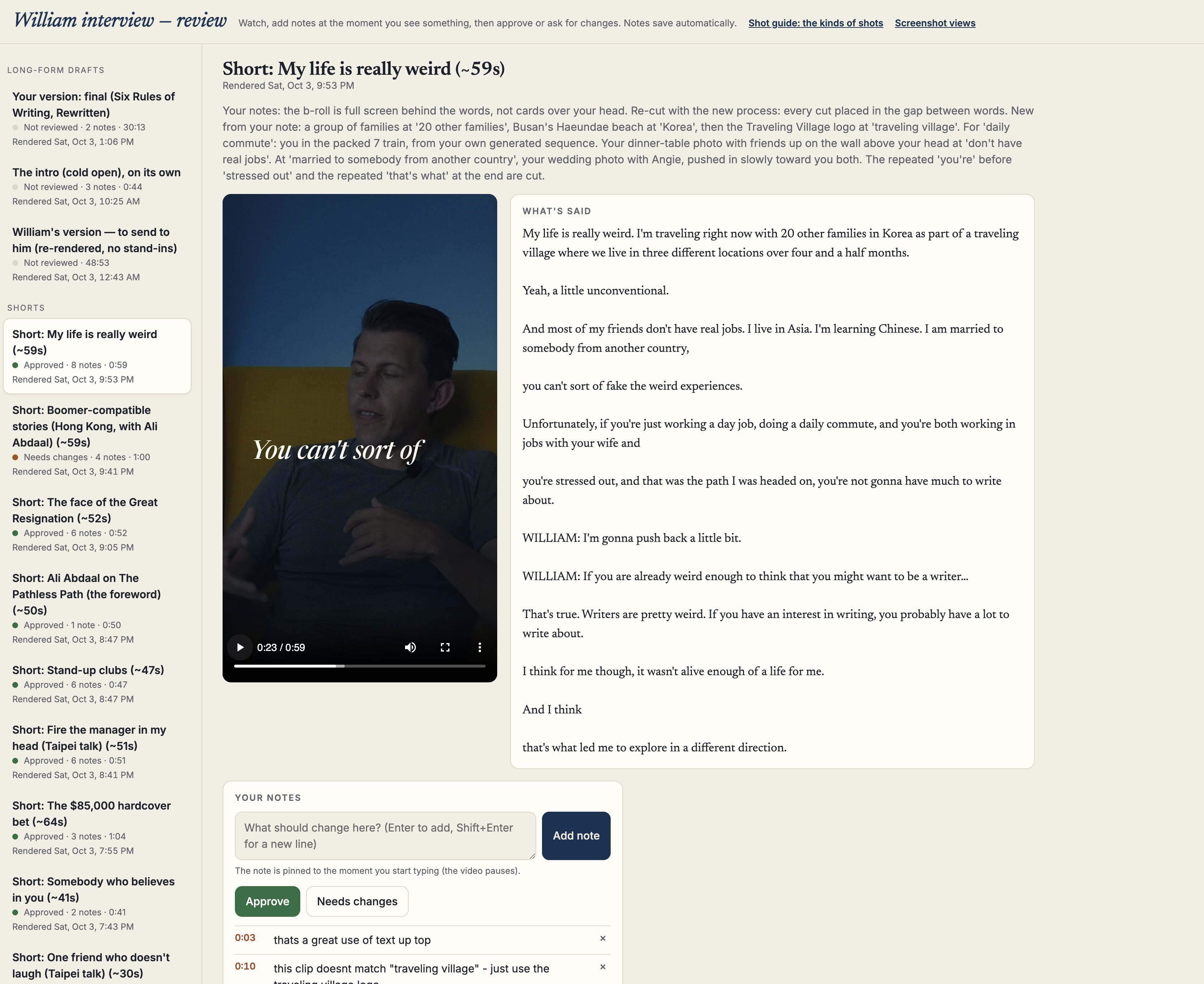
If you want to edit videos with claude code - a few tricks: 1. use opus 5.5 2. literally single prompt attempt something first, get a feel for how it works 3. then film something on your own and ask it to turn it into a nice clip or youtube video. ask it what it needs from you to do great work - inform it about hyperframes and ask about other open libraries including motion graphics 4. build your own review dash - tell it to create a dash where you can give feedback aligned with timestamps and tag stuff as need review 5. find reels or videos you link and ask it to watch and screencapture them, and start building your preferences 6. ask it to scan your local folders for b roll and have it organize and label b roll 7. ask where you can get free b roll 8. prompt away with the dash in your browser 9. tell it to auto update every time you fix something to develop a skill around your preferences heres a preview of the dash i am using in claudes browser
This post quotes another post: x.com/p_millerd/status/2106345717770117268