How to write GPT Image 2.5 prompts: patterns from 650 shared prompts, with templates
Shared GPT Image 2.5 prompts that people copy read like a design brief: they name the deliverable and aspect ratio, describe subject, light, and material, and spell out what to keep and what to avoid, with 78% of 653 sampled prompts stating explicit constraints while exact on-image text is quoted in only 16%. This analysis draws on 653 prompts from a classified random sample of 2,000 posts out of 3,379 collected on X between September 8 and October 17, 2026, OpenAI's launch page and prompting guide, and five prompts copied verbatim from community posts (two in full, three as excerpts).
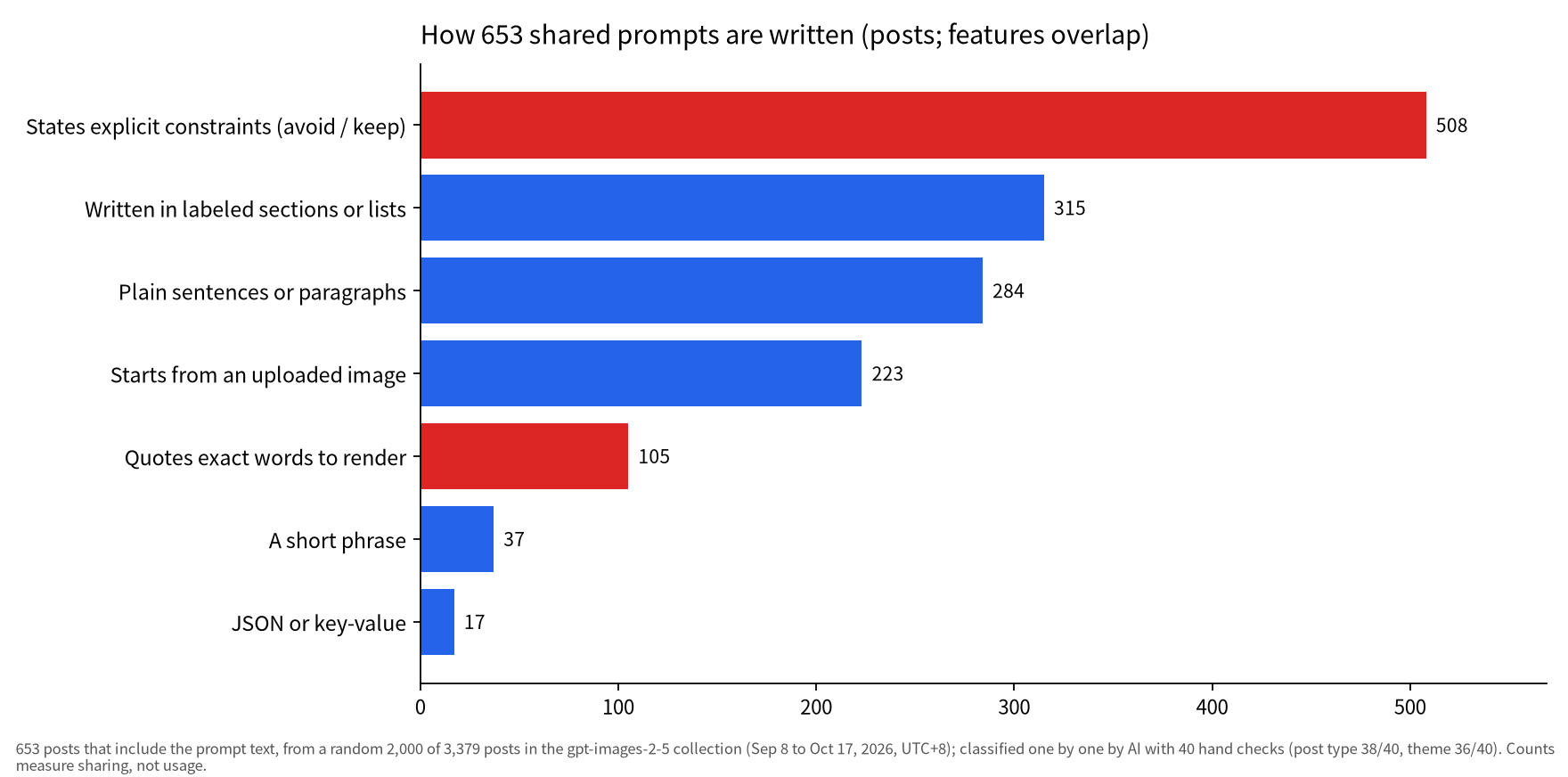
In practice: start with what the image is for and its format (a 4:5 poster, a product flat lay, an infographic), then the subject, composition, lighting and materials, and end with what must stay the same and what must not appear. That order matches OpenAI's image prompting guide.
Most users sharing prompts focus on photoreal photos and film stills (34%), posters and ads (19%), restyling their own photos (18%), and character illustration (17%). Functional deliverables like infographics and product shots remain rare, appearing in only 11 and 6 posts, respectively.
A noticeable gap exists around text handling. While OpenAI advises placing required wording in quotation marks and explicitly asking for no extra text, only 16% of shared prompts specify exact text. If your target image requires legible lettering, specifying the exact wording should be your first addition.
This guide breaks down data from the collection, compares OpenAI's official prompting recommendations with actual community habits, presents five prompts copied verbatim from creators (two in full, three as excerpts) with their resulting images, and notes where users report the model still struggles. Posts were collected from X by keyword, and a random sample of 2,000 posts was classified by AI with manual checks; these figures track sharing behavior rather than total real-world model usage. OpenAI launched GPT Image 2.5 on September 8, 2026.
Browse more prompts and results in the GPT Images 2.5 prompts and examples collection. For turning images into video start frames, see the AI video platforms collection and how to make videos with Claude Opus 5.5. Other articles built the same way: Gemini 4 Argon review and What is Jev.
What people make with shared GPT Image 2.5 prompts
Most shared prompts aim at realistic photos of people and scenes, posters, and restyling the user's own photo, while text-heavy graphics and product images remain a small minority.
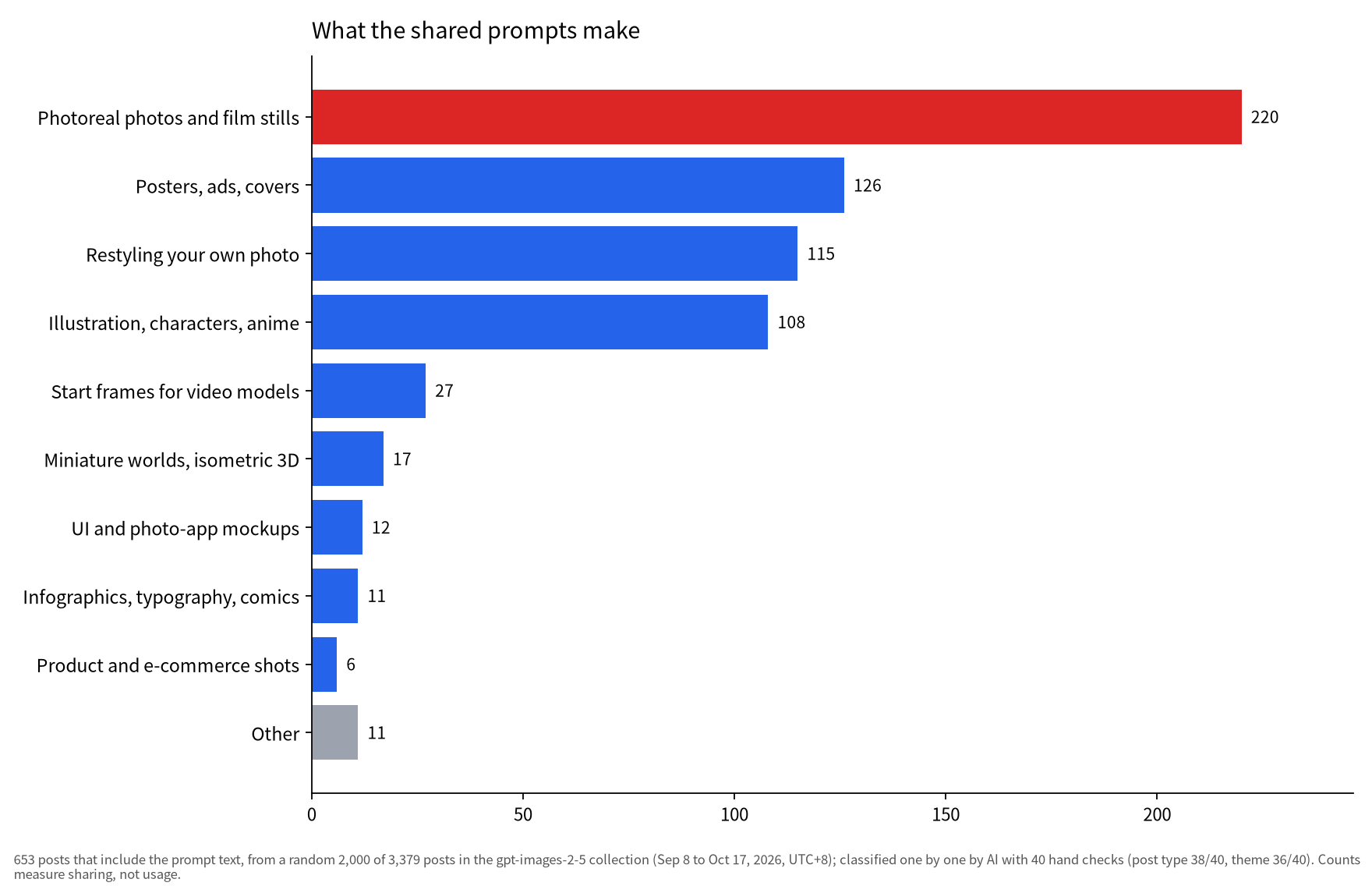
Sample/method: 653 posts that include the prompt text, from a random 2,000 of 3,379 posts in the gpt-images-2-5 collection (Sep 8 to Oct 17, 2026, UTC+8); classified one by one by AI with 40 hand checks (post type 38/40, theme 36/40). Counts measure sharing, not usage.
Across the classified sample, only 37% of posts include the raw prompt text, totaling 742 of 2,000 posts. Another 30% show results only, often with a note that the prompt is in the replies.
Table: What kind of posts the collection holds
| Post type | Posts | Share |
|---|---|---|
| Includes the prompt text | 742 | 37% |
| Results only (often 'prompt in replies') | 606 | 30% |
| Tips, tutorials, workflows | 266 | 13% |
| Comparisons with other models | 155 | 8% |
| News and availability | 73 | 4% |
| Promotions, prompt packs, credits | 35 | 2% |
| Other | 123 | 6% |
Sample/method: Random 2,000 posts from the gpt-images-2-5 collection (Sep 8 to Oct 17, 2026, UTC+8), classified by AI with 40 hand checks (38/40 agreed). Counts measure discussion.
The prompt counts are concentrated: the 653 prompts came from 147 accounts, and the top 10 accounts posted 355 of them. When calculating theme distribution by counting each account only once, photoreal imagery remains steady at 34%, but posters drop from 19% down to 10%.
The model also plays an upstream role in video workflows. Of the 682 posts with video in the whole collection, 196 mention Seedance; the usual pattern is to use GPT Image 2.5 to generate an initial character sheet or a clean start frame before passing it to a video generator.
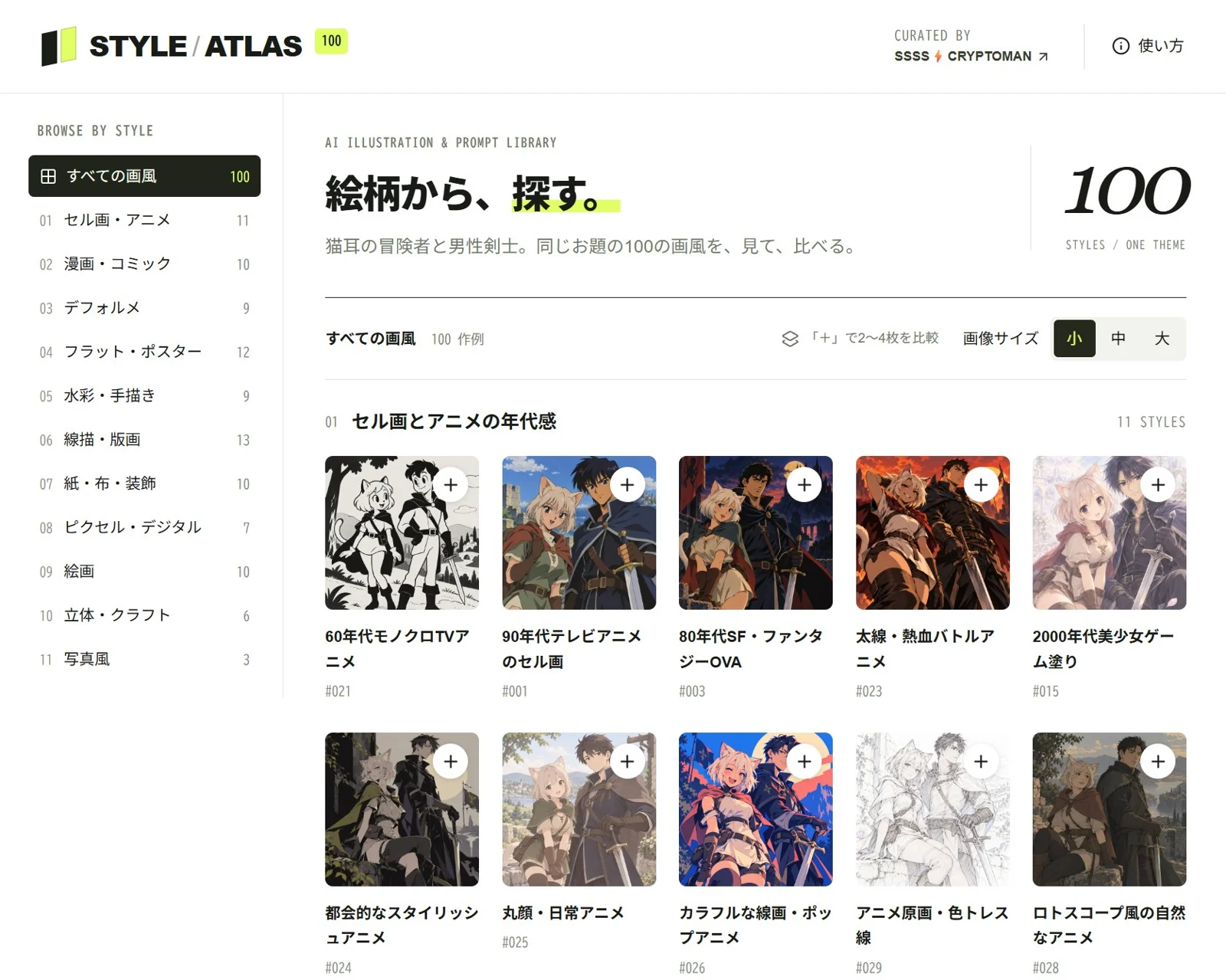
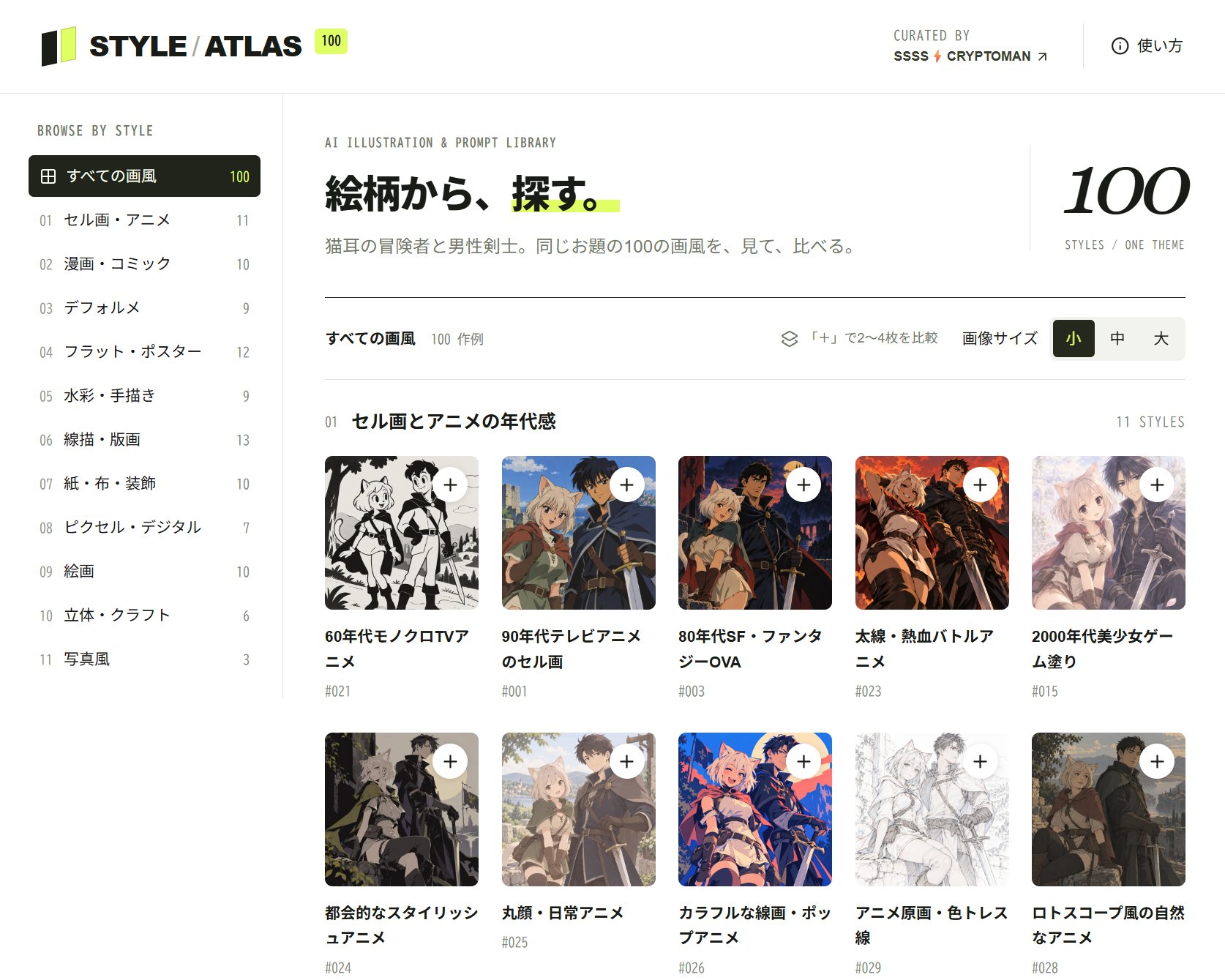
On September 22, 2026, SSSS.CRYPTOMAN⚡️AI (@SSSS_CRYPTOMAN) shared a screenshot of their style-comparison website showing a 100-illustration grid made entirely with GPT Image 2.5, alongside full prompt text for each style. (Item: Style atlas compares 100 illustration styles, all made with GPT Image 2.5)
SSSS.CRYPTOMAN⚡️AI says that simply asking ChatGPT for "anime art" tends to give similar faces, while naming a specific style changes the look a lot.
What the most-copied prompts look like: deliverable first, constraints last
The standard structure of a successful prompt specifies the deliverable and format first, moves through subject, scene, light, and material, and finishes with an explicit list of constraints.
Sample/method: 653 posts that include the prompt text, from a random 2,000 of 3,379 posts in the gpt-images-2-5 collection (Sep 8 to Oct 17, 2026, UTC+8); classified one by one by AI with 40 hand checks (post type 38/40, theme 36/40). Counts measure sharing, not usage.
Structuring prompts does not require complex syntax. OpenAI states that short prompts, prose paragraphs, and JSON-style outlines are all effective approaches. In our sample, 315 prompts rely on labeled sections and 284 use standard paragraphs, while JSON formatting appeared in only 17 cases. When evaluating unique accounts rather than post counts, plain paragraphs are more prevalent, representing 53% of accounts compared to 33% using labeled sections. This indicates that long, multi-section templates are largely popularized by a small group of high-output creators.
Table: OpenAI's prompting advice vs what community prompts actually do
| OpenAI's advice | What community prompts do (n=653) |
|---|---|
| Define the result and its use; organize complex requests as scene, subject, details, constraints | 315 use labeled sections (48%), 284 plain paragraphs (43%) |
| Any format works: short prompts, paragraphs, JSON-like; pick what is easy to maintain | JSON or key-value only 17, a short phrase 37 |
| Separate changes from constraints; list what to preserve and exclude | 508 state explicit constraints (78%) |
| Put required text in quotes with position and typography; ask for no extra text | Only 105 quote exact text (16%) |
| Assign each reference image a role (subject, style, clothing, background) | 223 start from an uploaded image (34%) |
Sample/method: Left column from OpenAI's Image prompting guide (checked Oct 18, 2026); right column is our count, same method as the charts.
Among the prompt posts whose engagement we looked up, the most-liked one, by 沐阳 (@yyyole) with 2,885 likes, was not an original template but a Chinese summary of OpenAI's official guide. The post emphasized opening with the intended deliverable, followed by use case, subject, composition, style, lighting, material, text requirements, and an explicit list of excluded elements.
Community templates also rely on standardized bracketed placeholders, such as COUNTRY, LOCATION, SUBJECT, or STRUCTURE NAME. This mechanism allows creators to generate consistent image series by changing single variables while preserving lighting and camera instructions.
Two templates you can copy: a miniature-world poster and a product flat lay
These two complete templates are drawn directly from community posts, allowing you to swap bracketed placeholders or specific props for your own use case.
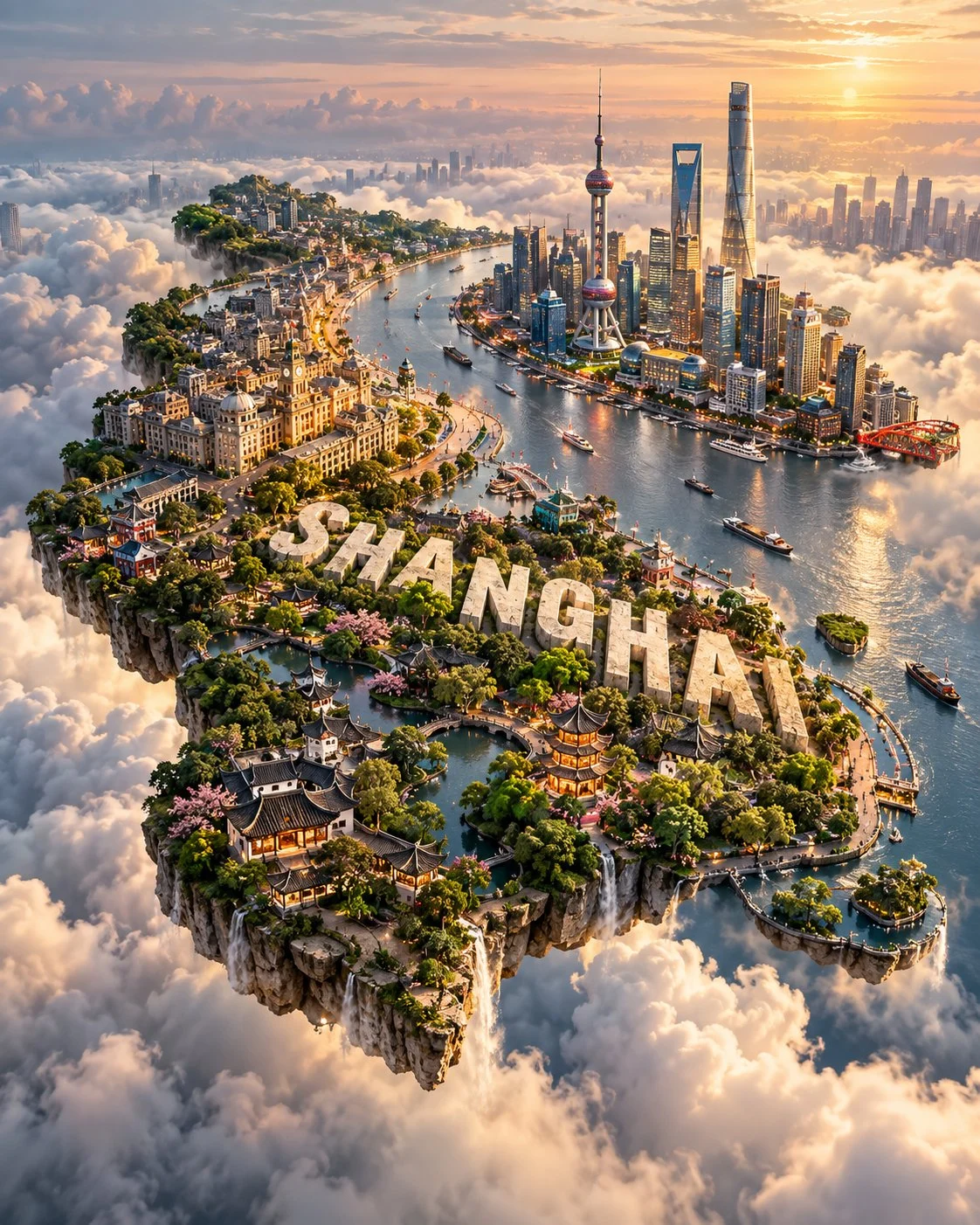
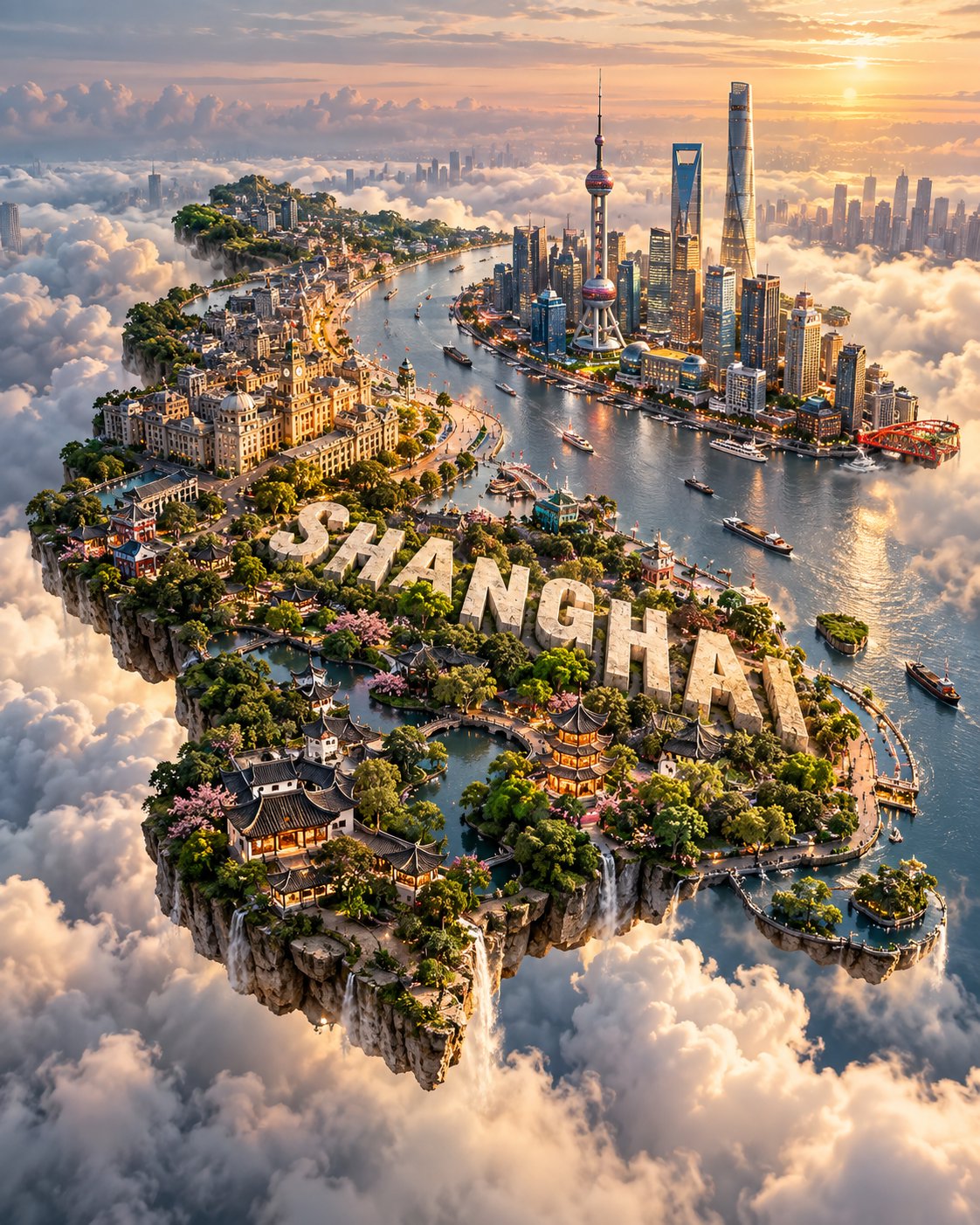
On September 25, 2026, Saul Goodman (@Goodmanprotocol) posted an image of a floating miniature island shaped like Shanghai suspended above clouds, featuring landmarks across the terrain and the city name carved into the landscape in white 3D letters. (Item: GPT Image 2.5 prompt turns any country into a floating miniature island poster)
Prompt as posted (full text), shared by Saul Goodman (@Goodmanprotocol); copied verbatim, not re-tested by us.
Create a premium 4:5 vertical ultra-HD miniature world poster for [COUNTRY / LOCATION / SUBJECT].

TEXT-TO-IMAGE ONLY — generate the entire composition creatively from [COUNTRY / LOCATION / SUBJECT] alone. No reference image required.

MAIN CONCEPT
Create a breathtaking floating miniature island shaped organically like [COUNTRY / LOCATION / SUBJECT], suspended high above a vast layer of soft white clouds. The landmass should clearly preserve the recognizable geographic silhouette while remaining visually natural and believable.

LANDSCAPE & IDENTITY
Automatically integrate the most iconic landmarks, architecture, natural landscapes, terrain, vegetation, waterways, and cultural elements associated with [COUNTRY / LOCATION / SUBJECT]. Select several recognizable features and arrange them naturally across the miniature terrain rather than creating a random collection of landmarks.

Add appropriate local wildlife and environmental details where visually relevant. Include tiny roads, villages, forests, coastlines, mountains, rivers, or other geographic features to create the feeling of a complete miniature world.

TEXT ELEMENT
Carve the exact name of [COUNTRY / LOCATION / SUBJECT] directly into the terrain using elegant large white 3D letters. The lettering should feel physically embedded into the landscape, not floating above it.

LIGHTING & ATMOSPHERE
Use cinematic golden-hour sunlight, realistic atmospheric haze, soft cloud illumination, vivid but natural colors, detailed terrain textures, realistic shadows, subtle sun reflections, and dramatic aerial depth.

STYLE
Hyper-realistic miniature world × cinematic aerial photography × premium travel poster × detailed geographic diorama. Emphasize realistic scale, convincing materials, natural landscapes, intricate miniature details, and an awe-inspiring sense of altitude.

Avoid random landmarks, distorted geography, impossible architecture, excessive text, cartoon styling, toy-like plastic appearance, flat terrain, artificial colors, clutter, logos, watermarks, or UI elements.

FORMAT: 4:5 vertical, ultra-HD, hyper-realistic, cinematic aerial perspective.
This prompt specifies TEXT-TO-IMAGE ONLY, itemizes cultural landmarks to integrate, embeds the location name directly into the terrain, and closes with a dedicated avoid list alongside vertical aspect ratio constraints.
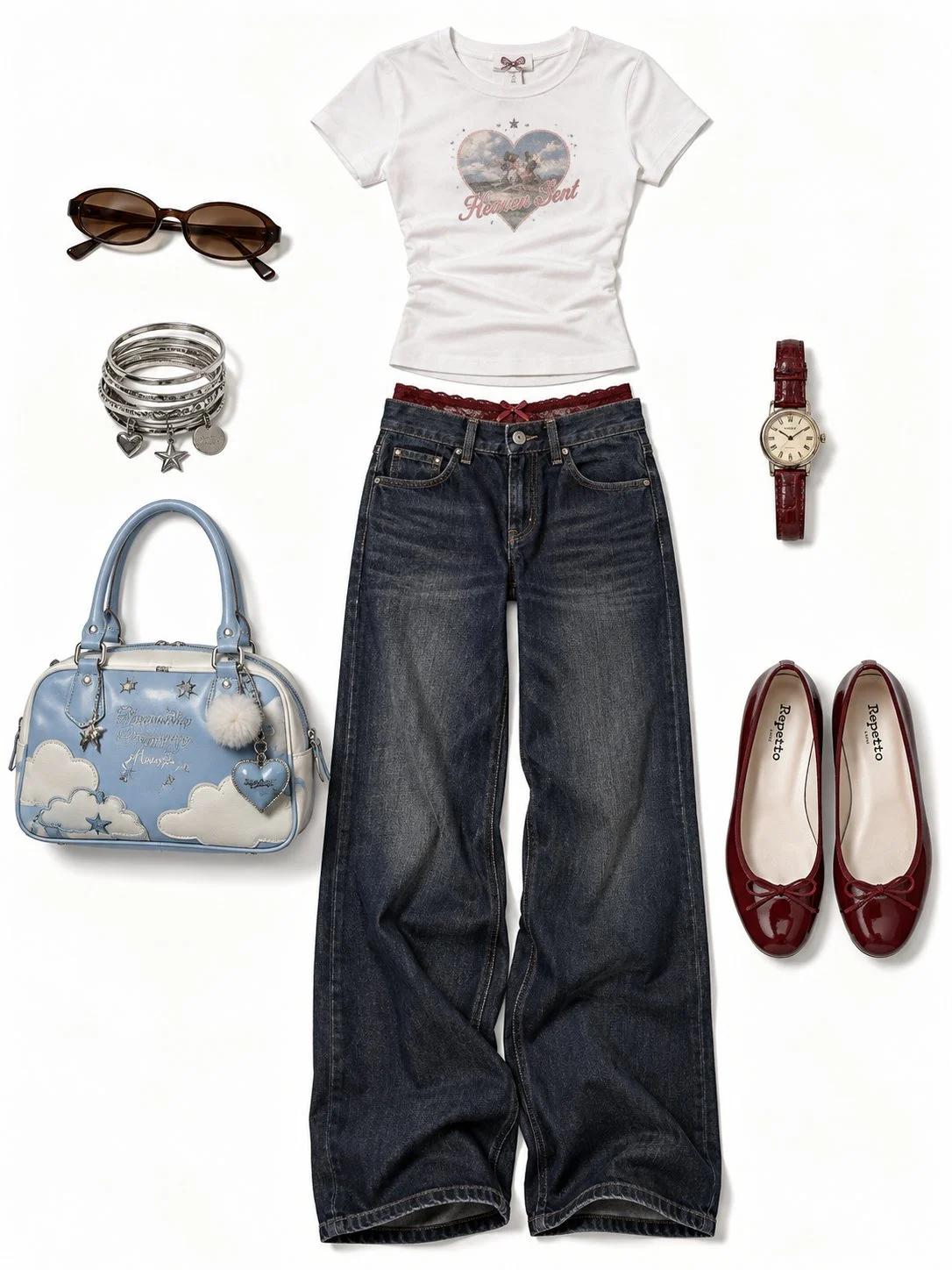
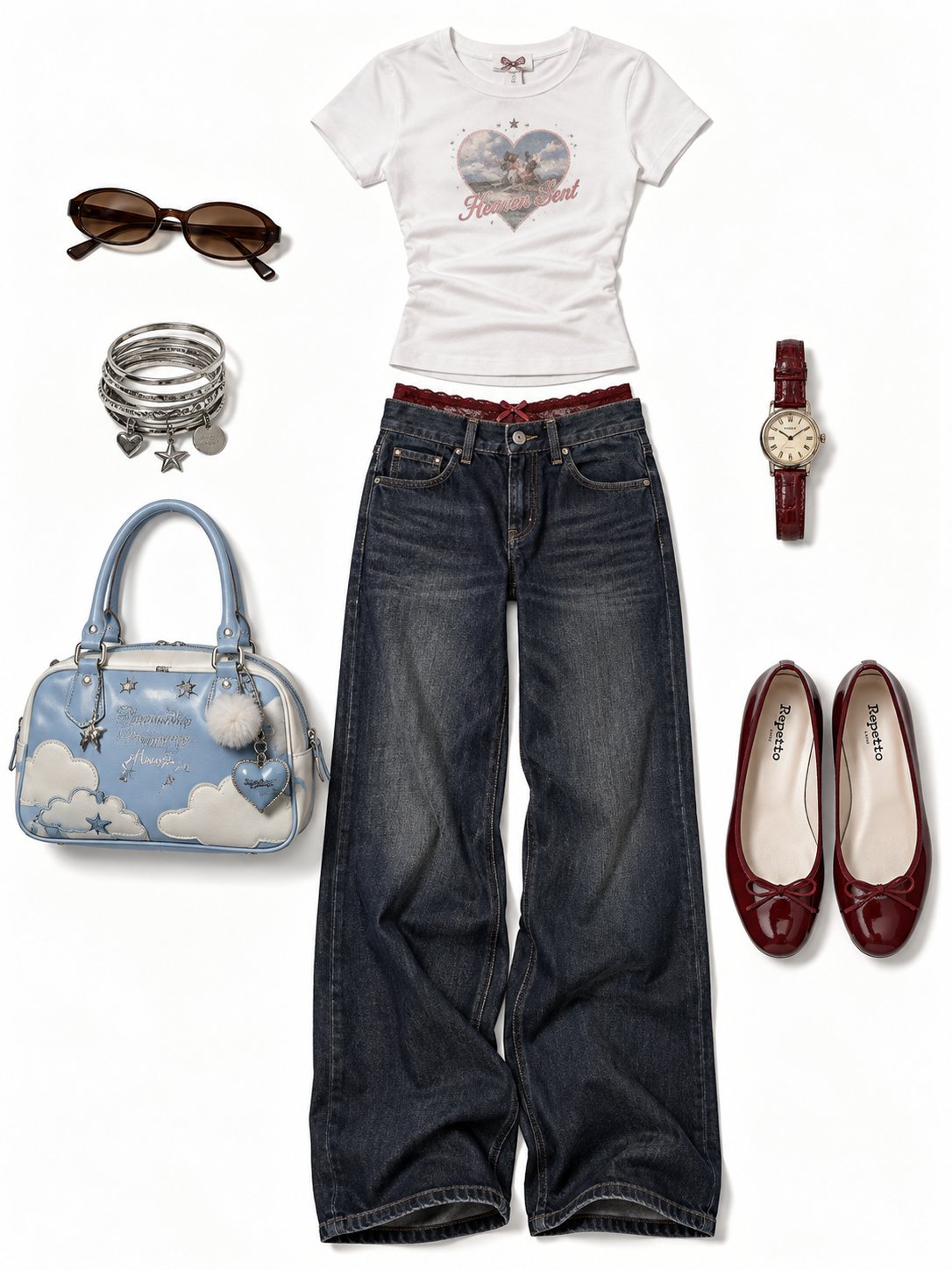
On September 19, 2026, Sania (@saniaspeaks_) shared a Y2K fashion flat lay on a clean white background, arranging a white tee, dark wide-leg jeans, sunglasses, bangles, a blue bag, a watch, and red ballet flats without any human models. (Item: Y2K outfit flat-lay prompt for GPT Image 2.5)
Prompt as posted (full text), shared by Sania (@saniaspeaks_); copied verbatim, not re-tested by us.
Create a realistic Y2K fashion flat-lay outfit collage on a clean pure white background, matching the reference composition and spacing.
At the top center, place a fitted plain white short-sleeve T-shirt with a subtle vintage graphic/logo on the chest.

Below it, place dark indigo wide-leg low-rise jeans, neatly arranged vertically with realistic denim texture and natural fabric folds. A delicate deep red lace waistband should be slightly visible above the jeans.

On the left side, arrange brown-tinted oval sunglasses and a stack of vintage silver bangles.

Next to the jeans on the left, place a sky-blue themed handbag with a completely different design from the original bag: soft sky-blue and white color palette, cute cloud and star pattern, small decorative charms, silver hardware, short handles, and a nostalgic early-2000s fashion aesthetic. The bag should look stylish and unique, not like the original Union Jack design.

On the right side, place a small vintage wristwatch with a warm gold face and dark red-brown leather strap.

At the bottom-right, place a pair of glossy dark-red ballet flats with delicate bow details.

Keep every item separated with generous white negative space, similar to a high-end fashion catalog flat lay. No person, no mannequin, no body.

Style: photorealistic product photography, realistic fabric and leather textures, natural soft shadows, clean cutout appearance, subtle vintage Y2K aesthetic, elegant coordinated color palette, crisp details, accurate proportions, minimal composition, pure white background, vertical 3:4 aspect ratio.
This prompt maps each object to an exact position, specifies changes relative to the reference image for the bag, and explicitly rules out unwanted elements by stating no person, no mannequin, and no body.
When the image needs words: quote them and ask for no extra text
Official guidance instructs users to enclose every required word in quotation marks, designate typography and placement, and explicitly request that no extra text appear on the canvas.
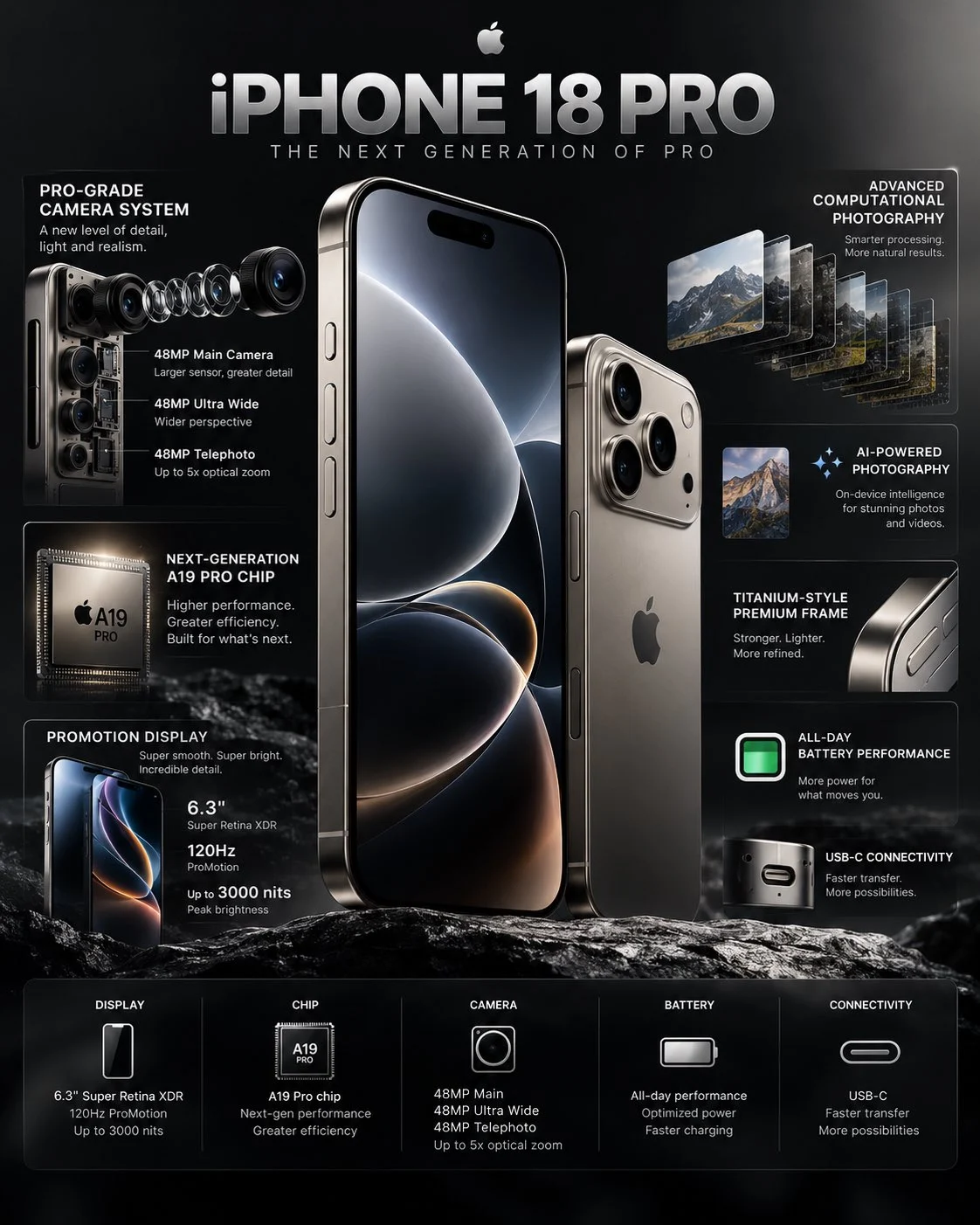
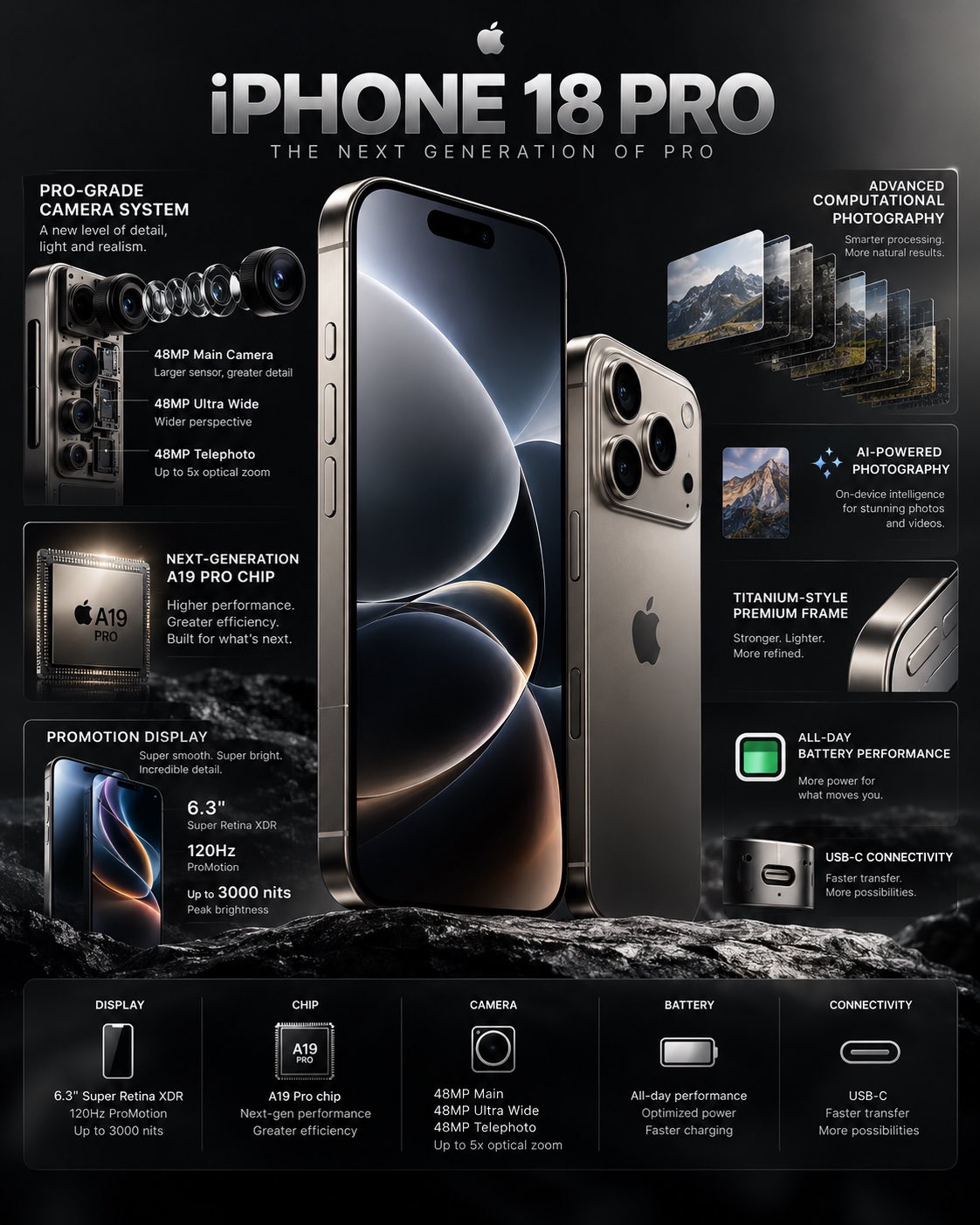
On October 3, 2026, Jack (@j_smeaton99) shared an AI-generated iPhone 18 Pro infographic on a dark background with callout lines and a specifications strip, though the internal chip labels and performance figures were invented by the model. (Item: GPT Image 2.5 generates iPhone 18 Pro infographic)
Prompt as posted (excerpt; […] marks omissions), shared by Jack (@j_smeaton99); copied verbatim, not re-tested by us.
Create a premium, photorealistic 4K technology infographic showcasing the iPhone 18 Pro as the hero product.
[…]
Add a refined title at the top:

“iPHONE 18 PRO”

Subtitle:
“THE NEXT GENERATION OF PRO”

At the bottom, include a compact specification strip with categories such as:
DISPLAY • CHIP • CAMERA • BATTERY • CONNECTIVITY
[…]
Aspect ratio: 4:5 vertical
Ultra-sharp, high-resolution, photorealistic, no unnecessary decorative elements, no distorted phone geometry, no messy typography.
Jack's infographic illustrates a recurring limitation. While the title and subtitle rendered accurately as requested in quotes, the model hallucinated technical specifications and component labels where exact copy had not been supplied. OpenAI's guide explicitly notes that users must verify diagrams and technical relationships, as the model will invent details for any unspecified text areas.
Background artifacts present another frequent hurdle. User Kai (@hqmank) reported recurring issues with blurry, pseudo-text artifacts across web mockups and infographics, noting that no phrasing reliably solved the problem. OpenAI recommends adding explicit exclusions for extra text, logos, or watermarks, as well as testing medium or high quality settings when rendering small, dense lettering.
Starting from your own photo and editing in rounds: say what must not change
Roughly 34% of shared prompts begin with an uploaded reference image, and the most reliable workflows separate what must change from what must stay identical.
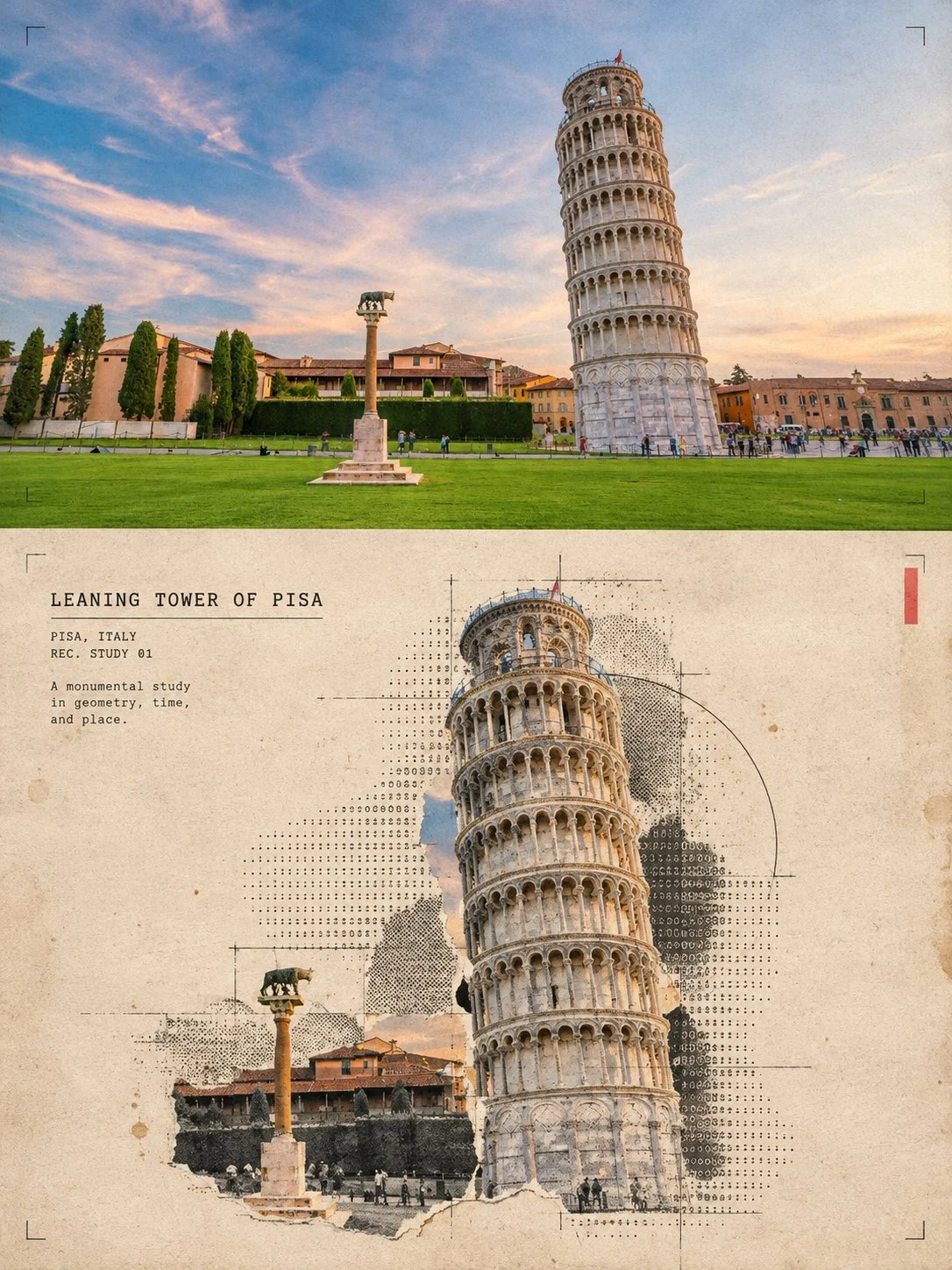
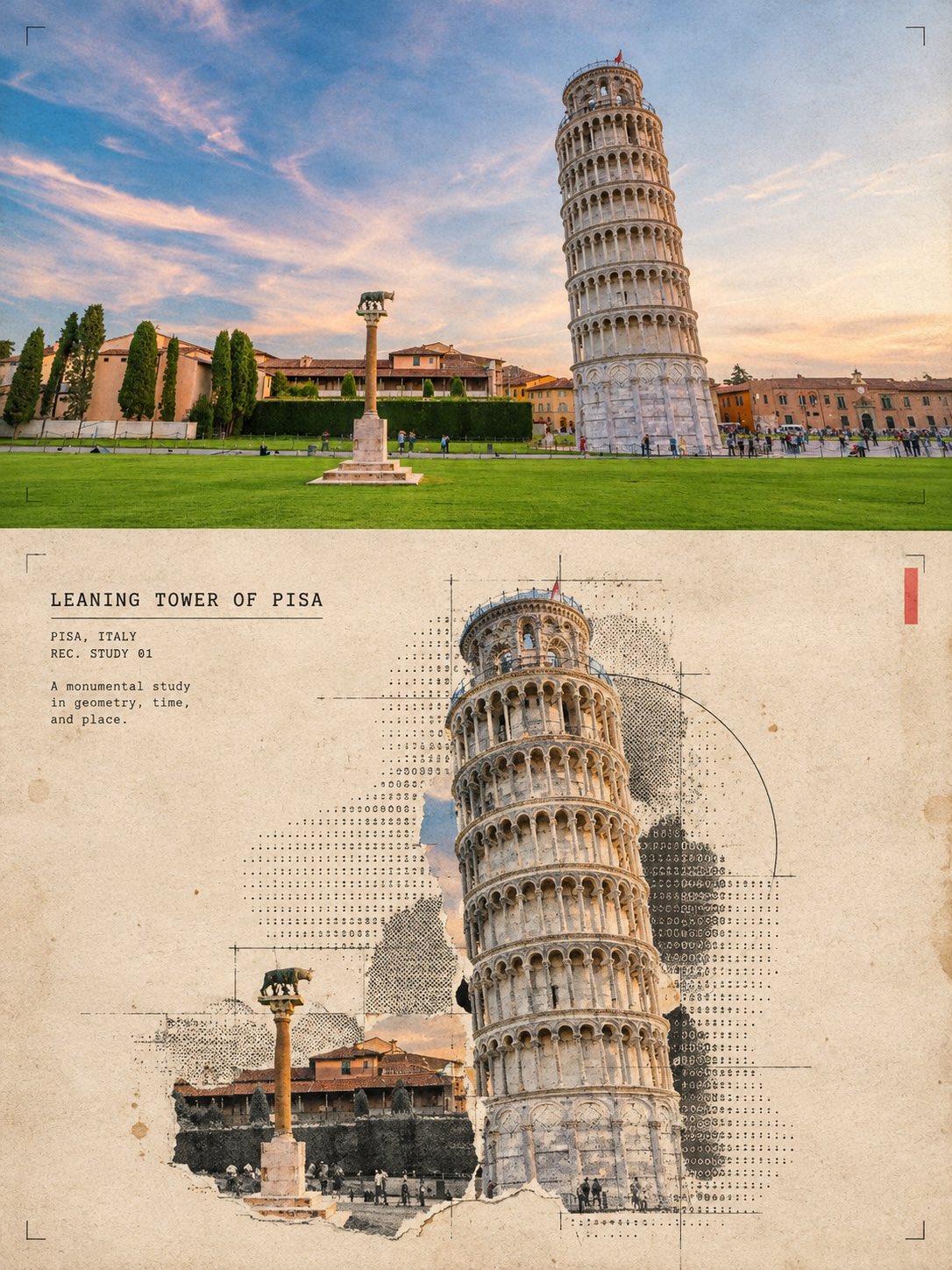
On September 16, 2026, simeon-sanai (@Naiknelofar788) posted a split travel poster showing an original photo of the Leaning Tower of Pisa on top and a halftone and ASCII art print collage on the bottom. (Item: GPT Image 2.5 prompt turns building photos into halftone collage posters)
Prompt as posted (excerpt; […] marks omissions), shared by simeon-sanai (@Naiknelofar788); copied verbatim, not re-tested by us.
Turn this structure photo into a single high-end halftone architectural travel-collage poster. Output one poster per uploaded photo — never merge multiple structures or photos into one frame.
[…]
FORMAT

3:4 vertical canvas. Split into two roughly equal zones — real architectural photo on top, printed reconstruction below — divided by one clean, sharp horizontal line.

Do not stretch, warp, tilt, or unnaturally reposition the structure to force the proportions.
[…]
TYPOGRAPHY

Add one clean, readable fixed-width architectural title based on the structure:

[STRUCTURE NAME]

Below it include:

[CITY, COUNTRY]
REC. STUDY 01
[…]
AVOID

Solid black terminal backgrounds, dense walls of code, cyberpunk neon, excessive ASCII, distorted architecture, impossible geometry, invented architectural details, fake technical specifications, random symbols with no meaning, garbled text, excessive colors, brand logos, QR codes, watermarks, author credits, or tourist-poster clichés.
[…]
Priority: Preserve the structure’s identity and architectural accuracy first. The experimental halftone/ASCII treatment should enhance the architecture, not hide it.
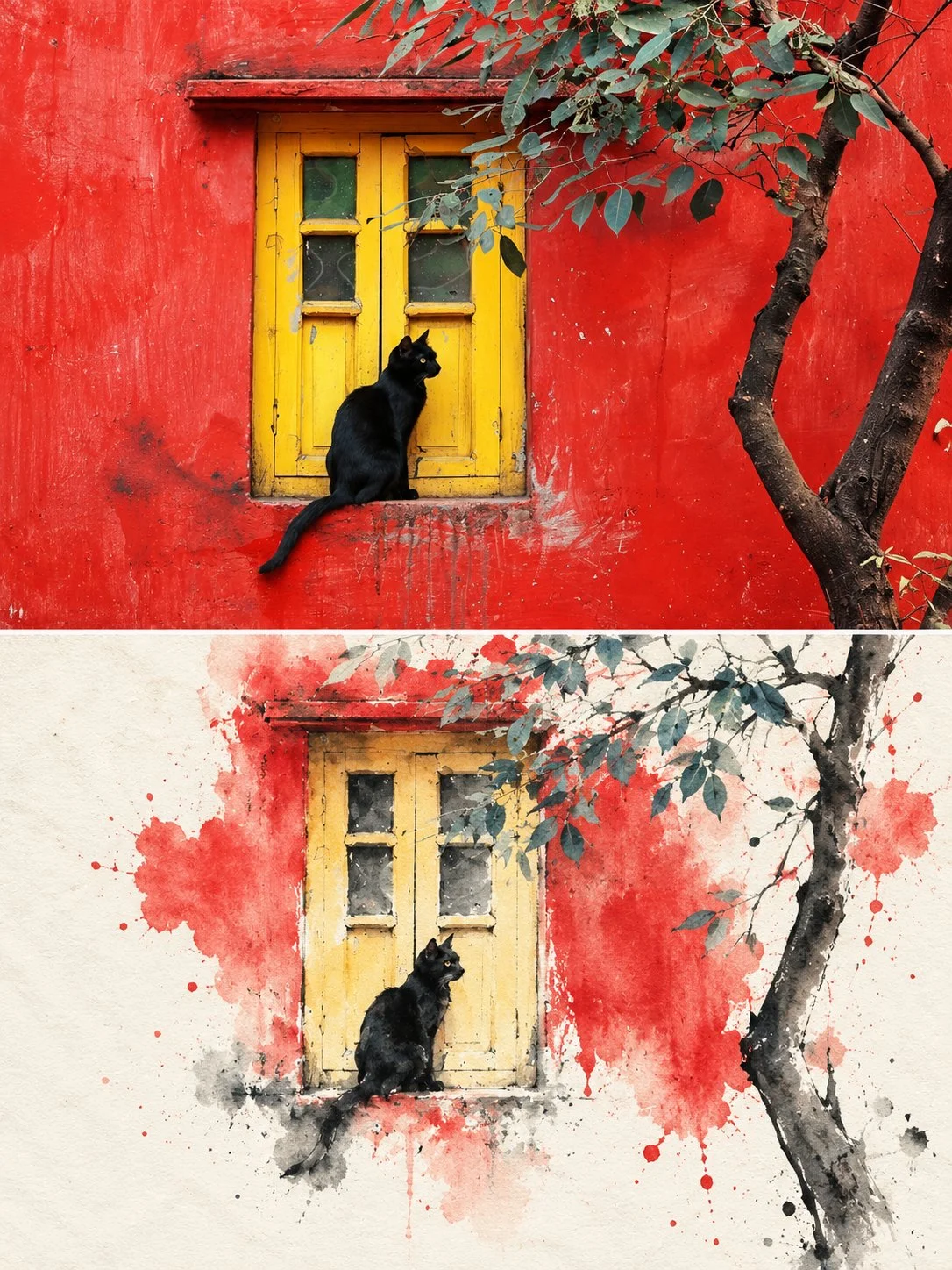
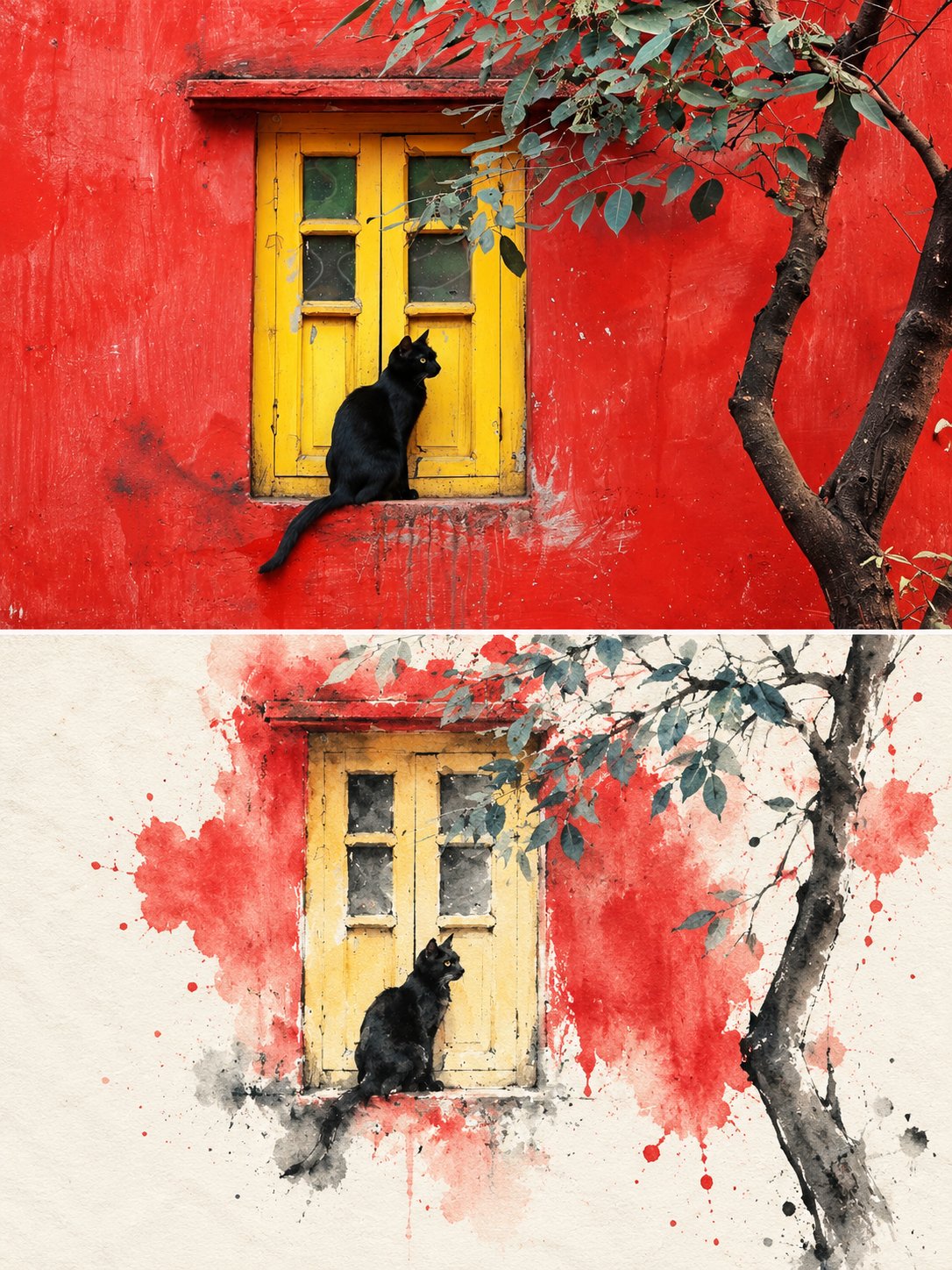
On September 29, 2026, Harboris (@harboriis) shared a split-frame poster featuring a photo of a black cat in a yellow window on a red wall on top, paired with a minimalist ink-wash reinterpretation below. (Item: GPT Image 2.5 prompt for split-frame ink wash reconstruction)
Prompt as posted (excerpt; […] marks omissions), shared by Harboris (@harboriis); copied verbatim, not re-tested by us.
Split-Frame Ink Wash Reconstruction
3:4 vertical composition · photo / ink wash split · contemporary Eastern aesthetic
The image is in a 3:4 vertical composition, divided into two regions, with a strict 1:1 ratio, each taking up 50% of the image.
[…]
Text Treatment
Text is only allowed a very small amount of editing intervention, without preset titles and numbers. A small number of words or short sentences can be extracted from the subject, location, time, action, emotion, or metaphor, and quietly placed in the blank area or the edge of the subject. The text should be restrained, sparse, and have a sense of breathing, not noisy or dominant.
Split layouts that place an original photograph above a stylized reconstruction represent a common template family across multiple accounts. These formats define clear bounding zones and assign the uploaded image a specific reference role.
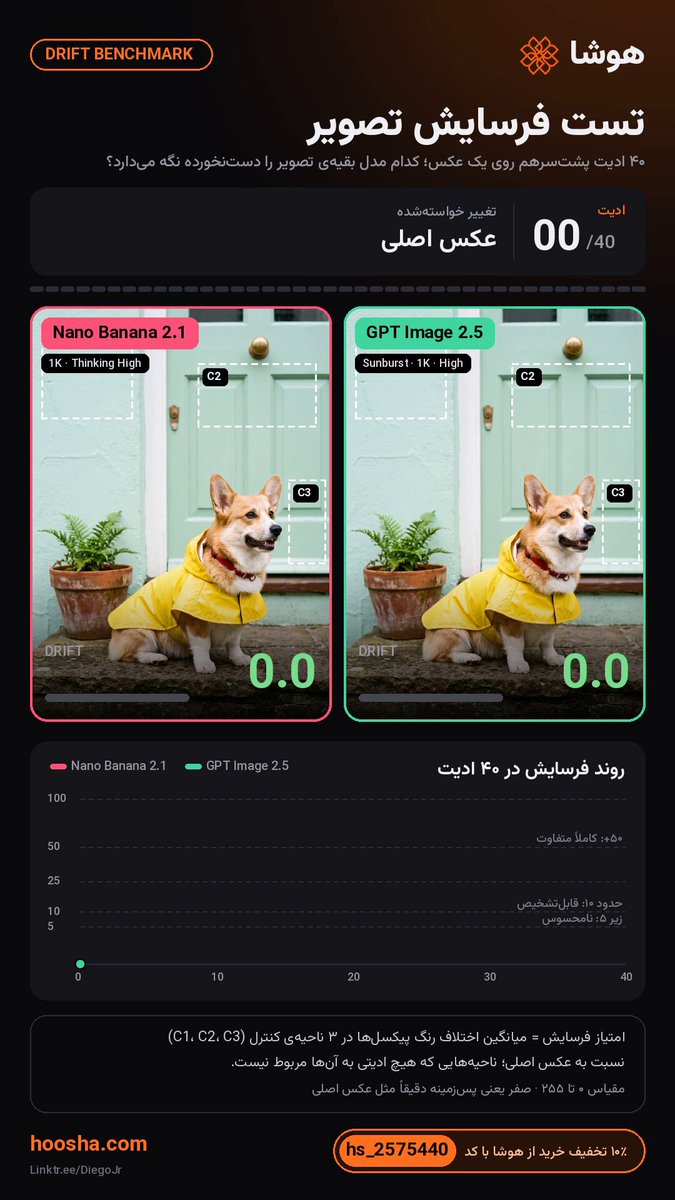
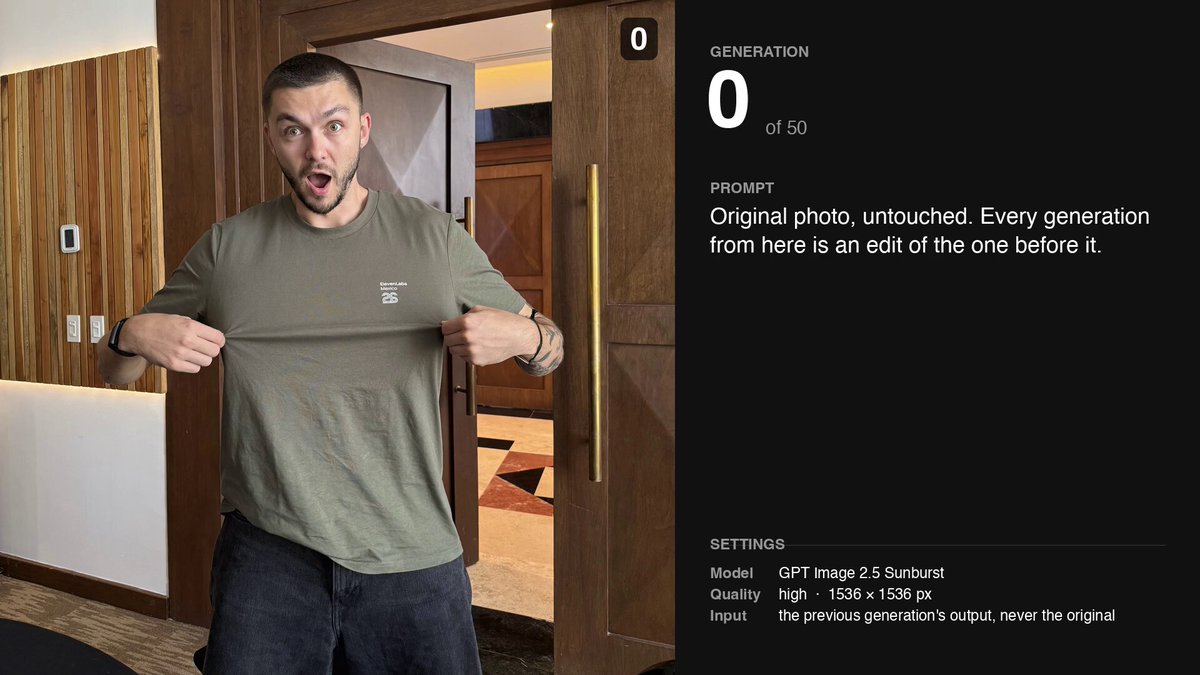
Iterative multi-turn editing still suffers from drift over extended sessions. Creator Alec Wilcock (@alecwilcock) tested recursive edits by changing a subject's t-shirt over multiple rounds, saying that at round five "the generation isn't too bad" but that in practice he rarely goes beyond two turns without restarting from the original asset. In an automated test of 40 consecutive edits, Diego Jr (@CallMeDiegoJr) recorded a drift score of 48.6 for GPT Image 2.5 compared to 61.6 for Google's Nano Banana 2.1, concluding that neither is reliable for long edit chains and that you should restart from the original every few steps. (Diego Jr's post includes a referral code for the testing service.) OpenAI's prompting documentation similarly advises restating baseline constraints during each turn and manually compositing targeted edits back into the primary image if specific regions must remain pixel-perfect.
How it compares with Nano Banana, and where it still falls short
Most comparison posts let readers judge visual quality for themselves, but authors who published explicit verdicts favored GPT Image 2.5 over rival models by 73 to 13, with 24 mixed assessments.
Table: How authors judged their comparisons (explicit verdicts only)
| Compared with | Posts | 2.5 better | Mixed | Rival better | No verdict |
|---|---|---|---|---|---|
| Google Nano Banana models | 142 | 20 | 15 | 8 | 99 |
| Older OpenAI models (GPT Image 2 etc.) | 57 | 31 | 1 | 1 | 24 |
| Other named models | 51 | 9 | 2 | 2 | 38 |
| Midjourney | 13 | 1 | 0 | 0 | 12 |
| Seedream | 10 | 2 | 1 | 0 | 7 |
| 2.5 Flare vs Sunburst | 6 | 0 | 1 | 0 | 5 |
| No specific rival | 67 | 10 | 4 | 2 | 51 |
Sample/method: 346 posts from the whole collection found by keywords (vs, compared, Nano Banana, same prompt…) plus first-pass comparisons; strict second AI pass counting only explicit author verdicts, 18 hand checks (16/18 agreed).
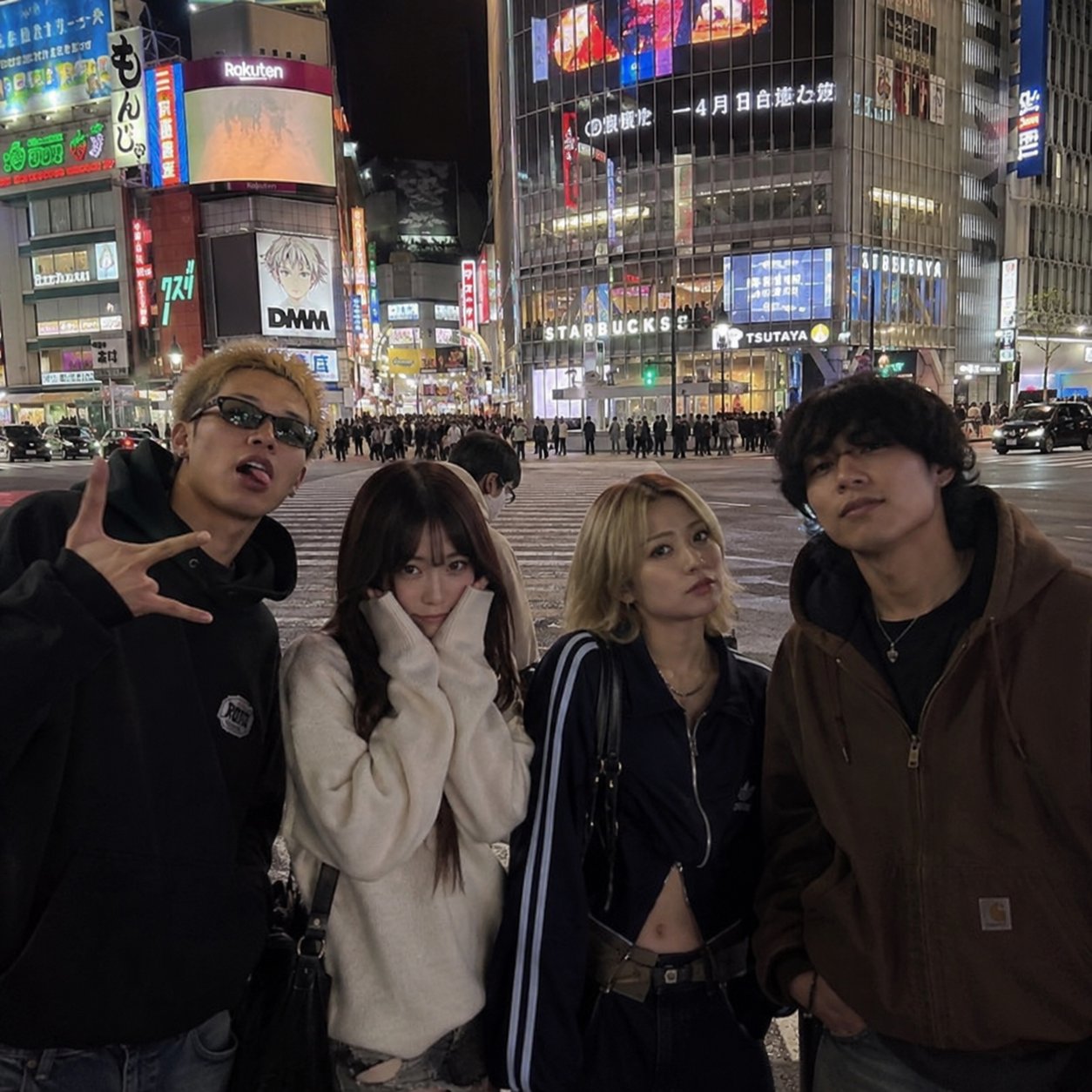
User assessments highlight trade-offs across different use cases. 結パパ (@Yuupapa_free) tested GPT Image 2.5 against Nano Banana 2.1 on an iPhone-style night scene of four people in Shibuya, finding GPT Image 2.5 superior at rendering background typography, natural expressions, and complex group poses at comparable generation speeds.
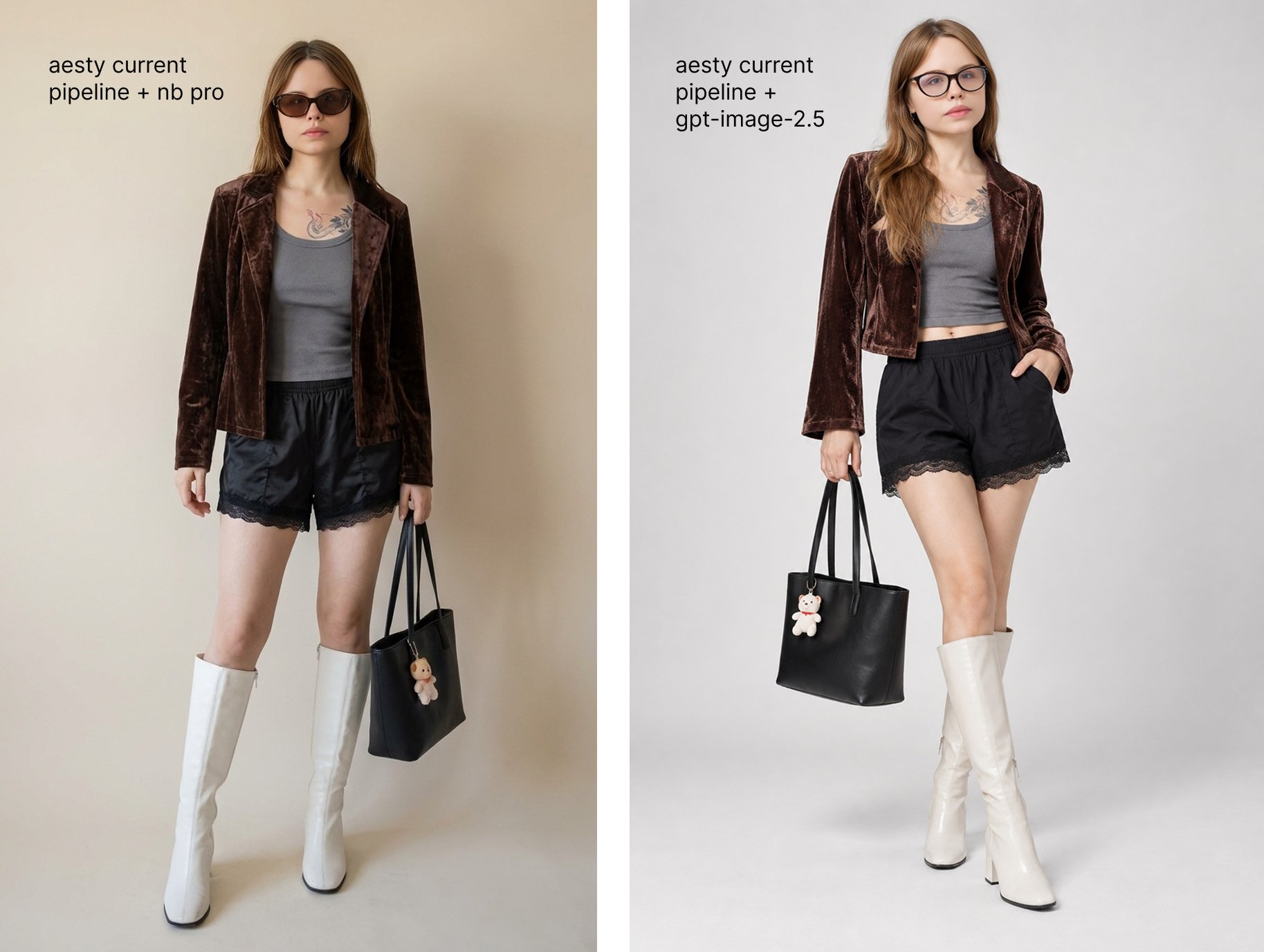
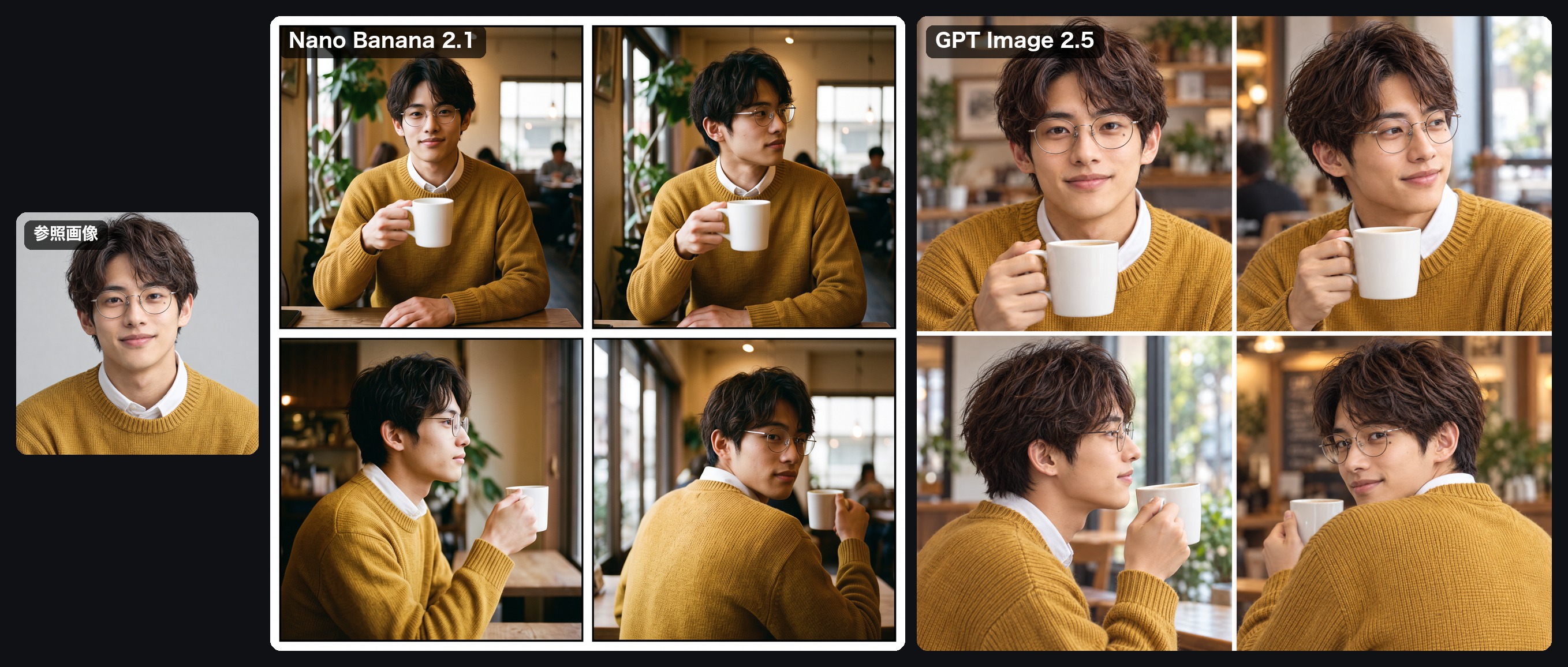
Criticism often focuses on realism and aesthetic style. Flowers (@flowersslop) observed that while ChatGPT closely matched reference faces, it did so by copying the source closely, whereas Nano Banana Pro produced the texture of an ordinary mobile snapshot rather than a hyper-processed render. App founder Nadia Zueva (@nestymee) tested swapping GPT Image 2.5 into her app's pipeline and wrote that "yes it beats gpt-image-2, but the plastic look didn't really go away": people still looked doll-like despite explicit instructions, and the glasses came out wrong, so she was leaning towards not integrating it.
Instruction following also breaks down on specific spatial details. Creator むく (@muku_sns) tested both models on a four-panel comic strip with instructions to keep a mug in the character's left hand; neither model maintained the placement across panels, with GPT Image 2.5 managing it in only a single rear-angle view. For specialized conversions, てんねん (@munou_ac) found GPT Image 2.5 did not turn an illustration directly into a figurine well (the author allows it may have been the prompt), so they used Nano Banana Pro for the figurine step and fed that image back in as a reference.
Individual posts also report anatomy errors, such as a three-hand image Benjamin Peng (@BinPeng22) posted on September 10, and by mid-October some users were asking whether quality had dropped. OpenAI has not said anything about a quality change.
Questions and answers
How do I stop blurry fake text and noise in the background of mockups and infographics?
No reliable fix showed up in the collection. OpenAI's guide says to state exclusions explicitly: no extra text, no logos, no watermarks. User Kai (@hqmank) raised this issue on September 18 after finding that standard prompt variations failed to resolve background ghosting. OpenAI's guide recommends combining explicit negative instructions with medium or high quality settings when rendering dense graphics, though whether this completely eliminates the artifacts has not been verified.
Why does GPT Image 2.5 feel worse lately?
OpenAI has published no notices regarding updates or regressions in GPT Image 2.5 model performance. Nate Herk (@nateherk) asked this on October 15, saying he had not changed how he prompts. Without an official explanation, a practical check is to rerun a prompt you saved earlier and compare the results, then change one thing at a time, as OpenAI's guide suggests for refinement.
Is anyone else getting anatomy glitches like three hands?
They show up in individual user posts; we have no measured rate. Benjamin Peng (@BinPeng22) documented a three-hand generation error on September 10. OpenAI's guide says to inspect each result; when this happens, regenerate.