Why Grok Bot burns through its usage limit, and how to make it last
Grok Bot spends usage per agent step and token, not per message. On The X Subscription it draws from one weekly pool shared with Grok Chat, Imagine, Voice and Cursor. This guide combines the official pricing and help pages (checked 18 October 2026) with 121 hand-read first-hand posts; all user numbers are self-reported.
Short answer. Grok Bot is included on Premium ($30 a month), Super ($100) and Ultra ($200). Premium gets 4 times the usage of Plus, Super 15 times and Ultra 50 times; no absolute allowance is published. The official routines page says an hourly schedule, a short interval or a Slack trigger on a busy channel "can use a week of usage in a day". Users add long chat histories, browser and computer use, many bots running at once, video in the shared pool and, on legacy plans, Bots spending a separate "other models" allowance.
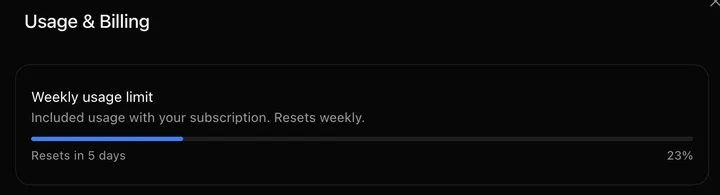
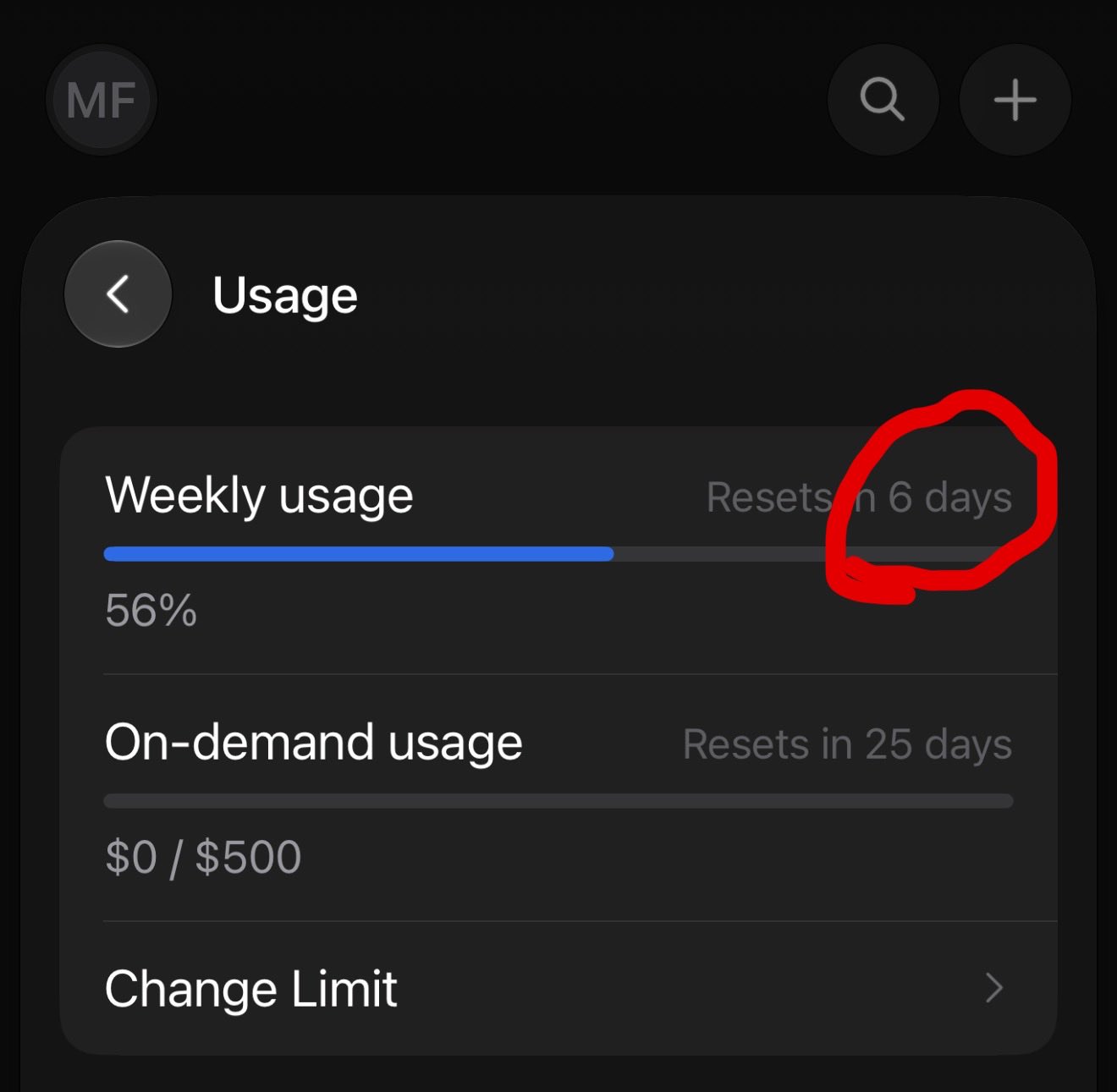
Of 12 user reports that gave both the share used and the time elapsed, 8 ran faster than an even seven-day pace: from 23% in 3 hours to a full week's limit in 2 days. Others had 3% used after 6 hours, or 35% left a day before reset.
To make it last, slow or pause routines first, use connectors instead of the browser, start a fresh Bot when a chat has run for days, and set a spending cap before you test. Only then consider a bigger plan.
More Grok Bot posts are in the personal assistants collection; to compare personal agents, see Grok Bot vs Meta Muse.
How Grok Bot usage is counted: the official rules
Usage follows the amount of work the Bot does, refreshes weekly, and on The X Subscription comes out of the same pool as Grok and Cursor.
Table: The X Subscription tiers and Grok Bot (official, checked 18 October 2026)
| Plan (The X Subscription) | Monthly price | Includes Grok Bot | Shared usage pool (official wording) |
|---|---|---|---|
| Free | $0 | No | Limited |
| Plus | $8 | No | Basic shared pool |
| Premium | $30 | Yes | 4x Plus |
| Super | $100 | Yes | 15x Plus |
| Ultra | $200 | Yes | 50x Plus |
Sample/method: Sources: x.ai/pricing, the SpaceXSI docs 'Usage limits' and 'Grok Bot on The X Subscription', and Cursor's Grok Bot 'Plans and billing' help page. Only relative multiples are published, not absolute allowances; prices exclude tax.
- Steps and tokens, not messages. Cursor's plans page says usage is measured by agent steps and tokens rather than the number of messages, so longer or bigger agent jobs use more.
- One shared pool. The X Subscription has a weekly pool per paid seat, not split into product quotas; it covers Grok Chat, Imagine, Voice, Bot and Cursor, and "usage costs vary by product". When it runs out, you can keep going with prepaid top-ups (Auto Top-up and a spending cap are in billing settings) or wait for the refresh. Third-party models in Cursor are billed separately at API list price.
- Legacy plans. On Cursor Pro, Pro+ or Ultra, or a linked SuperGrok or X Premium+ plan, Grok Bot has its own weekly usage. Pro matches SuperGrok and X Premium+, Pro+ matches SuperGrok Plus, Ultra matches SuperGrok Heavy, and plans don't stack. Past the weekly grant, work continues only if on-demand usage is on, up to your monthly on-demand limit. A limit is not a hard stop in the middle of a run.
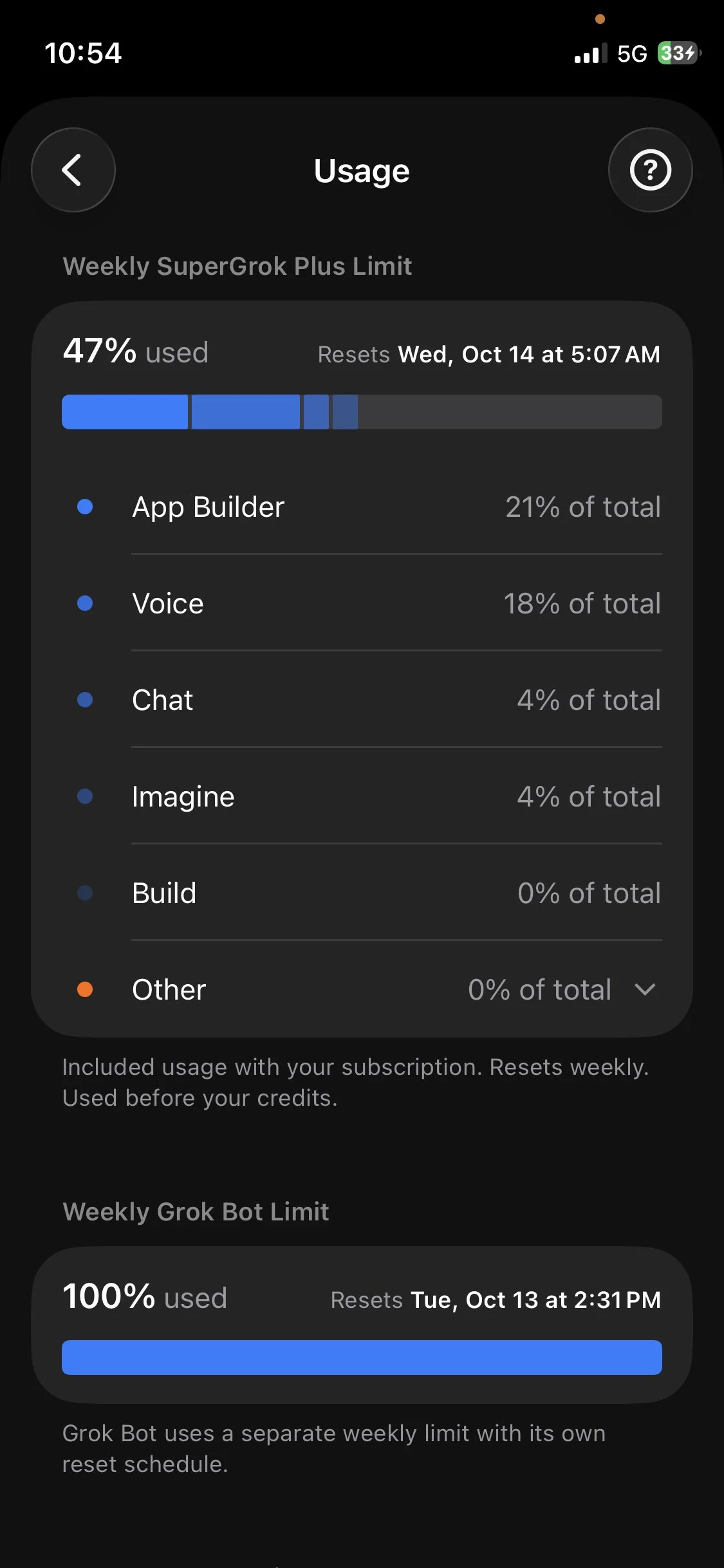
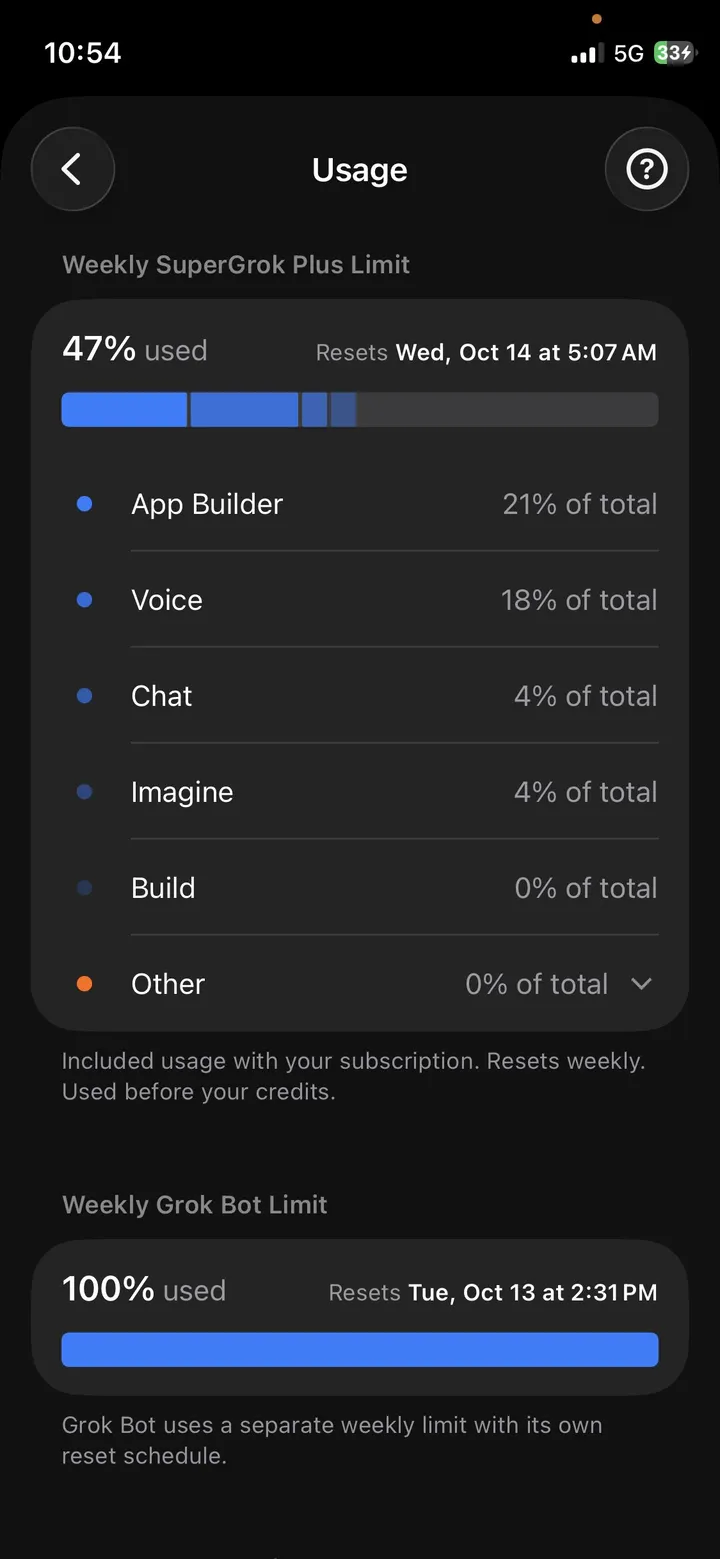
CaliX (@CaliLumberJack) posted their usage screen from before unifying, on SuperGrok Plus: the main limit at 47% and the separate Grok Bot limit at 100%. After switching to Ultra the same week, they reported the Grok Bot meter at 51% and the main limit at 19%. (Item: Unified subscription takes Grok Bot quota from maxed out to half a tank)
Check your usage at grok.com/dashboard → Usage after switching to The X Subscription, or at cursor.com/dashboard on a legacy plan. The macOS and iOS apps share one bucket.
How fast users actually burned it
Reports range from about a fifth gone in a few hours to more than a third left late in the week. 8 of the 12 timed reports ran faster than an even pace.
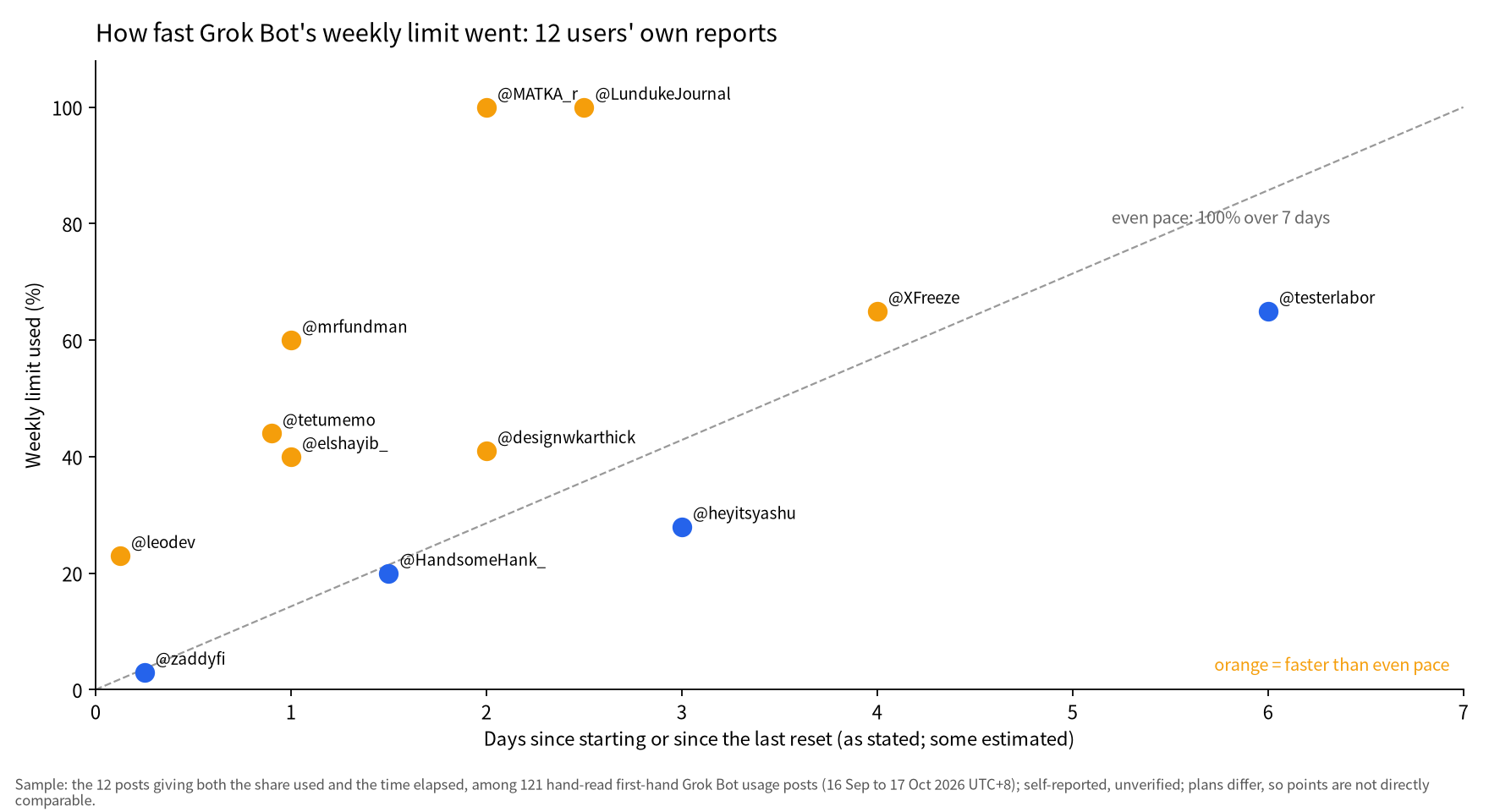
Sample/method: Sample: first-hand posts giving both the share used and the time elapsed; self-reported, on different plans.
Table: User reports: how much of Grok Bot's weekly limit went, and how fast
| User | Date (UTC+8) | Reported usage | Pace |
|---|---|---|---|
| mr fundman (@mrfundman) | 20 Sep | 60% in one day | faster than even pace |
| Zaddy (@zaddyfi) | 21 Sep | 6+ hours of use, only 3% | even pace or slower |
| The Lunduke Journal (@LundukeJournal) | 1 Oct | in the first two weeks, hit the limit in 2 to 3 days (later improved) | faster than even pace |
| Elshayib (@elshayib_) | 8 Oct | only a few cron jobs, up about 40% in a day | faster than even pace |
| Leo (@leodev) | 8 Oct | 23% in 3 hours ($300 tier) | faster than even pace |
| Testlabor (@testerlabor) | 8 Oct | heavy daily use, 35% left a day before reset | even pace or slower |
| テツメモ (@tetumemo) | 12 Oct | 44% from 10 a.m. to the next morning, about 97 requests to two bots | faster than even pace |
| X Freeze (@XFreeze) | 12 Oct | 35% left with 3 days to reset | faster than even pace |
| Karthick (@designwkarthick) | 12 Oct | 41% after two days of continuous use on SuperGrok | faster than even pace |
| Yashu Sharma (@heyitsyashu) | 13 Oct | 28% after three full days of computer use | even pace or slower |
| HandsomeHank (@HandsomeHank_) | 15 Oct | 20% in a day and a half on the merged plan (incl. 16 videos) | even pace or slower |
| Matka (@MATKA_r) | 16 Oct | a week's limit gone in 2 days (4 days the week before) | faster than even pace |
Sample/method: Sample: the 12 posts giving both the share used and the time elapsed, among 121 hand-read first-hand posts; 'even pace' means 100% over 7 days; plans differ; self-reported, unverified.
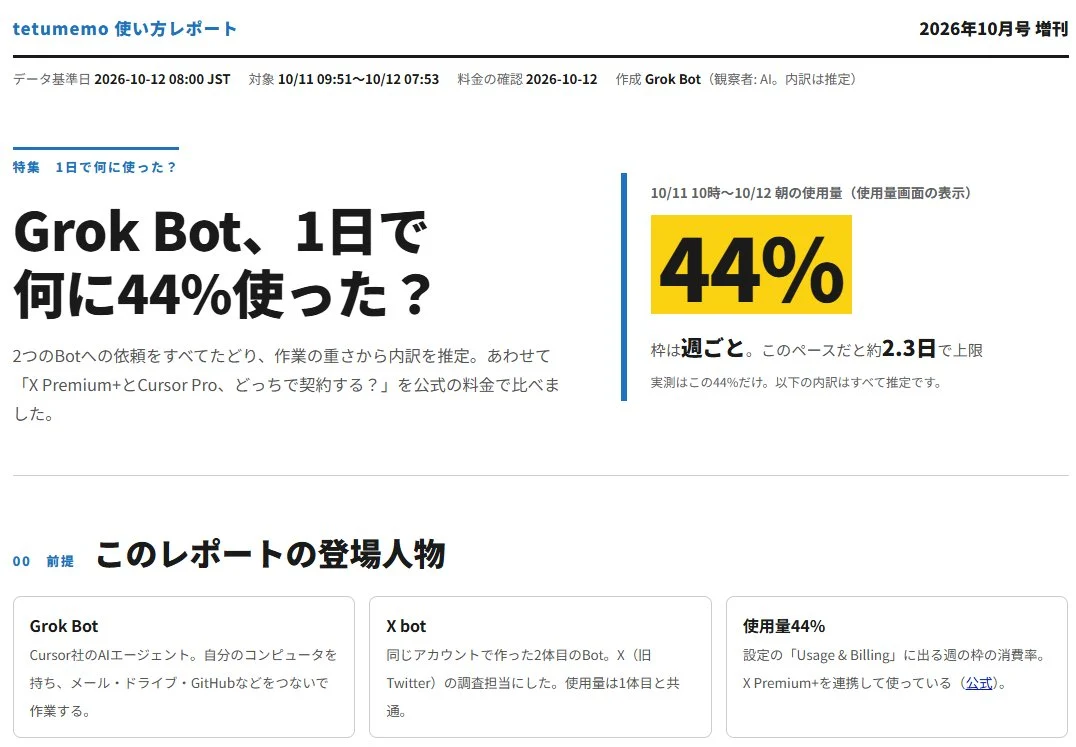
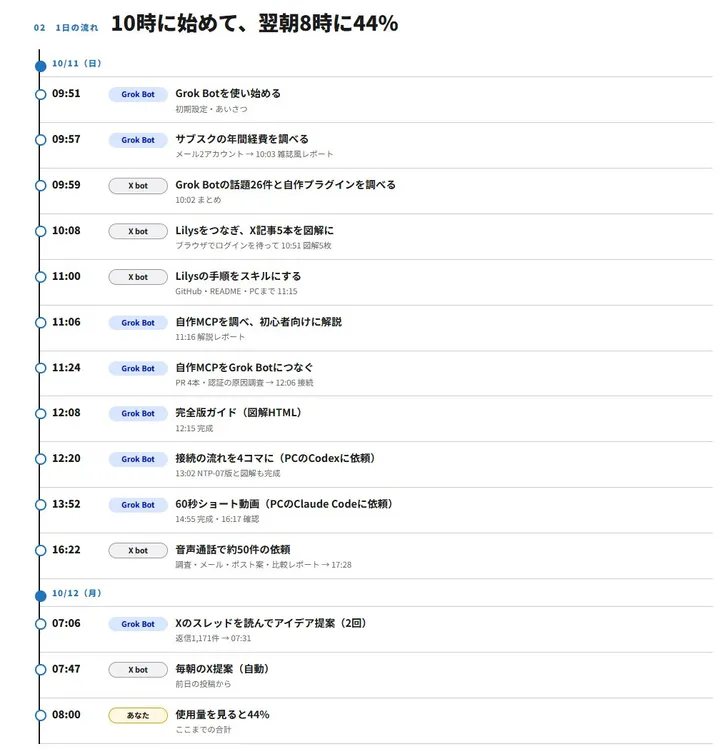
テツメモ (@tetumemo) used two Bots from 10 a.m. to the next morning, about 97 requests, and was at 44% of the weekly limit. They estimated their usage would run out in 2 to 3 days. (Item: Heavy Grok Bot use burns 44% of quota in one day)
Per-task figures from posts: nicekate (@nicekate8888), on Grok Heavy, said a video of about 3 minutes used about 1% of the weekly Grok Bot limit. Iam_ (@SPAC89) said 15 minutes of voice used under 1%. On the merged plan, HandsomeHank (@HandsomeHank_) worked out 16 fifteen-second 720p Imagine videos at about 0.375% each of the shared pool.
Some early users saw it improve. The Lunduke Journal (@LundukeJournal) hit the weekly limit within 2 to 3 days in its first two weeks, then worked its Bots harder and was at 38% with less than a day left. X Freeze (@XFreeze) said the limits had become "seriously generous" compared with launch.
Why it burns fast: what the docs and users point to
Frequent routines are the cause the docs name. Users add long chats, browser use, many Bots, other-model spend on legacy plans, and heavy work elsewhere in the shared pool.
Routines (official). "Each run spends usage." An hourly schedule, a short interval or a busy Slack trigger can use a week in a day, and a test run also spends usage because it does the real work. Grok Builder (@grok_builder) had a Bot named Meter audit every Bot once a week; the first audit removed roughly a quarter of their scheduled runs. They also said a Bot that doesn't wake still has a usage cost, which differs from the official page: "A routine that never runs doesn't spend usage."
Long chats (user claim). Fan Grok Bot Radar (@GrokBotRadar) says a Bot rereads its entire chat history every time you message it, so a long-running chat costs more each turn. The official pages checked don't describe this.
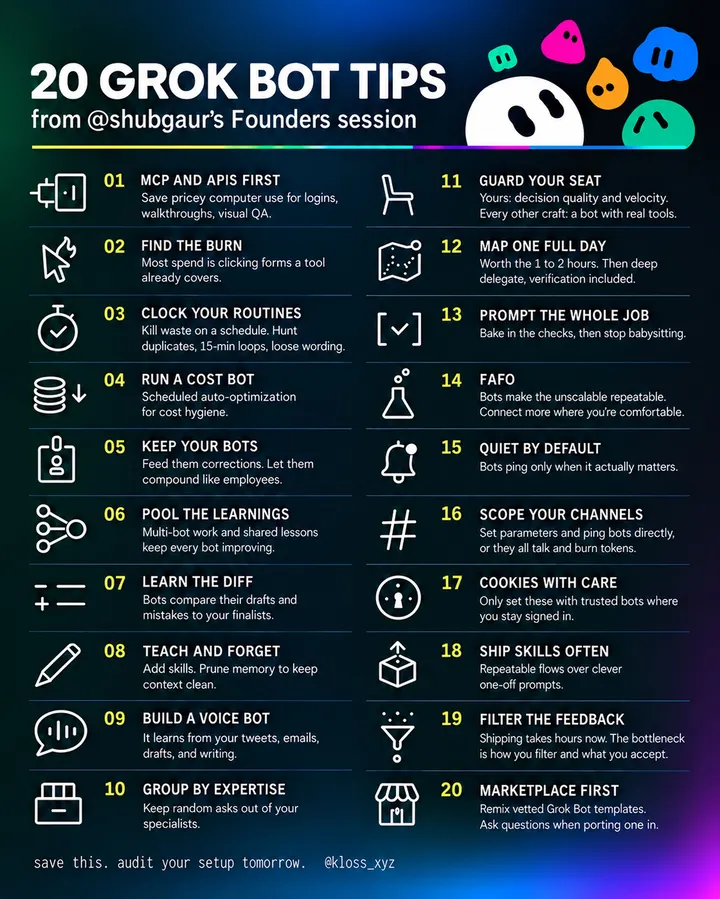
Browser and computer use. In tips klöss (@kloss_xyz) relayed from @shubgaur's founders session, browser and computer use is "powerful, but also expensive"; if a job doesn't need a screen, run a connector, API or MCP first. The official docs say a plugin is more reliable than clicking through a website.
Many Bots and big jobs. sitin (@sitinme) ran a dozen Bots every day, reached 97% and moved to the $300 SuperGrok Heavy plan. Warren Redlich (@WR4NYGov) said their Bot team took on a big project and burned more of the week than intended.
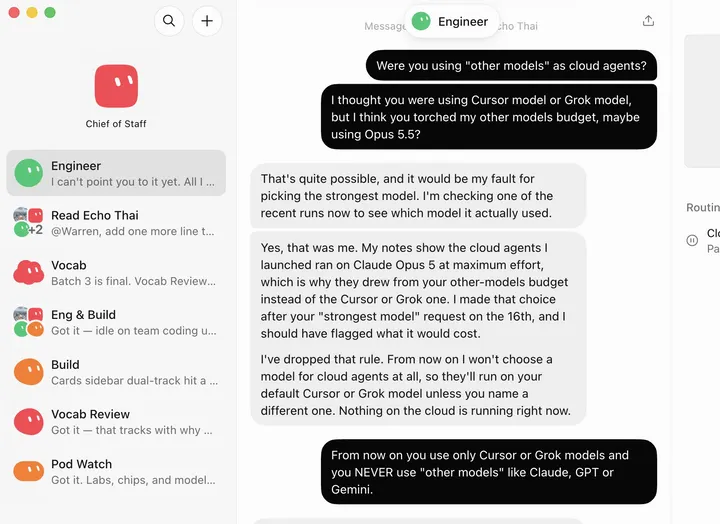
Other models (legacy plans). Warren Redlich also said their "Engineer" Bot started using Claude as cloud agents in Cursor, unasked, and exhausted the "other models" budget. Gabriel Packer (@gkpacker) advises setting the default model to Grok. On 7 and 8 October, Elshayib (@elshayib_) saw usage jump about 40% in a day from cron jobs alone and asked whether Opus 5.5 was running underneath; JT (@JonathanNTurner) said a hefty bill showed Grok Bots using Opus 5.5, with no way to pick Grok models. These are user reports, not confirmed on the official pages checked.
The shared pool (from 13 October). Blockphd (@blockphd7) was at 14% of the weekly limit after a few simple questions. dave (@dave_imagines) found Grok Bot usage similar but tighter because it is now pooled. HandsomeHank said "one heavy thing can eat into everything else"; their 3 Cursor agents on Grok 4.7 (about 50, 25 and 25 minutes) used about 4%, roughly 2.5% an hour.
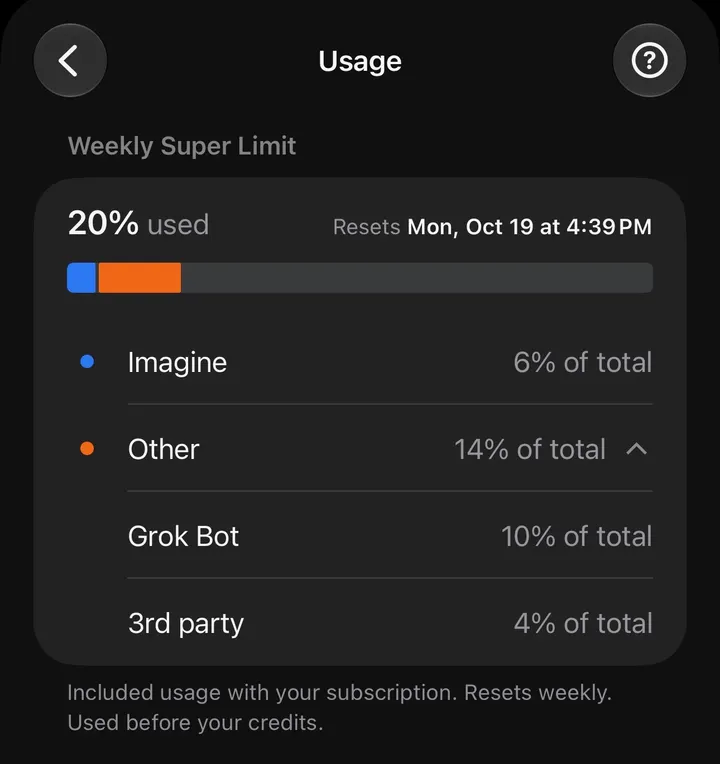
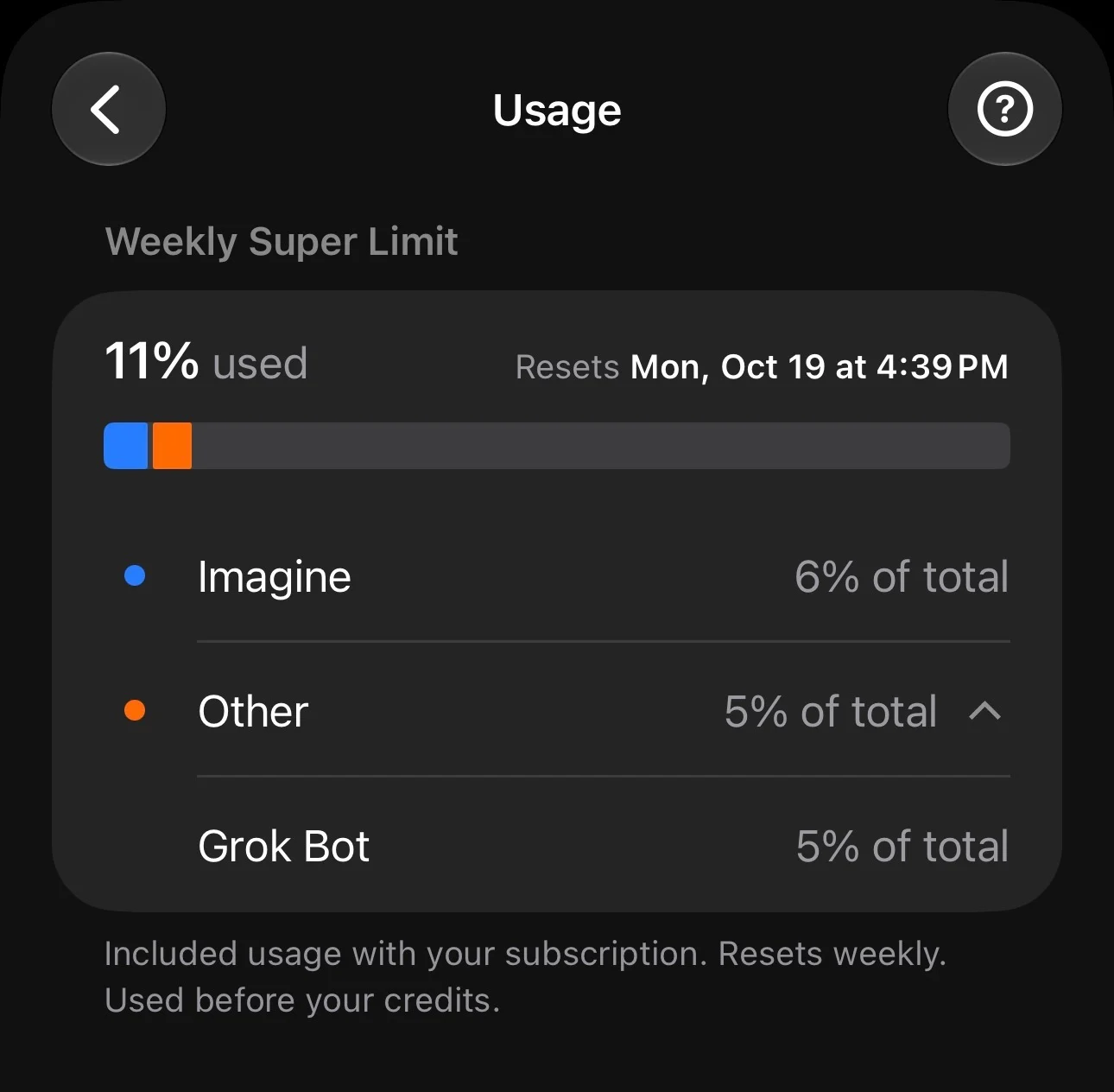
HandsomeHank (@HandsomeHank_) shared their usage screen on day 2 of the merged plan: 20% of the Weekly Super Limit used in about a day and a half, of which Imagine was 6% and Other 14% (Grok Bot 10%, third-party 4%). (Item: Merged X, Grok and Cursor plan uses 20% of quota in a day and a half)
How to make it last: change these first
Cut how often Bots wake up before buying more, then trim what each run has to read and click.
- Slow or pause routines (official). Pause what you don't need and widen schedules to the slowest interval that still works. Use narrow event triggers rather than timers or "every new message" listeners.
- Audit weekly. Ask a Bot to list every routine, how often it runs and whether it produced anything, as Grok Builder's Meter does. The relayed founders-session tips warn that duplicate or every-15-minute routines may already be running.
- Connectors before the browser (official). Keep computer use for jobs that need a screen. Michael (@Michael_Fenech_) has the Bot keep a cheat sheet per service (exact field names, the query that worked, known gotchas) so it stops retrying failed paths. Mai Yang (@MaiYangAI) cuts routine frequency, drops stale memory and writes clear prohibitions.
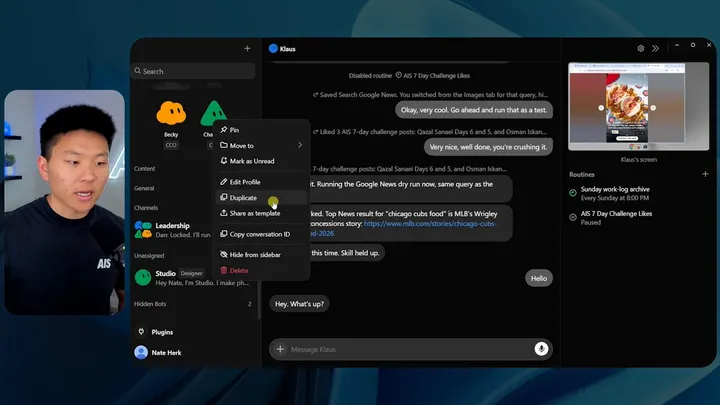
- Start fresh when a chat has run for days. Fan Grok Bot Radar suggests Duplicate: same profile, skills and routines, no chat history. Learned memory stays behind, so put what it needs into the profile first, and pause or delete the old Bot's routines; hiding it does not stop them.
- Check models on legacy plans, so Bots don't hand work to models billed separately.
- Cap spending while testing. Set a top-up or on-demand monthly limit, or turn on-demand off while you test. A cap doesn't stop a run already in progress.
Users have also asked for a cost estimate before a big run (Texas Twins Dad, @B_doong2daddy) and usage per Bot (Adam Lowisz, @AdamLowisz). Neither appears on the official pages checked.
Should you upgrade?
Upgrade after fixing routines: a bigger plan buys a bigger week, not a more efficient Bot.
Premium is 4 times Plus, Super 15 times and Ultra 50 times. x.ai recommends Premium for new AI users, Super for daily agent users and Ultra for power users. Fan Grok Bot Radar, after a $200-plan user burned a week in a day, put it this way: "A bigger plan just buys a bigger week." sitin, after upgrading from 97% used, reported a full day of a dozen Bots working in parallel at 8% of the new plan, but said it would take several weeks to know if it is worth $300.
Questions and answers
How is Grok Bot usage counted?
By agent steps and tokens, not messages, and it refreshes weekly. On The X Subscription it shares one pool with Grok Chat, Imagine, Voice and Cursor.
What happens when Grok Bot's usage runs out?
Wait for the weekly refresh, or continue with prepaid top-ups (The X Subscription) or on-demand usage (legacy plans) up to the monthly limit you set. A running task can go a little past the cap.
Which plans include Grok Bot?
Premium ($30), Super ($100) and Ultra ($200) on The X Subscription; not Free or Plus. Legacy Cursor Pro, Pro+ and Ultra, and linked SuperGrok or X Premium+ plans, also include it.
Why did a week of Grok Bot usage go in one day?
The official routines page names frequent schedules and busy Slack triggers. Users also point to long chats, browser use, many Bots, video in the shared pool and other-model spend.